
Planning Guides, Style Guide
Guest List Spreadsheet: Wedding Tracking Excel Template
Jul
Setting Up Your Guest List Spreadsheet
Okay so the absolute first thing you need to do is open Excel or Google Sheets—honestly I prefer Google Sheets because then your partner can access it too and you’re not emailing versions back and forth like it’s 2008. Create a new spreadsheet and just stare at it for a second because this blank document is gonna become your entire social life mapped out in rows and columns.
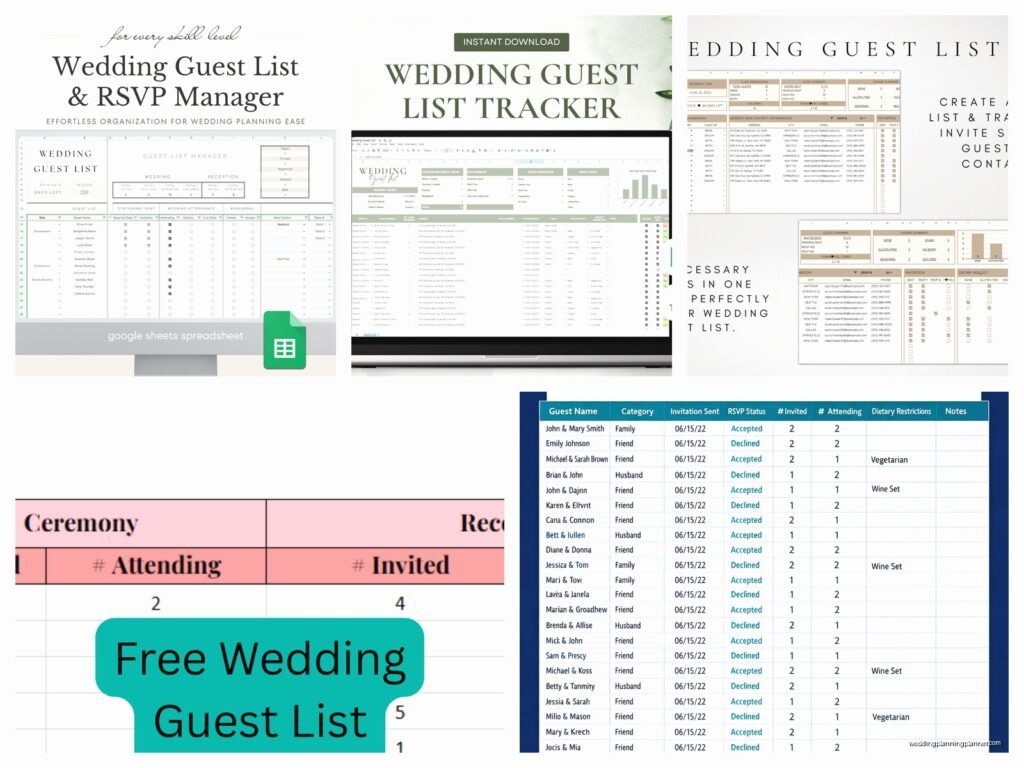
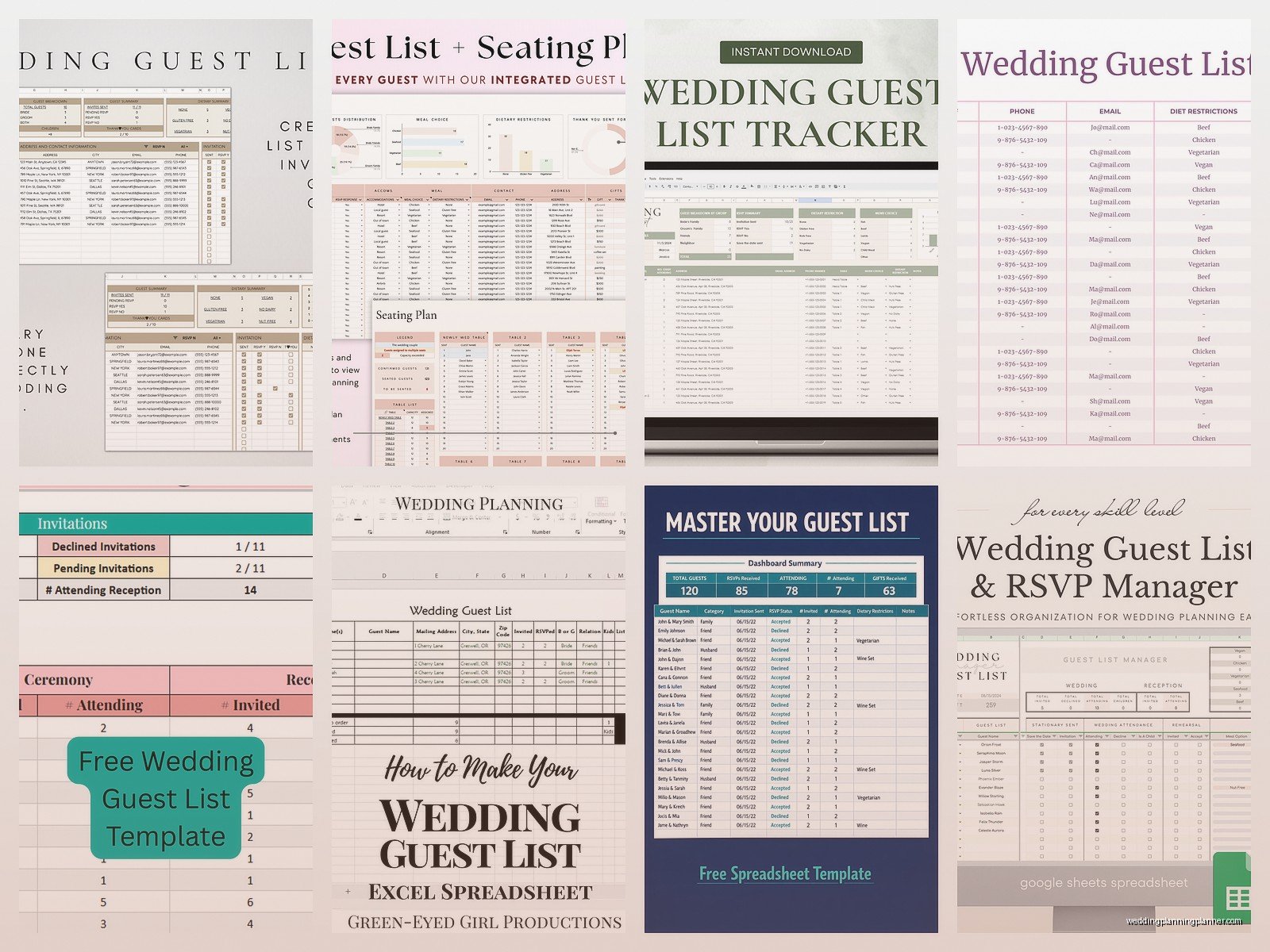
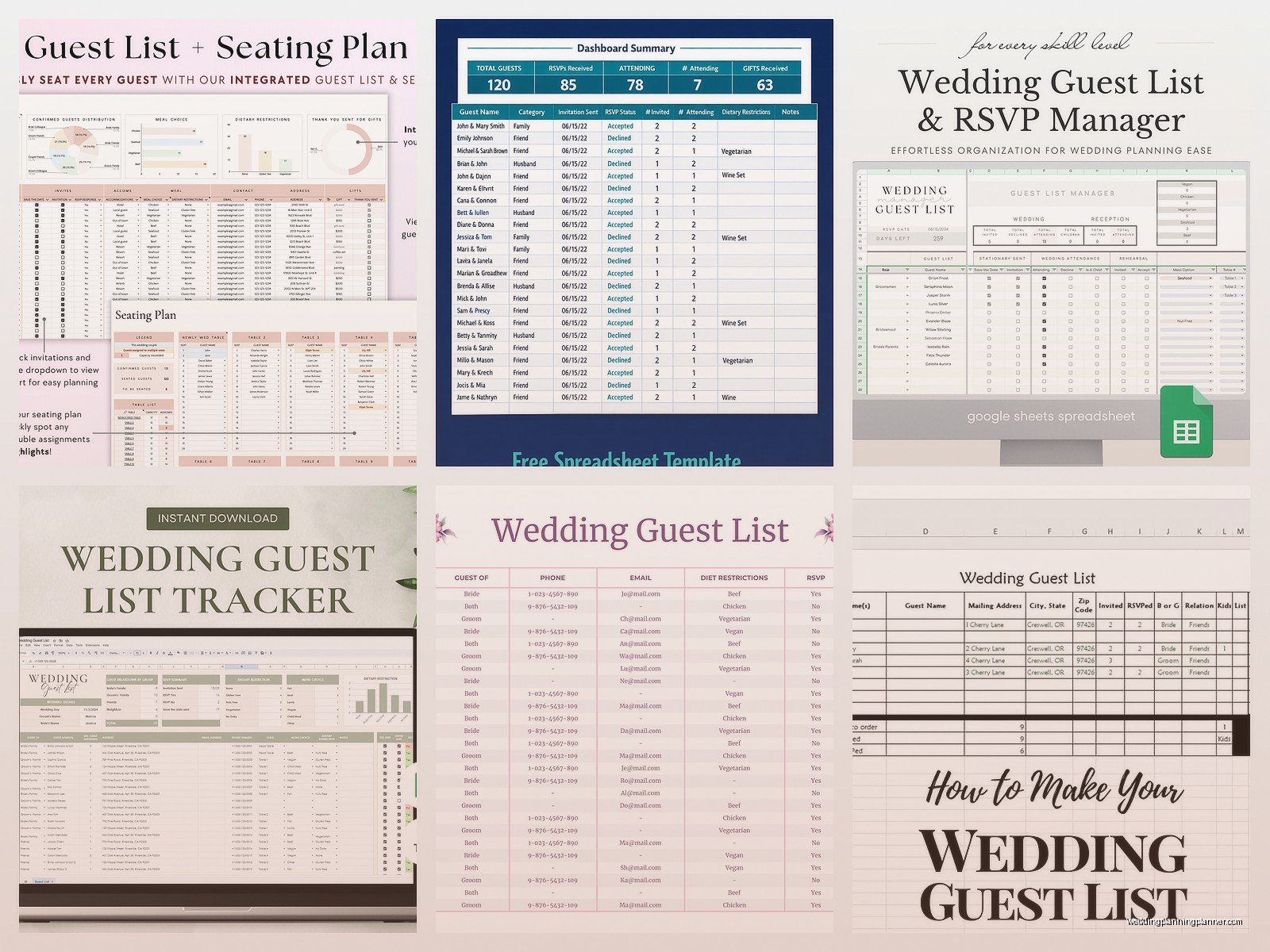
Start with these column headers in row 1: Guest Name, Side (Bride/Groom/Both), Category, Address, Email, Phone, Save the Date Sent, Invitation Sent, RSVP Status, Number Attending, Meal Choice, Dietary Restrictions, Plus One, Table Assignment, Gift Received, Thank You Sent. That’s like the bare minimum and you can always add more later when you realize you forgot something obvious.
I had this bride in spring 2023 who didn’t track plus-ones separately and she ended up with 47 extra people because she just assumed everyone was bringing someone and didn’t actually… count. It was a nightmare and we had to scramble for extra chairs three days before the wedding.
How to Actually Fill This Thing Out
Start entering names but here’s the thing—you gotta decide early if you’re doing individual entries or household entries. Like, are you writing “John Smith” and “Jane Smith” on separate rows, or “John and Jane Smith” on one row? I usually do separate rows for adults because it makes RSVP tracking easier when only one person can make it, but then you end up with like 300 rows instead of 150 and it looks overwhelming.
For the Side column, just put B for bride, G for groom, or Both if you’re both friends with them. This helps later when your families start arguing about numbers and you need to prove that his side invited 20 more people than yours did. Not that weddings are competitive or anything but… they kinda are.
The Category column is where you get specific: Immediate Family, Extended Family, Wedding Party, College Friends, Work Friends, Neighbors, Parents’ Friends (ugh), Kids, etc. This is super useful for creating your A-list and B-list if you’re doing that, which most people do even though no one admits it.
Address Collection Is The Worst Part
Getting everyone’s physical addresses is honestly the most annoying task of wedding planning and I will die on this hill. People move and don’t tell anyone, or they’re like “oh just send it to my parents’ house” and then their parents moved too and nobody knows where anyone lives anymore.
What I do—and what I tell all my clients—is send out a Google Form or use one of those address collection websites. But you still need to transfer all that info into your main spreadsheet which is tedious. You can sometimes export the form responses as a CSV and then copy-paste into Excel but the columns never line up right and you spend an hour fixing it anyway.
Tracking Your Mail-Outs
The Save the Date Sent and Invitation Sent columns should have dates, not just yes/no. Trust me on this. When someone claims they never got an invitation six weeks after you sent them, you can say “it was mailed on March 15th” instead of just “I definitely sent you one” which sounds defensive.
For RSVP Status I use: Not Sent Yet, Awaiting Reply, Accepted, Declined, No Response (followed up), No Response (gave up). That last category exists because there are always those people who just… don’t respond no matter how many times you contact them and at some point you just have to make an executive decision about whether they’re coming or not.
Number Attending is separate from RSVP Status because someone might accept but only 1 out of 2 people can actually come. This is the number your caterer actually needs.
Meal Choices and Dietary Stuff
If you’re doing plated dinner with options, you need a Meal Choice column. I use abbreviations: B for beef, C for chicken, F for fish, V for vegetarian. Some couples get fancy and put the actual menu item names but then your spreadsheet is wide enough to require horizontal scrolling and that’s just irritating.
Dietary Restrictions needs to be a text field where you can write actual notes. Don’t just put “yes” or “no”—write “gluten-free,” “vegan,” “allergic to shellfish,” “kosher,” whatever. Your caterer will need specifics. I once had a guest who was allergic to nightshades which I didn’t even know was a thing until that wedding and it includes tomatoes, peppers, and potatoes so like… what do you even serve that person? Anyway the caterer figured it out but only because I had detailed notes.
The Plus One Situation
Plus One column should specify: None, Named Guest, Unnamed Plus One. This distinction matters because “Named Guest” means you’re inviting a specific person who gets their own invitation, while “Unnamed Plus One” means your guest can bring whoever they want and you’re just hoping it’s not someone super awkward.
Table assignments come later obviously but having the column ready means you can start playing around with seating charts in the same spreadsheet. I usually create a separate tab for the actual seating chart with table numbers and then reference back to the main guest list. My cat walked across my keyboard while I was doing this for a wedding last fall and somehow created a circular reference error that took me twenty minutes to fix, so maybe lock your pets out of your office during spreadsheet time.
Gift Tracking Because People Ask
The Gift Received column is technically optional but also you’re gonna want to track this because thank you notes are required and you will forget who gave you what. Even if you think you won’t, you will. I’ve seen it happen to literally everyone.
Write actual descriptions: “Kitchen Aid mixer – red,” “Check for $150,” “Picture frame,” whatever. Don’t just put an X or checkmark. Three months later when you’re writing thank you notes you’ll have no idea what “X” means and you’ll end up thanking someone for the wrong gift which is super awkward.
Thank You Sent gets a date when you mail the card. The etiquette rule is within three months of receiving the gift or within three months of the wedding for gifts received at the wedding itself, whichever comes first. But honestly just send them as you go and then you’re not drowning in thank you notes during your honeymoon recovery period.
Color Coding For Your Sanity
Use conditional formatting or just manual cell colors to make this spreadsheet actually readable. I color-code RSVP status: green for accepted, red for declined, yellow for awaiting reply, grey for not sent yet. It gives you a visual snapshot of where you’re at with responses.
You can also color-code by table assignment once you get there—each table gets its own color. Makes it easy to see if you’ve got tables that are mostly empty or way too full.
Formulas That Actually Help
At the bottom of your Number Attending column, put a SUM formula so you always know your current headcount. This number will haunt your dreams but you need to see it. Same thing for each meal choice—count how many of each so you can give accurate numbers to your caterer.
I also create a summary section at the top or on a separate tab with these calculations: Total Invited, Total Accepted, Total Declined, Total Not Responded, Percentage Response Rate, Total Children, Total Adults. You can get fancy with COUNTIF formulas if you know how, or just do it manually if you don’t wanna figure out Excel functions.
For percentage response rate I do: (Accepted + Declined) / Total Invited * 100. This tells you how many people have actually responded regardless of their answer. Most weddings get like 80% response rate even after following up multiple times because people are just… like that.
The B-List Strategy
If you’re doing an A-list and B-list situation, you need to track that somehow. Some people add a column called “Invite Tier” with A or B. The strategy is you invite the A-list first, wait for declines, then send B-list invitations to fill those spots. It’s kinda ruthless but also practical if you have budget or venue constraints.
The timing is important though—you need enough gap between A-list and B-list invitations that people don’t figure out they were second choice, but not so much gap that you’re sending invitations like six weeks before the wedding which looks weird. I usually say send A-list invites at 3 months out, then B-list at 2 months out if you’ve gotten enough declines.
Sharing Access and Version Control
If you’re using Google Sheets, share it with your partner and maybe your parents if they’re helping with their side of the guest list. But set permissions carefully—you probably want your future mother-in-law to have “view only” access or she might start inviting her entire book club without telling you.
For Excel, you’re gonna be emailing files back and forth or using OneDrive sharing. Just please please please use version numbers in your filename: Guest_List_v1, Guest_List_v2, etc. Or dates: Guest_List_2024_01_15. Otherwise you end up with Guest_List_FINAL, Guest_List_FINAL_v2, Guest_List_FINAL_ACTUAL, and you want to throw your computer out the window.
Common Mistakes I See All The Time
Not tracking kids separately from adults. Children’s meals cost less and they don’t drink alcohol so they affect your budget differently. Have a column that indicates if someone is under 18 or under 12 or whatever your cutoff is.
Forgetting to track hotel room blocks. If you’re reserving hotel rooms for out-of-town guests, add a column for Hotel Block Used so you know if you need more rooms or if you reserved way too many.
Not noting relationship context. Sometimes I add a Notes column where you can write stuff like “groom’s college roommate,” “bride’s childhood neighbor,” “dad’s golf buddy” because six months into planning you will not remember who half these people are or why they’re invited and your partner will be like “who is Robert Jenkins” and you’ll have no idea.
Using complicated merged cells or fancy formatting that breaks when you sort the spreadsheet. Keep it simple. Merged cells are the enemy of functional spreadsheets.
When to Update This Thing
You should be updating your guest list spreadsheet like… constantly? At least weekly during the RSVP period which is usually 6-8 weeks before the wedding. Every time you get a response card in the mail or an email or a text, update it immediately. Don’t let them pile up because you will forget details.
Also update it whenever you receive a gift, whenever you send a thank you note, whenever someone tells you they’re bringing a different plus one than originally planned, whenever literally anything changes. This spreadsheet is your source of truth for everything guest-related.
The week before the wedding, print out a copy for your day-of coordinator or venue manager. They need to know final headcounts, table assignments, and meal choices. Also email them a copy because they’ll lose the printed version, I guarantee it.
Beyond the Basics
Some people get real extra with their guest list spreadsheets and add columns for: Song Requests, How You Know Them (with dropdown options), Whether They’re Staying for Farewell Brunch, Whether They Need Transportation, Guest Book Signed, Favors Given… honestly you can track whatever you want but at some point it becomes too much data and you’re spending more time on the spreadsheet than on actual wedding planning.
I had one groom who created a whole separate tab with graphs showing the geographic distribution of guests, the age breakdown, the relationship category percentages… he was a data analyst and it showed. His fiancée was like “this is insane” but also it was kinda cool to see everything visualized like that? Not necessary at all but if you’re into that sort of thing, go for it.
You can also link your guest list to your budget spreadsheet if you’re tracking costs per person. Every additional guest increases your total by the per-head catering cost plus rental costs plus favor costs, so some people create formulas that automatically calculate how much each RSVP “yes” adds to the bottom line. This is either really helpful or really depressing depending on your personality.
The main thing is just… start the spreadsheet early and keep it updated and don’t let it become this overwhelming thing you avoid. It’s just data entry, not rocket science, even though sometimes it feels like trying to organize chaos into neat little rows and honestly that’s exactly what wedding planning is anyway so you might as well get used to it now
