
Planning Guides, Style Guide
Reception Invite Template: Free Download Files

Aug
Okay So Here’s The Deal With Reception Invite Templates
Look, reception invites are kinda the forgotten stepchild of wedding stationery and honestly it drives me nuts because they’re actually super important. Like, you’re gonna have people who can’t make the ceremony but can come celebrate after, or maybe you’re doing a small intimate ceremony and then a big blowout party later. That was literally half my clients in spring 2023 when everyone was still figuring out post-pandemic wedding vibes.
The thing about reception-only invitations is they need to communicate really clearly what’s happening without making anyone feel like a second-tier guest. Which is tricky! I’ve seen so many couples mess this up by using confusing wording or just… not thinking it through. So let me walk you through what you actually need and where to find decent free templates that won’t make you want to pull your hair out.
What Makes A Reception Invite Different
First off, reception invitations are NOT the same as your ceremony invitations. The wording is different, the tone can be different, and honestly the whole vibe shifts a bit. You’re basically saying “hey, we’re already married or getting married in a private thing, but please come party with us.”
The key elements you gotta include:
- Your names (obviously)
- Clear indication this is a reception, not a ceremony
- Date and time
- Venue information
- Dress code if you have one
- RSVP details
- Registry info or “no gifts” if that’s your thing
What really annoyed me back in like summer 2021 was this couple who downloaded a template and just… didn’t change the wording. They sent out invites that said “join us for our wedding ceremony and reception” when they were literally already married and just doing a party. I got SO many confused calls from their guests asking what was happening. Don’t be that couple.
Where To Actually Find Free Templates That Don’t Suck
Alright so here’s where I send people when they need free downloads. Not all free templates are created equal though, some look like they were designed in 1997 and not in a cute vintage way.

Canva
I know everyone and their mom uses Canva now but honestly? It’s pretty solid for this. They have a ton of free reception invite templates and you can customize basically everything. The free version has enough options that you don’t need to pay unless you want specific fonts or graphics. You can download as PDF for printing or as an image for digital invites.
The customization is super easy even if you’re not design-savvy. You can change colors, fonts, add photos, move elements around. My cat literally walked across my keyboard once while I was working on a client’s Canva design and somehow made it better? Like she moved a text box that I’d been obsessing over and it just worked. Anyway.
Template.net
They have actual Word and Google Docs templates which is great if you’re not into graphic design stuff. You just download, type in your info, and print. Super straightforward. Some of their designs are a bit dated but there are gems in there if you scroll through.
Greetings Island
This one’s good for people who want something polished but don’t wanna mess with design software. You customize online and can download a PDF. They have specific reception invitation categories which helps because you’re not sorting through ceremony invites trying to adapt them.
Microsoft Office Templates
If you have Word or Publisher, there are built-in templates and more on their website. These tend to be pretty traditional and formal, which might be exactly what you need or might be totally wrong for your vibe. Worth checking though since you probably already have access.
DIY Printing vs Professional Printing
So you’ve downloaded your template and customized it. Now what? You’ve got options and they all have pros and cons that I learned the hard way through various client disasters.
Home Printing: Cheap, fast, you control everything. But your printer will jam at the worst possible moment, I promise you this. Get good cardstock (110lb is ideal), do test prints, and for the love of everything make sure you have backup ink cartridges. I had a bride in 2022 who printed 80 invitations and then her printer died on number 81. She had to hand-write the last ones and they looked totally different.
Print Shops (Staples, FedEx, etc): Middle ground option. You upload your file, they print on decent paper, you pick them up. Usually pretty affordable and the quality is consistent. Just make sure your file is the right size and resolution or you’ll get blurry results.
Online Print Services: Places like Vistaprint or Minted will print from your uploaded design. More expensive than DIY but less than custom stationery. Quality is usually good but turnaround time can be long so don’t wait until the last minute.
Wording That Actually Works
Okay this is where people get weird and overthink everything. The wording doesn’t need to be Shakespearean, it just needs to be clear. Here’s some formulas that work:
For a reception after a private ceremony:
Please join us for a reception celebrating the marriage of [Names]. The ceremony will be private, but we’d love to celebrate with you at our reception on [date] at [time] at [venue].
For a reception way after the wedding:
[Names] joyfully invite you to celebrate their recent marriage at a reception in their honor on [date] at [time] at [venue].
For a casual vibe:
We got hitched! Come party with us on [date] at [time] at [venue]. [Names]
You can adjust the formality to match your style but the key is making it obvious this is NOT the ceremony. I cannot stress this enough because people will show up expecting a wedding ceremony if you’re not crystal clear.
Design Tips From Someone Who’s Seen It All
Your template is just a starting point. Here’s how to make it actually look good and not like a last-minute thing you threw together (even if it is).
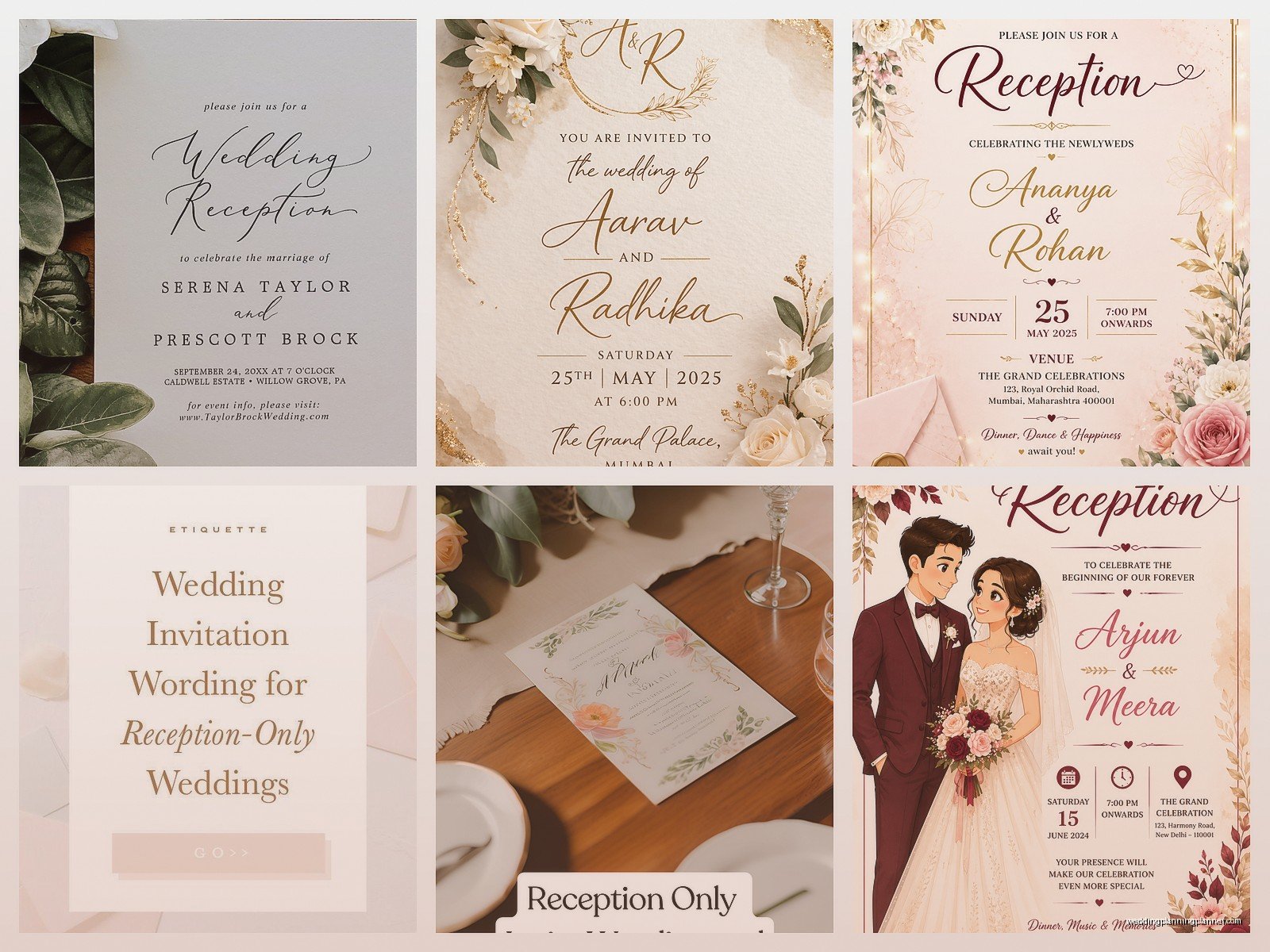
Keep it simple: You don’t need every font in existence on one invitation. Pick two fonts max – one for headers, one for body text. Make sure they’re readable. I’ve seen invites where people used super curly script fonts for everything and you literally couldn’t read the address or time.
White space is your friend: Don’t cram every inch with text or graphics. Let it breathe. A cluttered invitation looks cheap even if you spent money on it.
Match your wedding colors but don’t go overboard: If your wedding colors are navy and gold, great, use those. But you don’t need gold glitter covering the entire thing… unless that’s your vibe, then go for it I guess.
Photos are optional: Some templates have space for engagement photos. This can be really nice for reception invites since people might not have seen you as a couple if the ceremony was private. But it’s totally not necessary and sometimes makes the design too busy.
File Formats And Technical Stuff You Should Know
This is gonna sound boring but it matters. When you’re downloading templates, pay attention to the file format because it affects what you can do with it.
PDF: Good for printing as-is, not great for editing unless you have Adobe Acrobat (the paid version, not just the reader). If a template comes as PDF, it’s usually meant to be printed directly or you customize it online first.
DOCX (Word): Easy to edit, everyone has Word or Google Docs can open it. Limited design capabilities though. Fine for simple text-based invites.
JPG/PNG: Image files. You can’t really edit these unless you have photo editing software. Usually these are for digital invites you’ll email or text, not print.
PSD (Photoshop): Only works if you have Photoshop. Super customizable but there’s a learning curve if you’ve never used it.
AI (Illustrator): Same deal as Photoshop files. Professional level but requires the software and knowledge.
For most people, you want either Canva templates (which you edit online), Word/Google Docs templates, or editable PDFs. Don’t download a Photoshop template if you don’t have Photoshop, you’ll just frustrate yourself.
Digital vs Printed Reception Invites
So there’s this whole debate about whether digital invites are tacky or practical and honestly? It depends on your crowd and your wedding style. I’ve planned weddings where digital invites were perfect and others where they would’ve been totally wrong.
Digital invites work great when:
- Your guest list is tech-savvy
- You’re on a tight budget
- You’re planning quickly and don’t have time for printing and mailing
- Your wedding is casual or non-traditional
- Environmental concerns are important to you
Printed invites are better when:
- You have older relatives who aren’t great with email or might miss it
- Your wedding is formal
- You want something people can keep as a memento
- You’re already doing printed invites for other events and want consistency
Honestly you can also do both. Send digital to most people and printed to your grandparents and anyone else who needs it. There’s no rule that says it has to be all or nothing.
Common Mistakes I See All The Time
Let me just save you from the disasters I’ve witnessed because some of these are so easily avoidable.
Wrong dates or times: Proofread! Have someone else proofread! I had a client who sent invites with the wrong month. We caught it before most went out but it was a whole thing.
Missing RSVP info: How are people supposed to tell you if they’re coming? Include a date they need to respond by and HOW to respond – email, phone, wedding website, whatever.
Unclear venue information: “The Parker House” means nothing if there are three Parker Houses in your city. Include the full name and address. Maybe even a note about parking if it’s tricky.
Sending them too late: Reception invites should go out 6-8 weeks before the event minimum. Earlier if it’s destination or during holidays. People need time to plan.
Forgetting about plus-ones: Be clear about whether people can bring a guest or not. “We have reserved __ seats in your honor” is a polite way to indicate the exact number invited.
Envelopes And Mailing Stuff
If you’re doing printed invites, you need envelopes obviously. Some template sites include matching envelope designs but usually you’re on your own for the physical envelopes.
Standard invitation sizes are 5×7 or 4×6 which means you need A7 or A6 envelopes. You can get these at craft stores, office supply stores, or online in bulk. Consider getting a few extras because you WILL mess some up while addressing them or someone will spill coffee on theirs and need a replacement… or is that just me?
Addressing options range from handwriting (time-consuming but personal) to printing labels (efficient but less fancy) to hiring a calligrapher (gorgeous but pricey). For reception invites specifically, I think printed labels are totally fine unless your wedding is super formal.
Don’t forget about postage! Invitations are usually heavier than regular letters especially if you include RSVP cards. Take one fully assembled invite to the post office and have them weigh it so you know exactly how much postage you need. Nothing worse than having invites returned for insufficient postage.
Matching Your Other Stationery
If you’re doing other printed stuff like programs, menus, thank you cards, etc., your reception invite should coordinate with those. It doesn’t have to be exactly identical but keeping the same color scheme and general design style makes everything feel cohesive.
Most free template sites have matching sets so if you download a reception invite template, check if they have coordinating pieces. Canva is really good for this – you can create a whole suite of matching items pretty easily.
But also like… don’t stress about this too much? Your guests probably won’t notice if the font on your menu is slightly different from your invitation. I promise they’re more focused on the food and the open bar.
Budget Reality Check
Let’s talk actual numbers because “free template” doesn’t mean the whole thing is free, you know?
If you’re doing 100 invites with free templates and DIY printing:
- Cardstock: $20-40 depending on quality
- Envelopes: $15-30
- Postage: $70-100 (assuming regular stamps work)
- Ink if you need to buy it: $30-60
So you’re looking at roughly $135-230 for 100 invites doing it yourself. That’s WAY cheaper than custom stationery which would be like $300-800+ for the same quantity.
If you use an online printing service, add another $50-150 depending on paper quality and extras. Still cheaper than custom though.
Digital invites through sites like Paperless Post or Greenvelope might have free options or cost $0.50-2.00 per invite for fancier designs. So for 100 people you might spend $0-200 total.
Accessibility Stuff Nobody Talks About
Okay so this is something I learned from a client who had several guests with vision issues. Make sure your text is actually readable. That means:
- Font size at least 12pt for body text, bigger for important details
- Good contrast between text and background (no light gray text on white, please)
- Clear, simple fonts for key information
- If you’re doing digital invites, make sure they work with screen readers
It’s a small thing but it makes your invites accessible to everyone and that’s just… good practice, you know?
Last Minute Emergency Options
Life happens. Sometimes you need reception invites like NOW. Here’s what to do when you’re in panic mode:
Canva + digital delivery is your fastest option. You can create and send invites in literally a few hours. Just make sure you have everyone’s email addresses ready to go.
If you need physical invites fast, some online printers do rush shipping. Vistaprint has next-day options for an upcharge. Local print shops can sometimes do same-day or next-day if you’re nice and they’re not busy.
Or honestly? A really nice email with all the details formatted clearly works in a pinch. I watched a TV show once where they planned a whole wedding in like 48 hours and while that’s dramatic and unrealistic for most aspects, the invitation part is actually doable if you go digital.
The key thing with free templates is just making them work for YOUR situation. Download a few, play around with them, see what feels right for your style and your wedding. And proofread everything like seventeen times because once they’re printed or sent, you can’t really take them back. Trust me on that one – spring 2023 was a learning experience for all of us involved in that particular wedding where we misspelled the venue name. Good times.
