
Planning Guides, Style Guide
Day Of Wedding Binder Template: Free Download Files

Aug
Why You Actually Need This Thing
Okay so a day-of wedding binder is basically your entire wedding condensed into one physical book that you hand to your wedding planner, coordinator, or that super organized friend who volunteered to help. I learned this the hard way in summer 2021 when a bride texted me seventeen times between 6am and 8am on her wedding day asking where the backup boutonniere was and what time the string quartet was supposed to start. She didn’t have a binder. I was trying to drink my coffee and my cat knocked it over while I was frantically scrolling through emails from three months prior.
The binder keeps everything in one place so people aren’t hunting through their phones or asking you questions when you should be getting your makeup done and drinking champagne. It’s not romantic or cute but it’s gonna save your sanity.
What Actually Goes In This Binder
You need tabs or sections because just throwing papers in there helps nobody. Here’s what I always include:
- Contact sheet – every single vendor with their phone number, the specific person’s name you’ve been working with, and their role. Not just “ABC Flowers” but “ABC Flowers – talk to Maria, she’s handling delivery”
- Timeline – minute by minute schedule starting from when vendors arrive to setup until the last song plays
- Vendor contracts – just the important pages, not the entire 15-page document
- Reception layout – floor plan with table numbers, head table, gift table, everything labeled
- Ceremony details – processional order, who sits where, any readings or special moments
- Photography shot list – family groupings, must-have shots, that weird cousin who doesn’t want to be photographed
- Music selections – what song for first dance, parent dances, entrance, exit, everything
- Seating chart – I usually print two copies of this because someone always spills something on it
- Emergency contacts – your parents, wedding party, someone who has a key to your house
- Payments tracking – what’s paid, what’s due on the day, tip envelopes
The Contact Sheet Is More Important Than You Think
This needs to be the very first page. I’m talking like, someone opens the binder and BAM there it is. Include cell phones, not just office numbers because at 5pm on a Saturday your florist isn’t answering the shop line. Also put YOUR phone numbers on here but honestly you shouldn’t be the one getting called unless it’s a genuine emergency, that’s kinda the whole point of having someone else hold this binder.
One thing that really annoyed me was when couples would give me a contact sheet with just company names and no actual humans listed. Like cool, I’ll just call “Elegant Events DJ Service” and hope whoever answers knows about your wedding specifically among the three other weddings they’re doing that day.

Creating Your Timeline Section
The timeline is probably the most used page in the entire binder. Make it detailed but readable – I use a simple format like:
2:00 PM – Ceremony musicians arrive and setup (String quartet – contact Marco if issues)
2:30 PM – Guests begin arriving
3:00 PM – Ceremony starts (doors close at 2:55 PM sharp)
Keep going all the way through the night. Include buffer time because things run late, they just do. If you think photos will take 30 minutes, write down 45 minutes. Your photographer will love you for this.
I also add notes in parentheses for anything that needs context. Like “3:45 PM – Grand exit (bride wants to leave while it’s still light out for photos, do NOT let this run late)” or “8:30 PM – Cake cutting (groom is lefthanded, position accordingly)”.
Ceremony Processional Order
This page needs to spell out exactly who walks with who, in what order, and what song plays. I usually format it like a list:
Song: Canon in D
1. Grandmother (escorted by usher Jake)
2. Groom’s parents
3. Bride’s mother (escorted by usher Tom)
Keep going through the entire processional. Then do the same thing for the recessional because people forget that everyone needs to exit too. Also note if anyone has mobility issues or needs extra time walking down the aisle… one of my spring 2023 weddings had a grandmother with a walker and nobody told the musicians so they finished the song before she was even halfway down the aisle and it got awkward.
Where To Get Free Templates
You can find free day-of binder templates all over the internet. Etsy has a ton of free downloads – just search “free wedding binder printables” and you’ll find basic templates. Some of my favorite sources:
- The Knot has free printable planning pages
- Wedding Wire offers timeline templates
- Canva has editable templates you can customize (free account works fine)
- Pinterest has links to tons of Google Docs templates you can copy
I usually just create my own in Microsoft Word or Google Docs though because then I can adjust everything to fit the specific wedding. But if you want something prettier with nice fonts and decorative headers, those free Etsy downloads work great. Just make sure you’re actually downloading something editable, not just a JPEG image that you can’t type on.
My Basic Template Structure
When I make one from scratch, here’s my go-to structure. You can copy this:
Get a 2-inch binder, clear sheet protectors, and tab dividers. Label your tabs:
- Contacts & Timeline
- Ceremony Details
- Reception Details
- Vendor Info
- Payments & Tips
- Emergency Kit Inventory
- Miscellaneous
That last tab is for random stuff like the marriage license info, hotel room numbers, or backup chargers for your phone.
Actually Putting It Together
So you’ve got your templates downloaded or created, now you gotta actually fill them out. Set aside like… honestly probably 3-4 hours to do this properly. Put on a show you’ve already seen (I did this during a Schitt’s Creek rewatch) and just work through each section.
Use sheet protectors for everything. Yes it’s more expensive than just hole-punching papers but when someone spills champagne on your binder – and someone will – you’ll be glad the actual documents are protected. Also it looks more professional and keeps pages from ripping out.
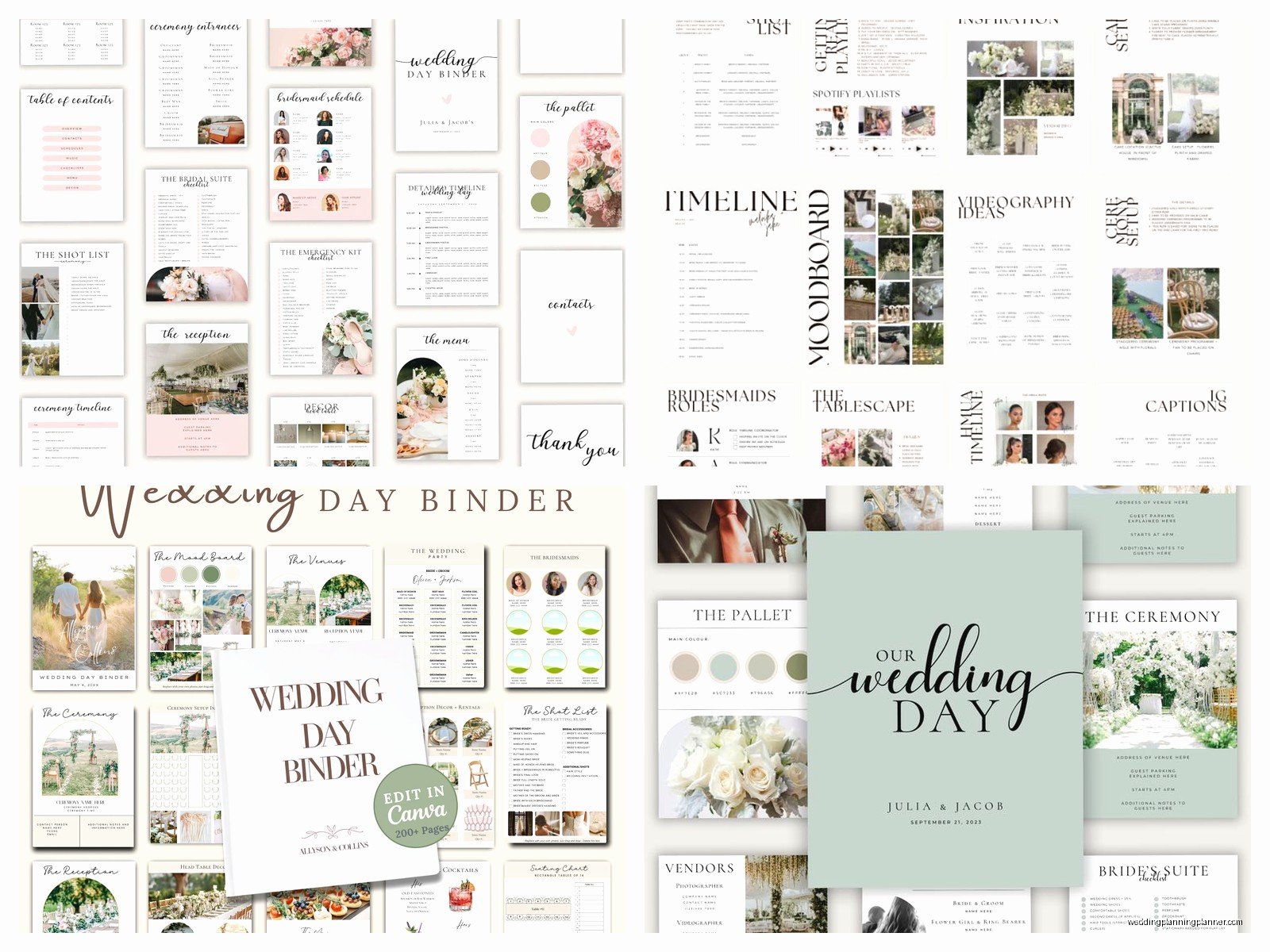
Print everything in color if you can, or at least use highlighters to mark important things. Like highlight all the times in your timeline in yellow so they’re easy to spot. Highlight vendor names in pink. Whatever system makes sense to you.
What I Learned From A Disaster Wedding
There was this wedding where the couple didn’t make a binder and just told everyone “we’ll figure it out.” The caterer showed up an hour late because they had the wrong start time in their system. The DJ played the wrong entrance song because nobody confirmed it with him. The photographer missed half the family photos because there was no shot list. It was… not great.
After that I started being way more pushy about binders even for couples who have a “laid back” vibe. You can be chill and still be organized, those things aren’t mutually exclusive. The binder isn’t about being controlling or Type A, it’s about making sure the vendors you’re paying thousands of dollars actually do what you hired them to do.
Digital vs Physical Binder
Some people ask about doing a digital binder, like a shared Google Drive folder or something. And look, I get it, we live in the future and paper seems outdated. But here’s the thing – on a wedding day you’re dealing with multiple people who need quick access to information, sometimes in places without great wifi, sometimes with hands full of flowers or equipment. A physical binder that anyone can flip through is just easier.
That said, I do recommend having a backup digital version. Scan or photograph every page and keep it in a Google Drive folder that your planner and key wedding party members can access. Best of both worlds.
The Emergency Kit Section
This is sorta separate but I always include a page that lists what’s in the emergency kit and where it’s located. Things like:
- Safety pins
- Stain remover pen
- Bobby pins
- Clear nail polish (for stocking runs)
- Pain reliever
- Bandaids
- Breath mints
- Tissues
- Phone chargers
- Backup earring backs
Note who’s in charge of bringing this kit and where it’ll be stashed during the wedding. Usually it’s a bridesmaid or the wedding planner.
Vendor Specific Pages
For major vendors I create individual pages with all their details. Like for the photographer:
Photographer: Jane Smith Photography
Contact: 555-0123
Assistant: Michael
Arrival time: 1:00 PM
Package: 8 hours coverage
Must-have shots: [list them]
Family photo groupings: [list each combo]
Special requests: Bride wants golden hour portraits, groom wants drone shots if weather permits
Do this for your caterer, florist, DJ, videographer, everyone major. It keeps all the info together instead of scattered through contracts and email chains.
The Seating Chart Drama
Okay the seating chart needs its own section because it’s always a whole thing. Print it large enough that people can actually read it – nobody wants to squint at tiny font while holding a clipboard and dealing with confused guests.
I do two versions: one that’s by table number (Table 1: John Smith, Mary Johnson, etc.) and one that’s alphabetical by guest last name with their table number next to it. The alphabetical one goes on display for guests to check, the table number one is for your planner or venue coordinator to reference.
Also make notes about any special seating considerations. “Aunt Carol and Aunt Linda shouldn’t sit together” or “Table 8 has three guests with severe nut allergies, catering has been notified.”
Payment and Tip Tracking
This section is super important and people forget about it. List every vendor, what’s already paid, what’s due day-of, and what tip you’re giving. Put cash tips in labeled envelopes and note in the binder who’s responsible for distributing them and when.
Something like:
DJ: Paid in full, $100 tip in envelope (give at end of reception)
Catering: $500 due day-of, 20% gratuity in envelope for head server
Photographer: Paid in full, no tip (already included in contract)
Assign one person – usually your planner or a parent – to handle all the money stuff so you’re not thinking about it.
Making It Pretty vs Making It Functional
Look, you can spend hours making your binder look like it belongs on Pinterest with matching fonts and color-coordinated tabs and floral borders. Or you can make it functional with clear labels and readable text. Guess which one actually matters on your wedding day?
I mean if making it pretty brings you joy, go for it. But don’t stress about aesthetics when clarity is what counts. Your day-of coordinator doesn’t care if the fonts match your wedding colors, they care that they can find the caterer’s phone number in under 10 seconds.
Who Gets The Binder
The binder goes to whoever is coordinating your wedding day. If you hired a planner or day-of coordinator, it’s theirs. If your venue provides coordination, give it to them. If your super organized sister volunteered, she gets it.
Give it to them at least a week before the wedding so they can review it and ask questions. Don’t hand it off the morning of and expect them to figure everything out on the fly… I mean they probably can because wedding coordinators are magicians, but why make it harder?
Make sure they know they’re empowered to make decisions based on what’s in the binder. Like if the timeline says photos start at 4:15, they need to make that happen even if guests are still finishing cocktails or whatever.
Updating It As Things Change
Your binder isn’t a one-and-done thing you create six months before the wedding. Keep updating it as details get finalized. Guest count changes? Update the seating chart. Vendor confirms a different arrival time? Update the timeline. Aunt Susan can’t make it so now you need a different usher? Update the ceremony processional.
I usually do a final complete review about a week before the wedding, print fresh copies of anything that changed, and call it done. Trying to make changes the day before or morning of is just stressful and unnecessary.
The Backup Binder Idea
Some really organized couples make a second smaller binder with just the essential pages – timeline, contacts, seating chart – and give it to someone else like the best man or maid of honor. That way if the main binder goes missing or the coordinator needs to be in two places at once, there’s backup. Probably overkill for most weddings but if you’re the type who likes redundancy, it’s an option.
Common Mistakes People Make
The biggest mistake is making the binder too complicated with too much information. Your coordinator doesn’t need to know the entire story of how you got engaged or copies of every single email exchange with your florist. Keep it to actionable information only.
Another mistake is assuming everyone knows the plan without writing it down. “Oh the bridesmaids know they’re supposed to…” nah, write it down. People forget, people get nervous, people get drunk. Documentation saves the day.
Also people forget to include their own contact info which is wild but it happens. Even though you shouldn’t be getting calls, sometimes there’s a genuine emergency and someone needs to reach you.
And honestly the thing that annoys me most is when couples spend all this time making a beautiful binder and then don’t actually give it to anyone or give it to someone who isn’t empowered to use it. What’s the point of having a detailed timeline if nobody’s actually following it?
Random Stuff That’s Helpful To Include
Here’s some things I throw in the miscellaneous section that end up being useful:
- Wifi password for the venue
- Parking information for vendors
- Load-in and load-out rules from the venue
- Weather backup plan details
- Hotel room numbers where you’re getting ready
- Rehearsal dinner info in case someone asks
- Next-day brunch details
- Honeymoon flight information (just in case)
Basically anything that someone might need to reference during the wedding weekend goes in there. Better to have it and not need it than need it and be scrambling through text messages trying to find it.
