
Planning Guides, Style Guide
Wedding Reception Table Layout Template: Free Download Files
Aug
Okay So Table Layout Templates Are Basically Your Sanity Saver
Look, I’ve planned like 200+ weddings at this point and the table layout thing still makes me want to pull my hair out sometimes. You’d think after doing this since 2009 it would get easier but nah, every venue is different and every family has that one aunt who cannot sit near her sister-in-law or the world will end.
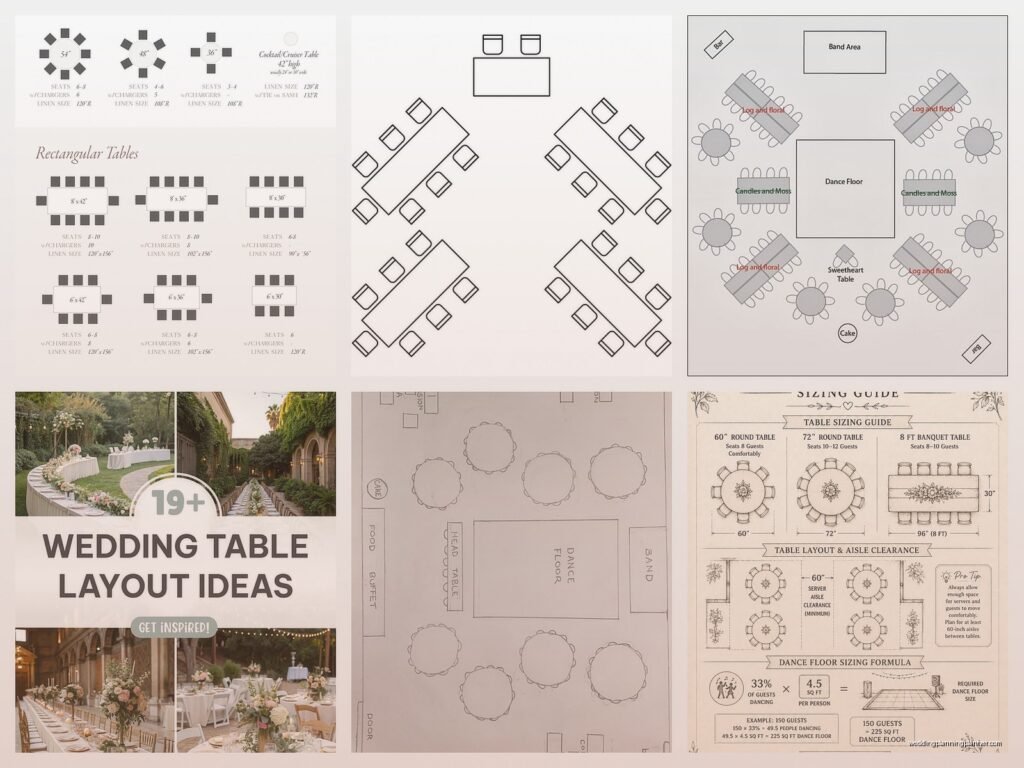
So here’s the deal with wedding reception table layout templates – they’re basically diagrams that help you figure out where to put tables, how many guests fit at each one, and how to arrange everything so people can actually, you know, move around and eat food without bumping into each other constantly.
What You Actually Need In A Table Layout Template
The free templates you can download (I’ll get to where in a sec) usually come in a few formats. PDF is gonna be the most common, but honestly Excel or Google Sheets versions are way more useful because you can actually edit them. Some come as PowerPoint files which… I mean they work but kinda clunky?
A good template should have:
- Actual measurements or a scale so you’re not just guessing
- Common table shapes already included (rounds, rectangles, squares)
- Space marked out for the head table or sweetheart table
- Dance floor area indicated
- DJ/band space
- Cake table spot
- Bar location options
Spring 2023 I had this bride who downloaded some random template from Pinterest that had literally no scale on it whatsoever. She spent THREE HOURS arranging her layout only to realize when we got to the venue that she’d planned for tables that were supposed to be 60 inches but were actually 72 inches and nothing fit. I wanted to scream but instead I just… we had to redo everything on site which was super fun let me tell you.
Where To Get The Free Templates That Don’t Suck
Alright so you want free files. I get it, weddings are expensive and why pay for a template when free ones exist?
Template.net has a bunch of wedding floor plan templates. Some are free, some aren’t – you gotta look for the ones that say “free” but they’re there. They usually give you Word, PDF, and sometimes Illustrator formats.

Canva is actually pretty solid for this now. They have drag-and-drop floor plan templates and you can customize everything. The free version works fine, you don’t need Pro for basic layouts. I use this one a lot with clients who are more visual and less spreadsheet-oriented.
AllSeated offers free 2D and 3D floor planning tools. You create an account (annoying but whatever) and can access their template library. The 3D view is honestly overkill for most people but clients love seeing it.
Social Tables has some free options too though their really good stuff is paid. But for a basic template to download and work with? Yeah it’s fine.
WeddingWire has downloadable planning templates including table layouts. They’re pretty basic but functional. You’ll need to sign up with your email which means you’re gonna get their newsletter but you can unsubscribe.
How To Actually Use These Things
Okay so you downloaded a template. Now what? First thing – and I cannot stress this enough – get your venue’s exact dimensions. Call them, email them, show up with a measuring tape if you have to. You need to know the length and width of your reception space, where the doors are, where the bathrooms are, if there are any columns or weird architectural features.
One thing that really annoys me is when venues say “oh we fit 150 people easily” but they don’t tell you that includes cramming tables so close together that servers can’t get through. Always ask for the floor plan with their recommended maximum capacity AND comfortable capacity.
Start with the non-negotiables. Where’s the head table going? Where does the venue require the DJ to set up (usually near a power source)? Where’s the dance floor? These are your anchor points and everything else works around them.
Table Shapes And What Actually Fits
This is where people get confused and honestly the templates don’t always help because they assume you know this stuff already.
60-inch round tables are the most common. They seat 8-10 people comfortably. I usually say 8 is ideal, 10 is pushing it unless you have tiny centerpieces.
72-inch rounds are bigger and seat 10-12. These take up way more space than you think – like you need about 12 feet of space total when you account for chairs and people pushing back from the table.
8-foot rectangular tables (that’s 96 inches) can seat 8-10 people, maybe 12 if you do family-style seating and everyone’s friendly. These are great for long farmhouse table vibes but they eat up space fast.
6-foot rectangular tables seat about 6-8 people and honestly these are underrated? They’re easier to fit into weird spaces and you can arrange them in more creative patterns.
When you’re placing tables in your template, remember you need at least 5 feet between tables for walkways. I learned this the hard way during a wedding in summer 2021 where we had gorgeous 6-foot floral centerpieces but forgot to account for how much visual and physical space they took up – guests were literally doing that awkward side-shuffle between tables all night.
The Guest List Integration Part That Everyone Forgets
So you’ve got your template, you’ve placed your tables, cool. But now you gotta figure out WHO sits where and this is where a template becomes more than just a pretty diagram.
Some of the better free templates (especially the Excel ones) have a second sheet where you can list guest names, assign them table numbers, and track meal choices if you’re doing that. This is super helpful because you can see at a glance if Table 7 has three vegetarians or if you accidentally put all the groom’s college friends at the table closest to grandma.

I usually tell couples to create categories first: family, bride’s friends, groom’s friends, work people, etc. Then within those categories think about who actually likes each other or has something in common. Don’t just throw random people together because they’re all “friends from college” – if they graduated ten years apart they probably don’t know each other?
Digital vs. Printable Templates
There’s like two schools of thought here. Some people want a PDF they can print out and write on with a pen because that feels more real to them. Totally fine, I’m not judging, sometimes I miss paper too… my cat knocked over my coffee onto a seating chart once and honestly it wasn’t the worst thing because I had it backed up digitally anyway.
But digital templates are more flexible. You can move things around, try different configurations, color-code tables by guest type, and share them easily with your planner, venue coordinator, or caterer.
If you’re using a printable PDF template, I’d suggest printing it at the largest size you can manage – like 11×17 if you have access to that size printer. The standard 8.5×11 sheets are too small to really see details when you’re dealing with a 150-person wedding.
Common Mistakes People Make With Templates
Not accounting for the actual chair size. Chairs take up space! A chiavari chair needs about 2 feet of space per person around a table. If your template doesn’t show chairs, you might think you have more room than you do.
Forgetting about the cake table, gift table, place card table, and other random tables that need homes. These aren’t always included in basic templates so you gotta add them yourself.
Putting tables too close to the dance floor. Nobody wants to get hit by a drunk groomsman doing the Cupid Shuffle while they’re trying to eat their salmon.
Not thinking about traffic flow. There should be a clear path from the entrance to tables, from tables to the bar, from tables to the dance floor, and from tables to the bathrooms. People shouldn’t have to navigate a maze.
Assuming the template’s default spacing works for your venue. Every space is different! What works for a hotel ballroom might not work for a barn venue with support beams every 10 feet.
Customizing Your Template For Your Actual Wedding
Once you download a template it’s not just plug-and-play, you gotta make it yours. Add your venue’s specific features – is there a fireplace? A big window wall? A weird column in the middle of the room? Mark these on your template.
I like to use different colors for different things. Like, make the head table one color, family tables another color, friend tables a third color. This makes it super easy to see at a glance if you’ve got a good mix or if all the family is clustered on one side.
Some templates let you add notes to each table. Use this! Write down stuff like “Table 5 – keep away from speakers because of Aunt Marie’s hearing aids” or “Table 8 – needs highchair for toddler.” Your future self will thank you.
Working With Your Venue And Vendors
Okay so you’ve created this beautiful layout. Now you gotta actually communicate it to the people who need to set it up. Your venue coordinator needs a copy, your caterer needs to know the layout for service flow, your florist needs to know table numbers for centerpiece delivery.
Export your final template as a PDF even if you worked on it in Excel or Canva or whatever. PDFs don’t get messed up when someone opens them on a different computer. Label it clearly – “Smith-Johnson Wedding Table Layout FINAL” or something. Not just “wedding stuff.pdf” because I guarantee you’ll have fifty files named wedding stuff and you won’t remember which one is which.
Send it to your venue coordinator at least two weeks before the wedding. Ask them to confirm that what you’ve planned actually works with their space and their setup capabilities. Sometimes venues have rules about where certain things can go that you didn’t know about.
The Backup Plan You Need To Have
Here’s something nobody tells you – even with the best template and planning, stuff changes. People RSVP no at the last minute, or they bring plus-ones you weren’t expecting, or the venue suddenly tells you they can’t put a table where you wanted it because of fire code or something.
Save multiple versions of your template as you work on it. Like “Layout Version 1,” “Layout Version 2,” etc. That way if you need to go back to an earlier idea you can. I learned this after spending an hour on a layout, hating it, changing everything, then realizing the first version was actually better but I hadn’t saved it separately and couldn’t remember exactly what it looked like.
Print a copy to bring with you on wedding day. Yes even if you have it digitally. Phones die, laptops crash, WiFi stops working. A printed floor plan in your emergency kit has saved my butt more times than I can count.
Templates For Different Reception Styles
Not all weddings need the same type of layout. If you’re doing a cocktail-style reception with mostly standing room and a few high-top tables, you need a totally different template than a formal seated dinner.
For cocktail receptions, look for templates that emphasize open space and show high-top table placement. You’ll need fewer tables overall but more spread out so people can mingle.
For family-style dinners, you want long rectangular tables which create a different flow than rounds. These templates should help you maximize the farmhouse table aesthetic while still leaving enough space.
For buffet service, your template needs to account for buffet table placement and the line that will form. People need to be able to access the buffet without walking through the entire reception space.
For plated service, you have more flexibility with table placement since servers need access from all sides anyway.
I had this wedding once where the couple wanted both a seated dinner AND a big dance floor for like 200 people in a space that realistically held 150 comfortably and we just… it was fine but tight and I think about that wedding whenever someone asks if they can fit “just a few more tables” into their layout. The answer is usually no.
Anyway that’s basically everything I know about table layout templates after doing this for way too many years. Download a few different ones, play around with them, show them to your venue coordinator, and don’t stress too much if your first attempt looks weird because everyone’s first attempt looks weird and that’s totally normal and why these templates exist in the first place so you can keep trying until it works.
