
Planning Guides, Style Guide
The Knot Budget: Brand Review & Guide
Mar
The Knot Budget Tool Is Actually Pretty Solid But Here’s What You Need to Know
So The Knot’s budget tool is probably gonna be one of the first things you see when you start planning, and honestly? It’s not terrible. I’ve had maybe 30+ couples use it over the years and the feedback is pretty consistent—it’s helpful but kinda pushy about their vendor marketplace, which yeah, makes sense since that’s how they make money but still.
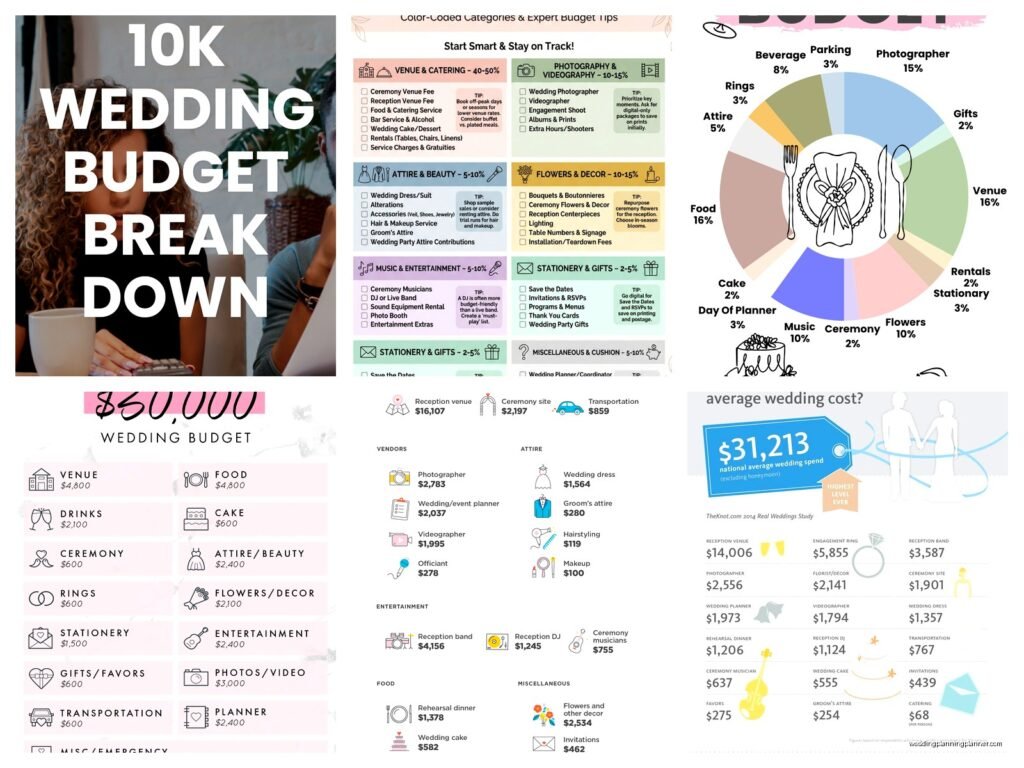
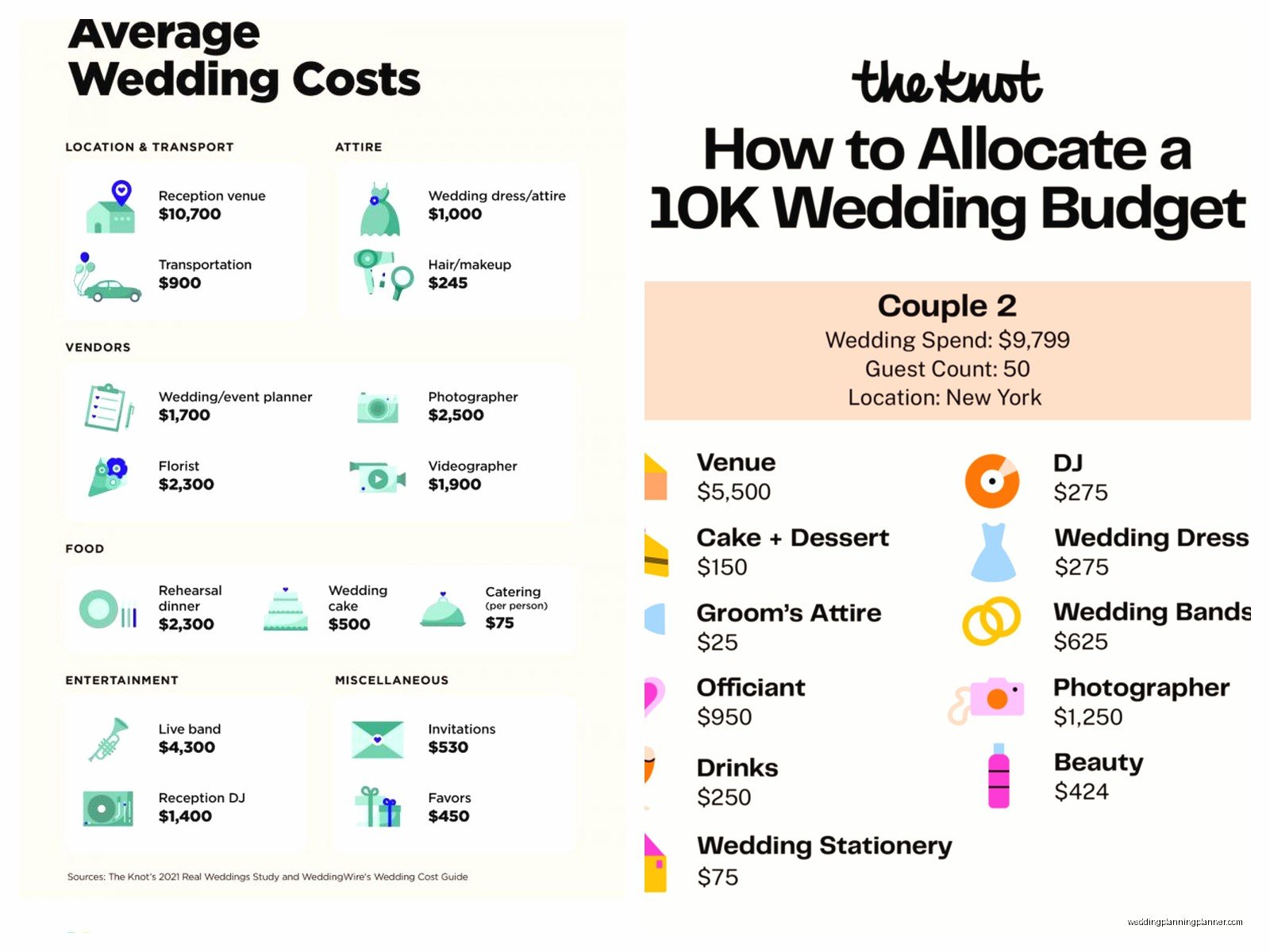
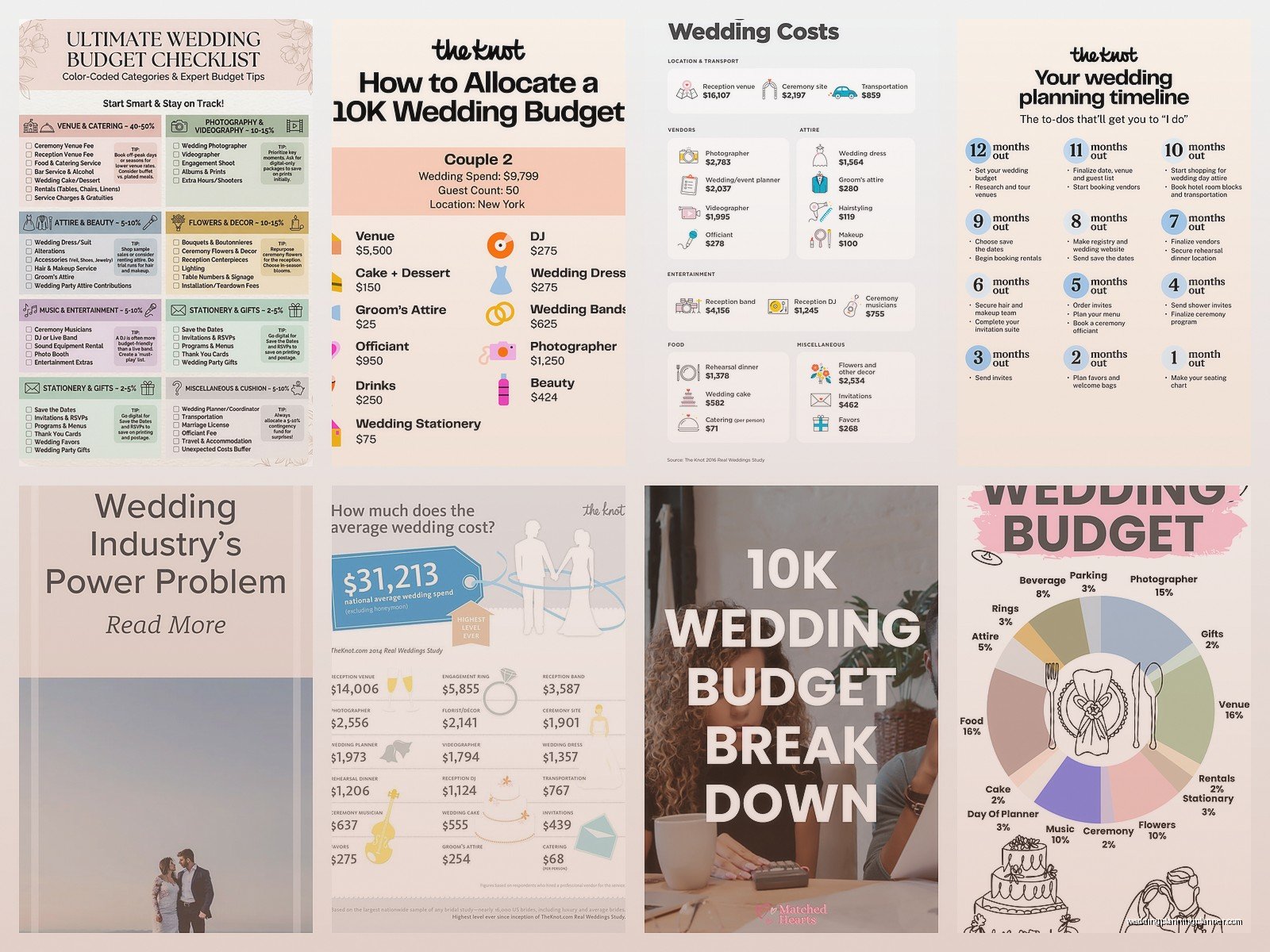
The tool itself is free which is obviously the main appeal. You set up an account, plug in your total budget number, and it automatically breaks down percentages for each category. Like it’ll tell you roughly 50% should go to reception venue and catering, 10% to flowers, 8% to photography, etc. These percentages are based on what couples typically spend nationally, so right away you gotta know that’s not gonna match everyone’s priorities.
How The Budget Breakdown Actually Works
When you first open the tool you enter your total wedding budget and your guest count. The Knot then generates this pie chart situation with all the categories already filled in with suggested amounts. The main categories they include are:
- Reception venue and catering (this is always the biggest chunk)
- Photography
- Videography
- Wedding planner or coordinator
- Flowers and décor
- Music/entertainment
- Wedding dress and accessories
- Beauty (hair and makeup)
- Stationery and paper goods
- Transportation
- Favors and gifts
- Rehearsal dinner
- Honeymoon
One thing that really annoyed me back in spring 2023 when I was helping a bride named Michelle—the tool kept suggesting she spend like $4,800 on flowers when she’d explicitly told me she wanted to do mostly greenery and keep florals minimal. The percentage-based approach doesn’t account for personal style at all, which… I mean obviously a computer can’t read your mind but it creates this false expectation that you SHOULD be spending X amount on flowers just because “that’s what people do.”
The Vendor Integration Thing
Here’s where it gets a little salesy. Every category in your budget links directly to The Knot’s vendor marketplace. So you’re looking at your photography budget and boom there’s a button to “Find Photographers” that takes you to their vendor listings. The vendors pay to be featured there, so you’re not exactly getting an unbiased selection.
That said, I’ve found some genuinely great vendors through The Knot marketplace. It’s not like they’re featuring terrible vendors just because they pay—they do have reviews and couples post real photos. But you’re definitely seeing a curated list based on who’s paying for premium placement. Just keep that in mind when you’re browsing.
The budget tool will also send you notifications when you’re getting close to your limits in each category, which is actually useful if you’re the type of person who needs those reminders. I’m not great at checking notifications myself (my cat literally sits on my phone when she wants attention so I miss half of them anyway), but my more type-A couples love this feature.
What You Can Customize And What You Can’t
You CAN adjust the amounts in each category manually, which is crucial. Like if you don’t care about videography at all, you can zero that out and move that money to photography or catering or whatever matters more to you. You can also add custom categories if they don’t have something you need—I had one couple who added a category for their dog’s tuxedo rental and honestly that’s valid.
What you CAN’T really customize is the way they calculate percentages initially. Their formula is kinda rigid and based on national averages that might not reflect your region at all. Wedding costs in Manhattan are wildly different from wedding costs in rural Ohio, but The Knot’s initial breakdown doesn’t account for that. You’ll need to manually adjust based on quotes you’re actually getting from vendors in your area.
The tool also doesn’t do a great job with tracking deposits versus final payments. You can mark things as “paid” but there’s no easy way to track that you paid $1,000 deposit in March and still owe $3,000 in October. I usually tell couples to use a separate spreadsheet for payment schedules or… actually there are better tools for that specific thing which I’ll get to in a sec.
The Guest List Integration Is Sneaky Helpful
Something I didn’t expect to be useful but actually is—The Knot’s budget tool connects to their guest list manager. So when you update your guest count in the guest list tool, it automatically adjusts your catering budget in the budget tool. This is smart because your guest count affects SO many line items (catering, rentals, favors, stationery) and having them talk to each other saves you from manually recalculating everything.
The guest list tool itself is pretty robust. You can track addresses, RSVPs, meal choices, plus-ones, all that stuff. And it’ll show you how your budget shifts as your guest list grows or shrinks. During a particularly stressful situation last summer where my couple kept adding “just a few more people” every week, watching their per-person costs increase in real-time actually helped them understand why I kept saying they needed to cut the list or increase the budget.
Where The Knot Budget Tool Falls Short
Okay so here’s the stuff that doesn’t work great. The mobile app is kinda clunky compared to the desktop version—like you can access everything but the interface feels cramped and it’s harder to see the big picture of your budget at a glance. If you’re someone who does most of your planning on your phone this might bug you.
The tool also doesn’t handle split budgets well. If your parents are contributing X amount and your partner’s parents are contributing Y amount and you’re covering Z, there’s no clean way to track those different funding sources. You just have one total budget number. For couples who need to track multiple contributors separately, you’re gonna need a different solution or a supplementary spreadsheet.
Another limitation is that it doesn’t project or forecast. Like if you’ve spent 60% of your budget but you’re only 40% of the way through your planning timeline, it won’t warn you that you’re burning through money too fast. You have to kinda eyeball that yourself or… honestly just have a planner help you pace your spending.
The Vendor Payment Tracking Could Be Better
I mentioned this earlier but it’s worth expanding on because this is where couples get into trouble. The Knot lets you mark vendors as “booked” and enter the total cost, but tracking the actual payment schedule is awkward. Most vendors want a deposit when you book, maybe another payment at the 6-month mark, and the final payment a week or two before the wedding. The Knot’s tool doesn’t give you a timeline view of when payments are due across all your vendors.
What ends up happening is couples think they have more cash available than they do because they’re looking at “remaining budget” without accounting for the deposits and mid-payments they’ve already committed to but haven’t paid yet. I started creating a separate payment calendar in Google Sheets for my couples because of this exact issue and honestly it’s saved several couples from overdrafting their accounts.
Comparing It To Other Budget Tools Real Quick
So there’s also WeddingWire’s budget tool which is basically identical to The Knot’s (they’re owned by the same parent company now so that tracks). Zola has a budget tool that’s a bit more modern-looking and integrates with their registry, which is kinda nice if you’re using their registry anyway. There are also apps like Joy and Notion templates and honestly just spreadsheets.
The Knot’s advantage is that it’s comprehensive and connects to all their other planning tools—checklist, guest list, vendor marketplace, etc. If you’re gonna use The Knot ecosystem for most of your planning, the budget tool makes sense because everything talks to each other. If you’re using a mix of different platforms, you might find the budget tool feels disconnected from the rest of your planning process.
I personally use a heavily customized Excel template for my own client budgets that includes payment schedules, vendor contact info, contract deadlines, all that stuff. But that’s because I’m a control freak and also because I’ve been doing this for like 15 years so I know exactly what I need to track. For couples planning their own wedding without a planner, The Knot’s tool is honestly a solid starting point.
The Realistic Budget Ranges Thing
One feature I actually really appreciate—when you’re looking at each budget category, The Knot shows you the typical range of what vendors charge in your area. So for photography it might say “Most couples spend between $2,500 and $5,000” based on your location and guest count. This is super helpful for couples who have NO idea what things cost and might otherwise assume a photographer costs like $500 or something wildly off-base.
These ranges come from real vendor pricing data and reviews on their platform, so they’re generally pretty accurate. Not perfect, but accurate enough to help you understand what’s realistic. I had a groom in early 2022 who was convinced he could get a four-course plated dinner with open bar for $50 per person because his cousin’s wedding in 2015 cost that much and… no. The Knot’s data helped him understand that prices had increased and also that his cousin probably wasn’t telling him the whole truth about costs.
Tips For Actually Using The Tool Effectively
Start by entering your REAL total budget, not some aspirational number you hope to spend. The tool only works if you’re honest with it. Then immediately adjust the category percentages based on your actual priorities. Don’t let the default percentages dictate your spending—they’re just a starting point.
As you get quotes from vendors, update the tool right away. This is where people fall off—they get a quote, think “I’ll add that later,” and then three months go by and their budget is completely out of sync with reality. I try to update it weekly at minimum, more often when you’re actively getting quotes and booking vendors.
Use the notes section for each vendor entry. The Knot lets you add notes to each line item, and I use this to track stuff like “includes setup and breakdown” or “travel fee not included” or “tip not included in price.” These little details matter when you’re comparing vendors or trying to figure out your final costs.
Also, build in a contingency buffer. The Knot doesn’t automatically include this but you should manually add a category called “Buffer” or “Unexpected Costs” and allocate like 10-15% of your budget to it. I promise you’re gonna need it for stuff like additional postage because your invitations are heavier than you thought, or an extra hour of photography because things are running behind, or whatever random thing pops up.
The Annoying Emails You’re Gonna Get
Fair warning—when you sign up for The Knot and start using their budget tool, you’re gonna get a LOT of emails. They’ll email you about vendors in your area, about planning tips, about real weddings, about basically everything. You can customize your email preferences in your account settings but the default is like… aggressive. Just be prepared to either manage those settings or create a separate email address for wedding planning stuff.
The emails can actually be useful though? Like they’ll send reminders about planning tasks you should be doing based on your wedding date, and sometimes those reminders catch things you forgot about. But yeah if you’re someone who gets overwhelmed by inbox clutter, definitely go into settings and turn off the promotional stuff.
Oh and they’ll also share your info with vendors you contact through their marketplace, which again makes sense but just know that once you reach out to a photographer through The Knot, that photographer has your contact info and might follow up with you. Most vendors are professional about this but I’ve had clients complain about pushy follow-ups, so just be aware that’s part of the deal when you use their vendor marketplace.
Is It Actually Worth Using Though
For most couples? Yeah, I think so. It’s free, it’s relatively user-friendly, and it gives you a framework to start with when you’re staring at a blank slate trying to figure out how to allocate $30,000 or whatever your budget is. The vendor integration can be helpful even if it’s a bit sales-y, and the connection to the guest list tool is legitimately useful.
Where it’s NOT worth using is if you need really detailed financial tracking, if you have multiple contributors who need separate budget views, or if you’re planning a very non-traditional wedding where their categories don’t apply. In those cases you’re probably better off with a custom spreadsheet or a more robust project management tool.
I usually recommend couples start with The Knot’s tool and then supplement with additional tracking methods as needed. Use The Knot for the big-picture budget overview and category allocation, then use a spreadsheet or calendar for detailed payment schedules. Use The Knot’s vendor marketplace to find potential vendors, but also ask for referrals from friends and search outside their platform to make sure you’re seeing all your options.
