
Planning Guides, Style Guide
Fall Wedding Invitation Templates: Autumn Seasonal Downloads
Jul
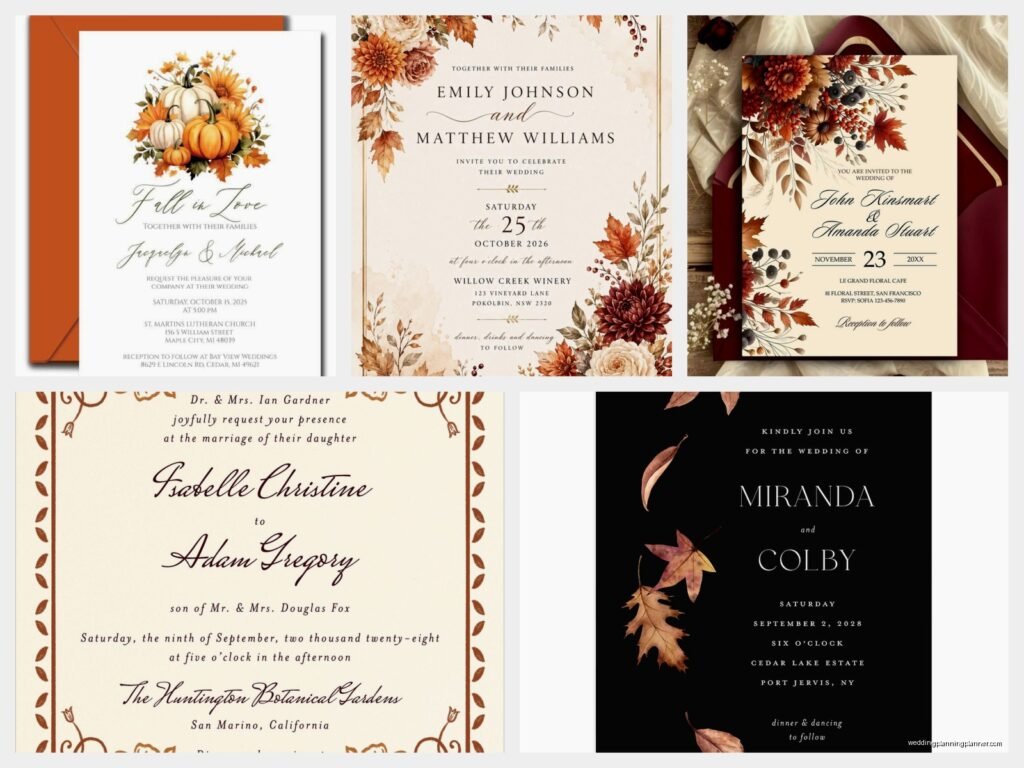
Getting Started with Fall Templates
So you’re looking at fall wedding invitation templates and honestly this is gonna save you so much money compared to custom design. I had this bride in October 2022 who waited until like 8 weeks before her wedding to even think about invitations and we had to scramble through every downloadable template site I could find. Not fun.
The thing with autumn downloads is that you’ve got way more options than you think. Sites like Etsy, Creative Market, and even Canva have thousands of templates specifically designed for fall weddings. You’re looking at price ranges from free (yeah actually free) up to maybe $45 for really elaborate suites. The mid-range sweet spot is usually $15-25 and that typically gets you the invitation plus RSVP card, details card, and sometimes even thank you cards.
What File Types Actually Matter
Okay so this annoyed me for YEARS until I figured it out properly. Template designers will offer their files in different formats and it actually makes a huge difference which one you pick. PDF templates are the easiest if you’re just adding names and details – you can usually edit them right in Adobe Reader or even your browser. PSD files (that’s Photoshop) give you way more control but you gotta have Photoshop or at least know how to use Photoshop Elements. Canva templates are becoming super popular because you edit everything online and don’t need to download software.
I usually tell couples to go with Canva templates if they’re not design-savvy. The interface is pretty straightforward and you can’t really mess things up too badly. My cat walked across my keyboard once while I was editing a Canva invite and even that didn’t break anything, just added some random “jjjjjjj” that I deleted.
Color Palettes That Actually Work for Fall
Everyone thinks fall means orange and brown but like… that’s kinda limiting yourself. The best fall templates I’ve used incorporate burgundy, deep plum, burnt sienna, goldenrod, sage green, and this gorgeous terracotta shade that photographs really well. You want colors that feel warm without screaming “Halloween” unless that’s your vibe, which hey, no judgment.
When you’re browsing templates, look for ones that use two or three colors max. More than that and your invitation starts looking busy. I learned this the hard way with a couple in fall 2021 who picked this template with like six different autumn shades and it just… it looked like a leaf pile exploded on cardstock. We ended up simplifying it down to burgundy and cream and it was so much better.
Fonts and Readability
This is where people get themselves into trouble. You’ll see these gorgeous script fonts on templates and think “yes that’s perfect” but then your guest list includes a bunch of older relatives who can’t read cursive anymore. True story – I’ve had clients whose grandparents called asking what the invitation said because the font was too swirly.
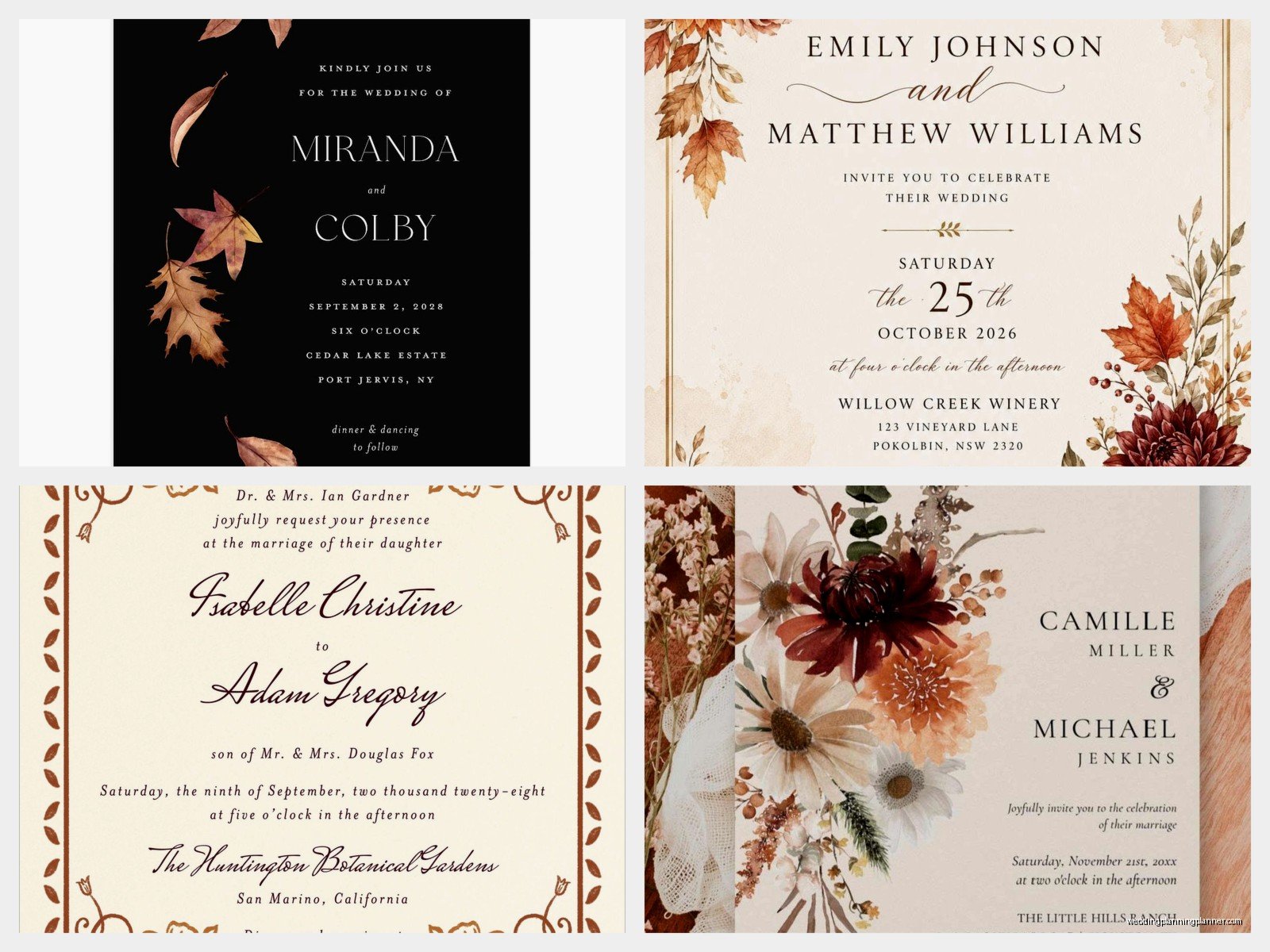
Look for templates that pair a decorative font (for names and maybe the main “you’re invited” part) with a clean, readable font for all the actual information. If the template uses the same fancy script for the date, time, venue address, and everything else, keep scrolling. You want guests to actually show up at the right place.
Where to Find Quality Templates
Etsy is honestly my go-to because you can read reviews from other couples who’ve already used the template. Search for “fall wedding invitation template” and filter by price if you’re on a budget. Read the descriptions carefully though – some sellers give you an editable PDF, others send you a Canva link, and some (this is the annoying part) just send you a JPEG that you have to take to a designer to customize anyway.
Creative Market has really professional templates but they’re usually pricier. The advantage is that the file quality tends to be better if you’re printing at home or through a print shop. They also have bundles sometimes where you get like 10 different fall templates for $40 which is great if you’re planning multiple fall weddings or… I don’t know, really indecisive.
Canva’s built-in template library is perfect for beginners. You can literally search “fall wedding invitation” and start editing immediately. The free templates are actually pretty good, and Canva Pro templates (which cost like $13/month but you can cancel after one month) give you access to better graphics and photos.
What’s Usually Included in Template Packages
A basic package should have the main invitation obviously. Most decent ones also include an RSVP card that matches the design. You might get a details card (for hotel blocks, website info, dress code), a reception card if your ceremony and reception are different locations, and sometimes envelope liners or belly bands.
The really comprehensive packages include save-the-dates, programs, menus, place cards, table numbers, and thank you cards all in the same design. These run more expensive but if you want everything to match perfectly they’re worth it. I had a super organized bride last September who bought one of these complete suites and literally every paper item at her wedding coordinated. It looked amazing in photos.
Customization: What You Can Actually Change
So here’s the thing about templates – they’re templates, meaning there’s a structure you’re working within. You can usually change text (obviously), colors within the palette, and sometimes move elements around. What you typically can’t do is completely restructure the layout or add major new design elements without it looking weird.
Most templates let you swap in your own photos if it’s a photo invitation design. The fall ones often have spots for engagement photos with autumn leaves or pumpkin patches which is very on-brand. You can usually adjust the fonts but stick with fonts that have a similar weight and style to the originals or it’ll throw off the whole design balance.
Colors are tricky because… well, some templates have colors integrated into graphics and illustrations that you can’t easily change. Like if there’s a watercolor maple leaf that’s burnt orange, you probably can’t make that navy blue without recreating the whole graphic. Just something to keep in mind when you’re choosing your template – pick one that already uses colors close to what you want.
Printing Your Downloaded Templates
You’ve got three main options here and they all have pros and cons. Printing at home is cheapest but most time-consuming and you need a decent printer. I’m talking about an actual good printer, not that inkjet from 2015 that you use twice a year. Home printing works best if you’ve got like 50 invitations or fewer.
Online print services like Minted, Vistaprint, or Printique let you upload your customized template and they’ll print and ship to you. The quality is usually really good and the price is reasonable. Turnaround time is typically 5-10 business days plus shipping. Just make sure your template is in the right dimensions and resolution for their specs – most sites want 300 DPI minimum.
Local print shops are my favorite option honestly. You can bring in your template file, talk to an actual human about paper weight and finish, and usually get your order within a few days. They can also help you troubleshoot if there’s any issue with your file. Plus you’re supporting local business which feels good.
Paper Weight and Finish Actually Matters
I cannot stress this enough – do not print your wedding invitations on regular printer paper. It looks cheap because it is cheap. You want cardstock at minimum 80lb, preferably 100lb or 110lb. The weight makes the invitation feel substantial and quality.
Matte finish is classic and photographs well. Glossy finish makes colors pop but shows fingerprints like crazy. There’s also linen finish which has a subtle texture that’s really nice for fall weddings – it gives this sophisticated, established vibe. Some people do pearlescent or shimmer finishes which can be pretty but sometimes photographs weirdly depending on lighting.
Seasonal Graphics to Look For
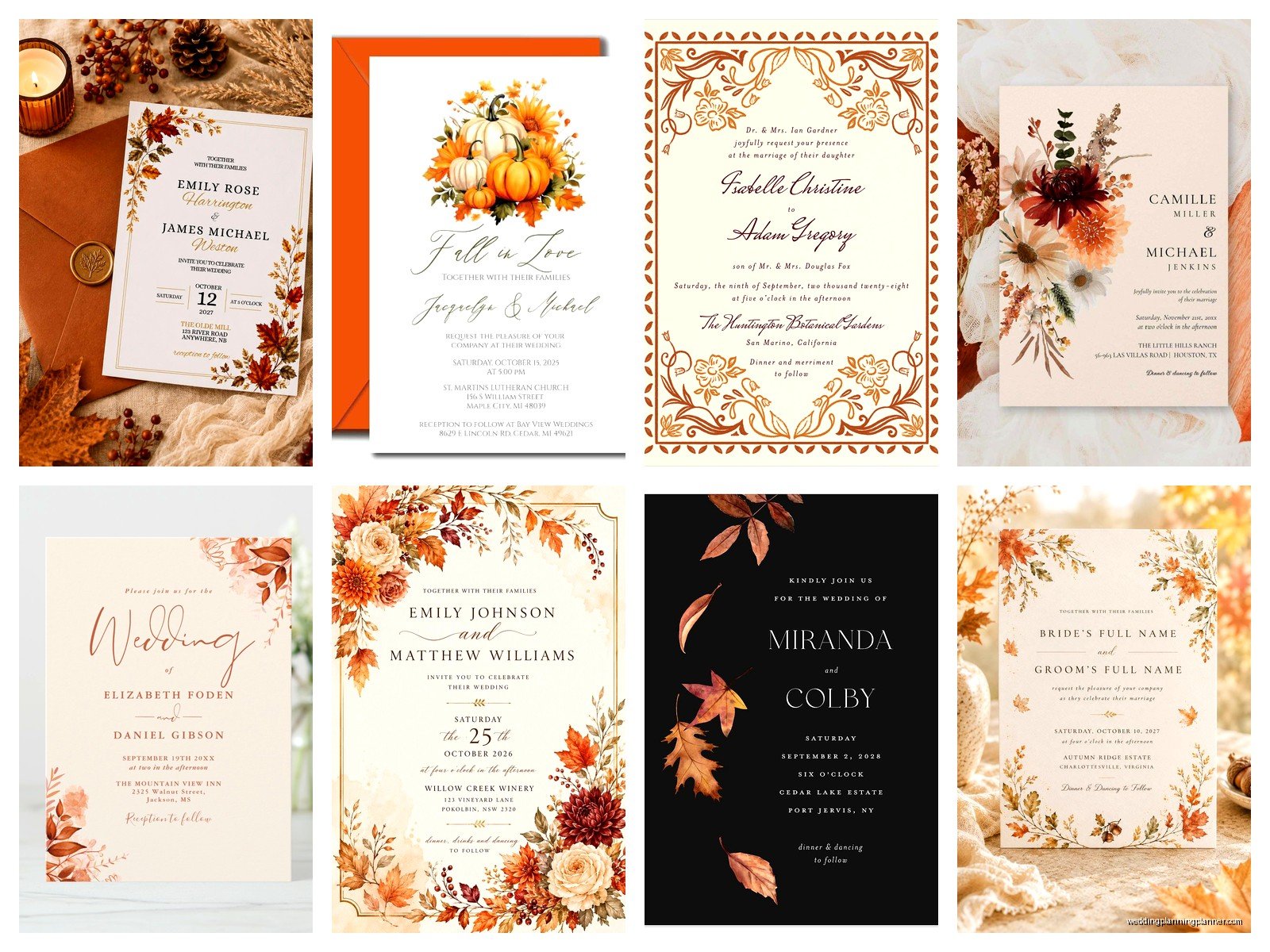
The best fall templates incorporate seasonal elements without being over-the-top. Look for things like watercolor leaves (maple, oak, birch), wheat stalks, pumpkins (but like elegant illustrated ones not cartoon jack-o-lanterns), acorns, pine cones, and branches. Florals that work for fall include dahlias, chrysanthemums, roses in autumn colors, and eucalyptus.
Geometric designs with fall colors are really trendy right now and they age better than super literal autumn imagery. Like a template with burgundy and gold geometric frames will still look current in photos years from now, whereas a template covered in orange pumpkins might feel dated. Just my opinion though, you do you.
Rustic wood textures are everywhere in fall templates and they can be really pretty if done well. The ones that look like barn wood or tree bark work great for outdoor fall weddings or barn venues. They pair nicely with script fonts and wildflower graphics.
Avoiding the Tacky Trap
There’s a fine line between “autumn wedding” and “Halloween party” and some templates really blur that line. If the template has actual jack-o-lanterns, black cats, ghosts, or anything skeleton-related… probably skip it unless you’re specifically doing a Halloween wedding. Even then, think about whether you want your wedding invitations to look that themed in photos ten years from now.
Also watch out for templates that use too many different fonts or too many graphics. I saw one last year that had leaves AND pumpkins AND wheat AND wood texture AND a photo frame AND about four different fonts. It was just chaos. Less is more with invitation design.
Timing and Etiquette Stuff
Fall weddings are popular so you wanna get your invitations out on time. Send them 8-10 weeks before the wedding date, or 12 weeks if it’s a holiday weekend like Thanksgiving weekend. Save-the-dates should go out 6-8 months ahead for fall weddings because people book up their autumn weekends.
Your RSVP deadline should be about 3-4 weeks before the wedding. That gives you time to get a final count to your caterer and make a seating chart. Build in a buffer though because people are terrible at RSVPing on time – I literally had someone RSVP to a wedding the day before once and the bride nearly lost it.
Wording That Works
Templates usually come with placeholder text that’s pretty standard formal wording. You can totally use that or make it more casual depending on your vibe. Formal fall weddings might use traditional “Mr. and Mrs. Smith request the honor of your presence” language. Casual ones might say “Join us for our autumn celebration” or whatever feels right to you.
Make sure you include all the important info: who’s getting married (obviously), date, time, ceremony location, reception location if different, and where to RSVP. A lot of couples now include their wedding website on the invitation which is smart because you can put all the extra details there – hotel blocks, registry info, travel tips, photos, the whole deal.
Budget Real Talk
Let’s say you’re inviting 100 guests which means you need about 60-70 invitation suites (since couples and families get one invite). If you buy a template for $20, print at home on decent cardstock for about $0.50 per suite, and get envelopes for $0.30 each, you’re looking at $20 + $35 + $21 = $76 total. Add stamps at current rates (what are they now, like $0.68 for a regular stamp?) and you’re still under $150 for everything.
Compare that to ordering custom invitations from a stationer which typically runs $4-8 per invitation suite and you’re saving hundreds of dollars. That money can go toward your photographer or your bar tab or literally anything else.
The main cost beyond the template itself is usually printing. If you go with an online service for those same 70 suites on nice cardstock, you’re probably looking at $100-200 depending on the site and any add-ons like envelope printing or liners. Still way cheaper than custom.
Common Mistakes I See All the Time
Not ordering enough invitations – always get at least 10-15 extra. You’ll want some for your parents, keepsakes, and inevitably someone won’t get theirs and needs another one sent. Forgetting to proofread before printing all of them – I watched someone print 80 invitations with the wrong venue address once and it was painful. Print ONE first, check it thoroughly, show it to multiple people, then print the rest.
Using the wrong paper size – most templates are designed for standard 5×7 invitations but some are 4×6 or different dimensions. Make sure you know what size your template is before buying paper and envelopes. Also those weird in-between sizes cost more to mail so stick with standard if you can.
Not testing your printer – if you’re printing at home, do a test print on regular paper first to make sure margins are right and colors look okay. Then do one test on the actual cardstock before you print everything. Cardstock sometimes feeds differently than regular paper and you don’t wanna waste 50 sheets figuring that out.
The assembly time too – people underestimate how long it takes to print, cut (if needed), stuff, address, seal, and stamp 70 invitations. Set aside a whole weekend or do it over several evenings. Put on a show you’ve seen before (I always rewatch The Office during invitation assembly) and just get through it. It’s tedious but kinda meditative once you get in a rhythm
