
Planning Guides, Style Guide
Bridesmaid Proposal Card Template: Will You Be My Downloads
Jul
Okay So Bridesmaid Proposal Card Templates
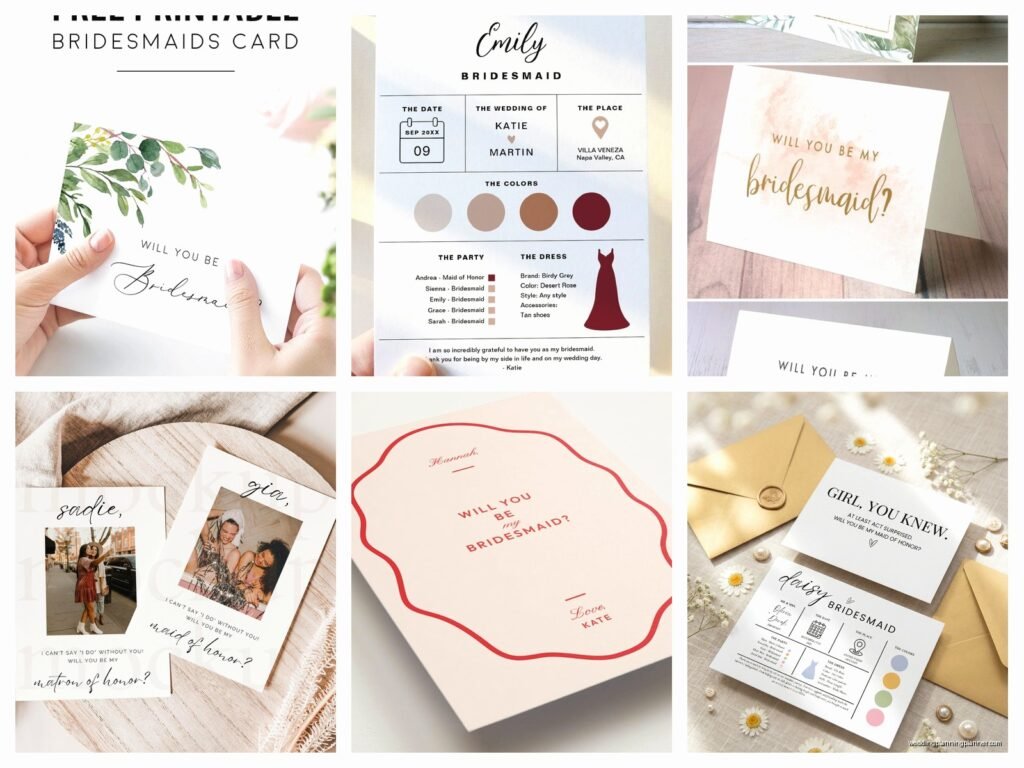
Right so you’re gonna ask your bridesmaids and you want it to be cute but also not spend like three weeks making cards from scratch. I get it. The whole “Will You Be My Bridesmaid” downloadable template thing has basically exploded in the past few years and honestly it’s one of those trends that actually makes sense because who has time to hand-letter everything when you’re also trying to figure out if your venue allows outside catering.
I had this bride in spring 2023 who spent literally $400 on custom bridesmaid boxes before she even had a venue booked and I was like… okay but maybe we should prioritize? But anyway that’s not what we’re talking about. We’re talking about the digital downloads you can print at home or send to a print shop, and they’re kinda perfect if you do them right.
What Actually Are These Templates
So bridesmaid proposal card templates are basically pre-designed cards that you download as a PDF or sometimes an editable file like Canva or Photoshop. You can personalize them with names, add your wedding date, maybe change colors if the template allows it. Then you print them out yourself or upload them to somewhere like Staples or a local print shop.
The formats you’ll see most often are:
- PDF files that are print-ready (you can’t edit these, they’re fixed designs)
- Canva templates that let you change text and sometimes colors
- PSD files if you know Photoshop
- PowerPoint or Word docs which honestly are kinda clunky but they work
Most of them come in standard card sizes like 5×7 inches or 4×6 inches because those are easy to print and fit in normal envelopes you can buy at Target.
Where To Find Good Templates
Etsy is obviously the big one. You can find thousands of options ranging from like $3 to $15 usually. The thing that annoyed me SO MUCH about Etsy templates though is that sellers often don’t clearly explain what’s editable and what’s not, so you buy something thinking you can change the font and then… nope. It’s a flat PDF. Always read the description twice.
Creative Market has really nice ones too, usually a bit more polished and design-forward. They tend to be pricier, maybe $12-20, but the quality is usually better and they often come in multiple color variations in one purchase.
Canva has free and paid templates if you have Canva Pro. The nice thing about Canva is everything is editable right there in your browser, you don’t need special software. I use Canva for client mood boards all the time and it’s just… it’s easy, you know?
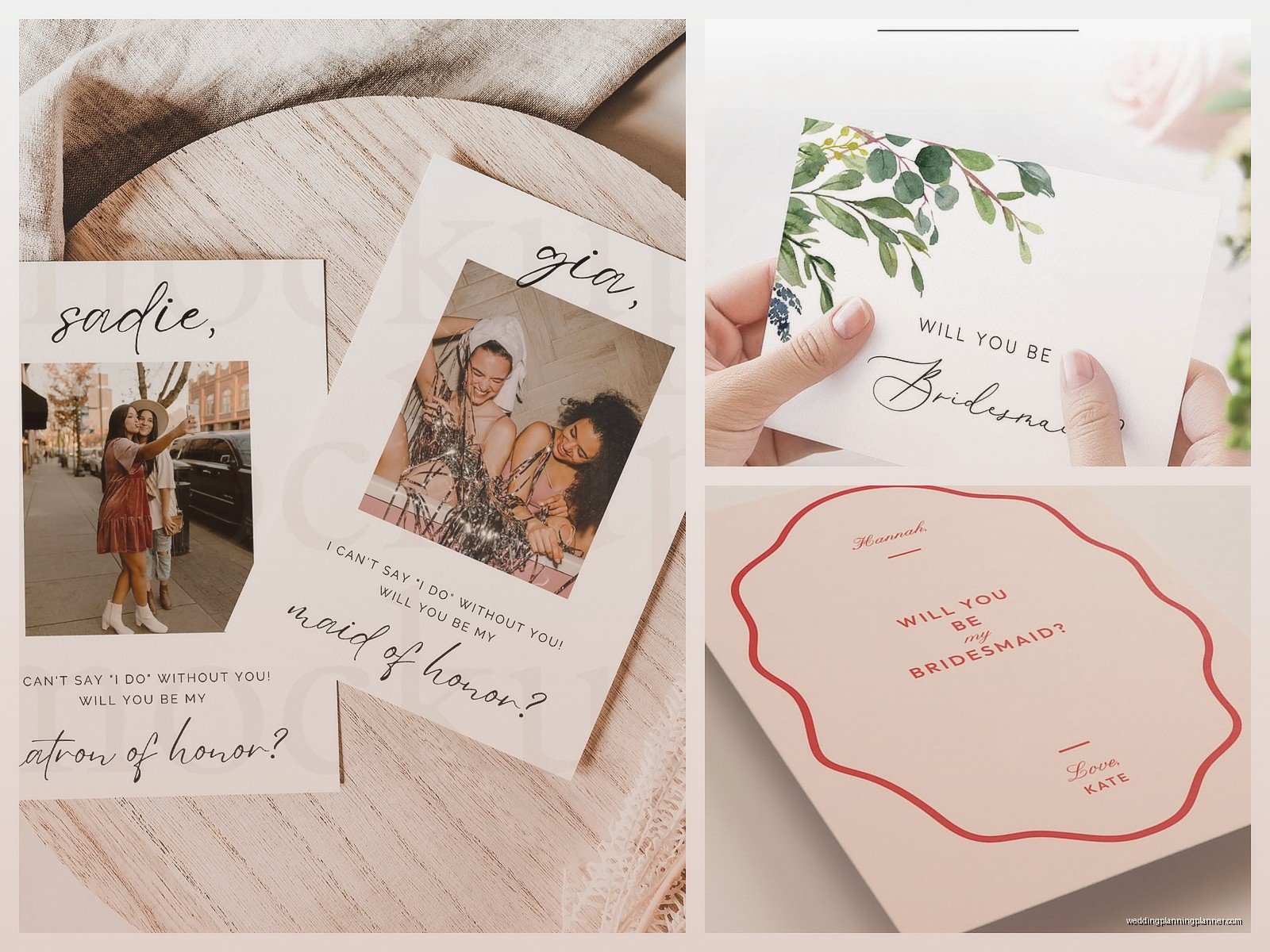
There are also some wedding blogs and websites that offer free printables but honestly the free ones usually look kinda basic. Not bad necessarily, just not as polished as the paid options.
Picking The Right Style For Your Wedding Vibe
You want something that matches your wedding aesthetic or at least doesn’t clash horribly. If you’re doing a modern minimalist wedding with lots of white and greenery, don’t pick a template with hot pink and gold glitter everywhere. Like it sounds obvious but I’ve seen it happen.
Popular styles right now:
- Minimalist with simple typography and maybe one color accent
- Floral watercolor which has been popular forever and probably always will be
- Boho with pampas grass or terracotta tones
- Elegant script fonts with gold foil effects (usually just printed gold, not actual foil)
- Fun and quirky with illustrations or funny phrases
I personally love the simple ones because they photograph well and don’t feel dated two years later when you’re looking back at photos, but that’s just me being a design snob probably.
The Actual Customization Process
Alright so you bought a template, now what. If it’s a Canva template, you’ll get a link to open it in your Canva account. Then you just click on the text boxes and type in your bridesmaid’s name or whatever message you want. Super straightforward.
For PDF templates that come with a separate editable layer or if you’re using Photoshop, it’s a bit more involved. You’ll need to have the right software and know basically how to use layers and text tools. Not gonna lie, if you’ve never used Photoshop before, maybe stick with Canva or find a friend who can help.
Some templates come personalized by the seller – you send them the names and details and they customize it for you, then send you the print-ready files. This costs more obviously but saves you the hassle if you’re not comfortable with design software or if you’re just… busy, which you probably are.
Printing Options And Paper Choices
You can print at home if you have a decent printer and some good cardstock. I’d recommend at least 80lb cardstock, preferably 100lb or 110lb so it feels substantial and not flimsy. You can get cardstock at any office supply store or on Amazon.
Home printing is the cheapest option but your print quality depends entirely on your printer. If you have an older inkjet that makes everything look kinda washed out, maybe don’t do this. Laser printers generally give crisper results.
Print shops are honestly not that expensive for small quantities. Staples, FedEx Office, or local print shops can do it. You upload your PDF, choose your paper stock, and pick them up in a day or two. Usually costs like $2-4 per card depending on size and paper quality.
Online printing services like Printful, Minted, or Artifact Uprising are another option. Higher quality usually, more paper choices, but you’re waiting for shipping so plan ahead. These are good if you want something really nice or if you’re doing a whole bridesmaid box situation and want everything to look cohesive.
Paper finishes matter more than you’d think. Matte cardstock feels elegant and modern. Glossy can look cheap unless it’s really high quality. Linen or textured cardstock adds a nice touch but costs more. Totally up to your budget and what vibe you’re going for.
What To Actually Write On These Cards
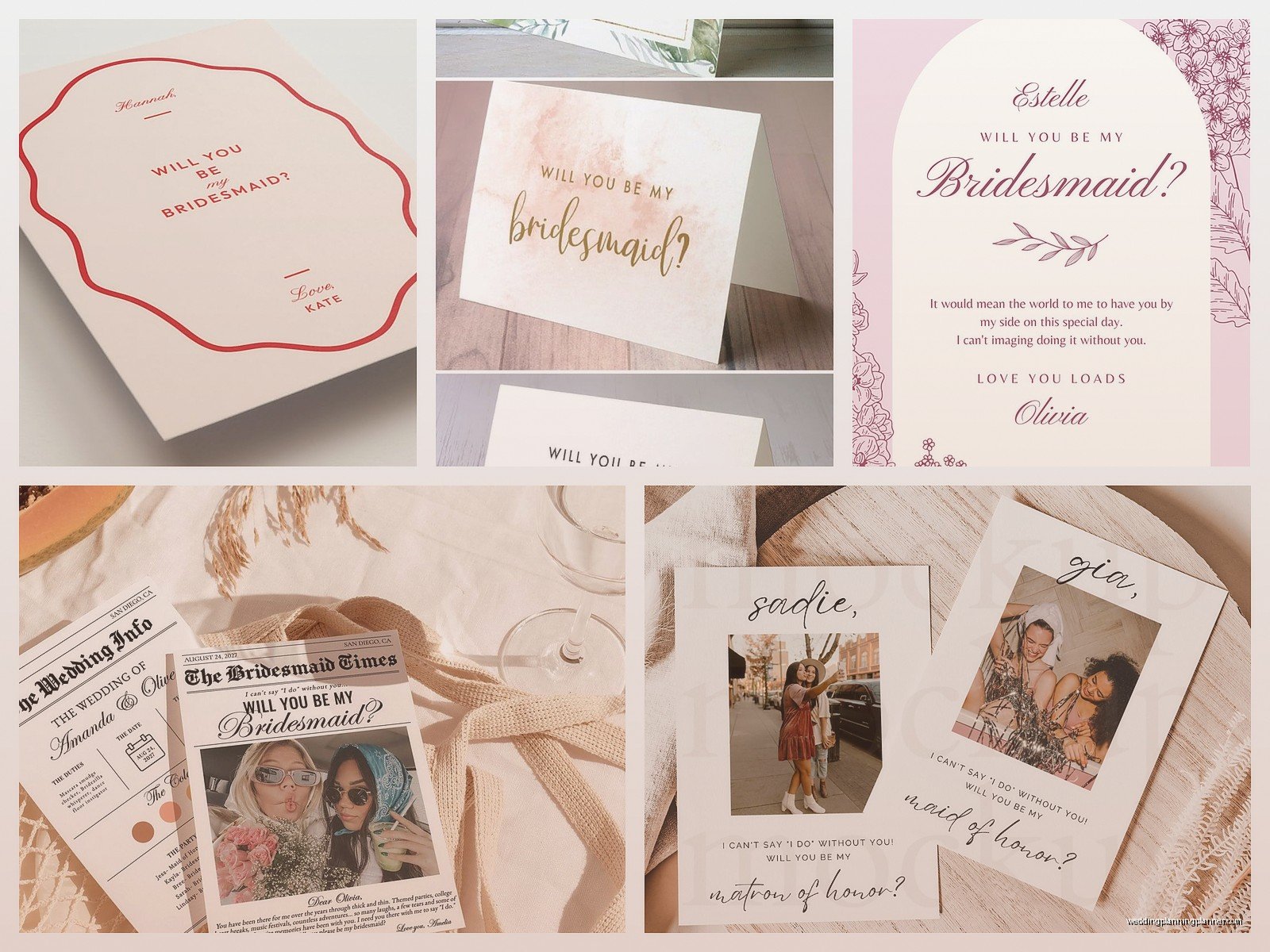
Most templates have some variation of “Will You Be My Bridesmaid” already designed into them, but you usually add a personal touch. Some ideas:
- Just their name and your wedding date
- A short personal message like “Can’t imagine this day without you”
- An inside joke if you have one that fits
- The specific role – bridesmaid, maid of honor, junior bridesmaid, etc.
Keep it short because space is limited on a card. Save the long sappy stuff for when you actually give it to them or write it in a separate note.
Pairing Cards With Other Stuff
The card doesn’t have to be the only thing. A lot of people pair it with a small gift, which is sweet but definitely not required. Your bridesmaids are hopefully saying yes because they love you, not because you gave them a candle, you know?
That said, if you wanna do a little something, popular options are:
- A mini bottle of champagne or wine
- A candle with a cute label
- Scrunchies or hair ties in your wedding colors
- A small piece of jewelry they could wear on the wedding day
- Personalized hangers for getting ready photos
- Face masks or other self-care stuff
My cat knocked over an entire bridesmaid proposal setup I had staged for a blog post once and broke the champagne bottle, so just… watch out for pets if you’re trying to photograph everything all cute.
Digital Vs Physical Cards
Some people skip the physical card entirely and just send a digital version, especially if their bridesmaids are far away. You can text it, email it, or post it on social media as a cute announcement.
Digital is obviously faster and cheaper. You can send it immediately after you download and customize the template. But it doesn’t feel quite as special as getting something physical in the mail or handed to you in person. Really depends on your relationships and what feels right.
If you’re doing long-distance proposals, you could do both – send the digital version first so they know you’re asking, then mail a physical card with maybe a small gift as a follow-up. That way they’re not waiting weeks to officially respond but they still get something tangible.
Timing This Whole Thing
You should probably ask your bridesmaids like 8-12 months before the wedding, maybe even earlier if it’s a destination wedding. That gives them time to budget for dresses and related expenses, request time off work if needed, and just mentally prepare for the commitment.
Don’t ask too early though – I had a bride ask her bridesmaids 18 months out and two of them ended up moving across the country before the wedding which made everything complicated. Life happens, but the closer to the wedding, the more likely people’s situations will stay stable.
Order or create your cards at least 2-3 weeks before you want to give them out, just to account for any printing delays, shipping times, or if you mess up the first batch. Trust me, you will probably mess up the first batch or realize you spelled someone’s name wrong after you’ve already printed.
The Actual File Setup Stuff You Need To Know
This gets a tiny bit technical but it’s important if you’re printing professionally. Your template should be set up with bleed if you’re doing a card that goes to the edge of the paper. Bleed means the design extends about 0.125 inches beyond the trim line so when they cut the cards, you don’t end up with weird white edges.
Resolution matters – you want at least 300 DPI (dots per inch) for print. Anything less will look blurry or pixelated. Most templates you buy should already be set up correctly, but if you’re making your own or heavily editing something, check this.
Color mode should be CMYK for professional printing, not RGB. RGB is for screens, CMYK is for print. Colors can look different between the two, so what looks perfect on your computer might print slightly different. Most print shops can convert for you, but it’s better if the file is already in CMYK.
I know this sounds complicated and honestly when I first started doing stationery work I was like what even is a bleed, but once you understand it, it’s not that bad.
Budget Breakdown
Let’s talk actual numbers because that matters when you’re planning a whole wedding.
Template cost: $5-15 typically for one design
Printing at home: $10-20 for cardstock and ink
Printing at a shop: $2-4 per card
Envelopes: $5-10 for a pack
Optional gifts: $10-30 per person depending on what you choose
So for like 5 bridesmaids, you’re looking at anywhere from $40 on the super budget end (template, home printing, no gifts) to $200+ if you’re doing nice printing and gifts. That’s honestly pretty reasonable compared to some wedding costs, but it adds up if you have a huge bridal party.
Common Mistakes People Make
Not proofreading before printing. Spell check everything three times. I once saw “Maid of Honer” printed on 50 cards and the bride was devastated.
Buying a template and then realizing it’s not the right size for the envelopes you already bought. Check dimensions first.
Assuming everyone will say yes. Like 99% of the time they will, but occasionally someone has to decline for personal reasons, so maybe don’t post all about your bridesmaid squad on Instagram before you’ve actually asked everyone.
Making the cards too busy or hard to read. Simple is almost always better than cramming every design element onto one card.
Waiting until the last minute and then stressing about shipping times or printer availability. Just… don’t do this to yourself.
Alternative Ideas If Traditional Cards Aren’t Your Thing
Maybe cards feel too formal or just not you. That’s totally fine. Some alternatives:
- Scratch-off cards where they scratch to reveal “Will you be my bridesmaid”
- Puzzle pieces they have to put together
- Custom labels for wine bottles or coffee bags
- Temporary tattoos (kinda goofy but fun)
- Personalized cookies or macarons with the message
- A simple text or phone call if you’re really low-key
There’s no rule that says you have to do proposal cards at all. If you and your friends are more casual and you’d rather just ask them over brunch or during a FaceTime call, that’s completely valid. The card thing is cute but it’s not mandatory.
What To Do With The Cards After
Your bridesmaids will probably keep them as a memory, stick them in a drawer, or maybe even frame them if they’re really sentimental. Some people include them in wedding day getting-ready photos which is a nice touch.
You might want to keep one for yourself for your wedding planning binder or scrapbook. I always tell brides to document this stuff because you forget the details surprisingly fast after the wedding is over.
Some of my brides have gotten their proposal cards printed as part of a larger set with matching day-of stationery – like programs, menus, or thank you cards. It creates a cohesive look throughout all your wedding paper goods, which I love from a design perspective but it does require planning ahead and probably working with the same template designer or style.
File Formats And Technical Stuff You Might Encounter
When you download a template, you’ll get different file types depending on the seller. PDF is most common and easiest – just open and print. JPG or PNG files work too but might not be as high quality for printing. If you get an editable format like PSD (Photoshop), AI (Illustrator), or a Canva link, that means you can customize basically everything about the design.
Some sellers provide multiple formats in one purchase which is super helpful. Like you’ll get the editable Canva version AND a print-ready PDF. That way you can customize it easily but also have a backup file that’s already set up correctly for printing.
Make sure you download everything immediately after purchase and save it somewhere you won’t lose it. I cannot tell you how many times brides have told me they can’t find their digital downloads because they didn’t save them or their email got deleted or whatever. Most sellers let you re-download from your account, but some have time limits on that.
