
Planning Guides, Style Guide
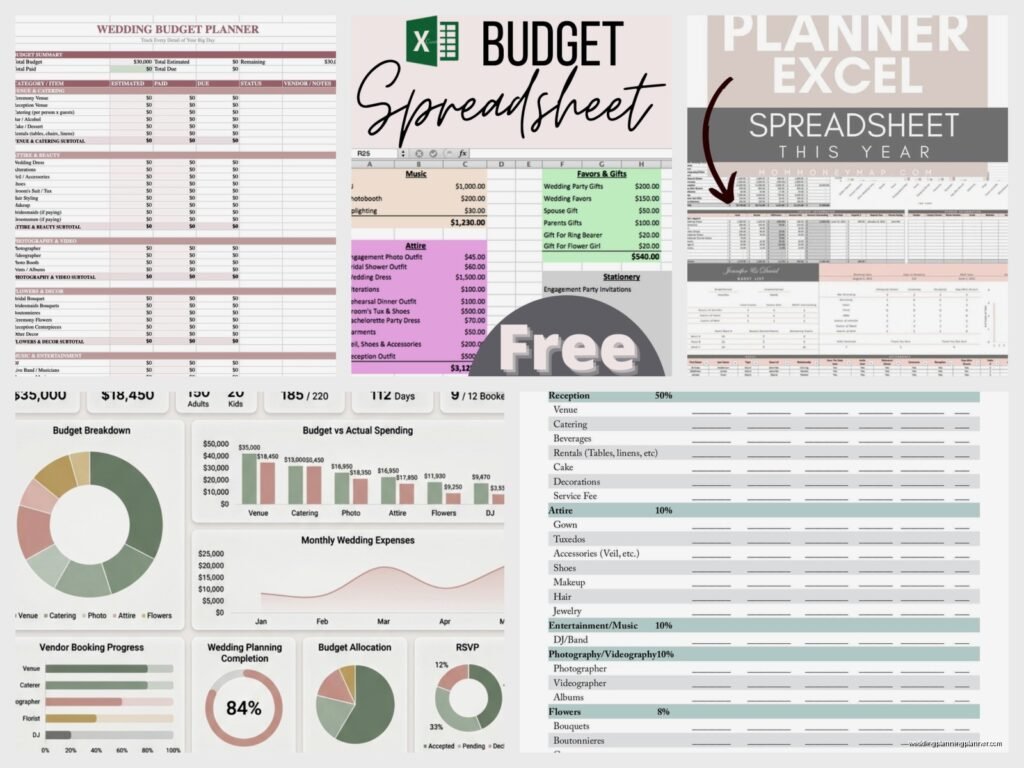
Wedding Budget Template Excel: Cost Tracking Spreadsheet
Jul
Setting Up Your Budget Spreadsheet
Okay so first thing you gotta do is open Excel or Google Sheets, whatever you have. I’m gonna be real with you, Google Sheets is actually better for this because you can access it from your phone when you’re at vendor meetings and your partner can edit it too without emailing files back and forth like it’s 2005. But Excel works fine if that’s your preference.
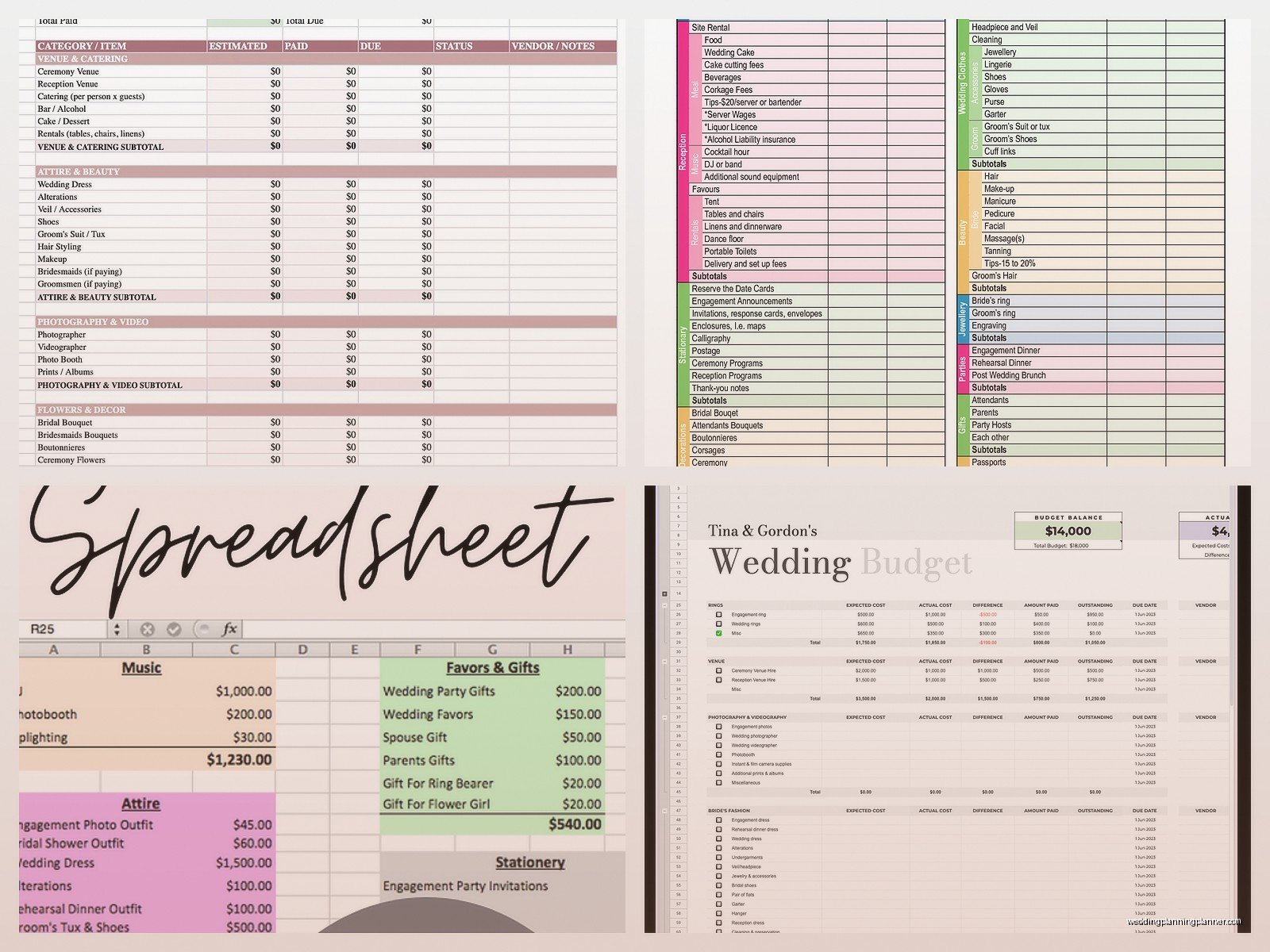
Create these column headers across the top: Category, Item/Vendor, Estimated Cost, Actual Cost, Deposit Paid, Amount Due, Due Date, Payment Status, and Notes. I know it looks like a lot but trust me you need all of these. In spring 2023 I had this couple who only tracked estimated costs and when the wedding rolled around they were short like $8,000 because they forgot about all the deposits they’d already paid and double-counted everything. It was a nightmare.
For the Category column, you’ll want these main sections: Venue, Catering, Photography, Videography, Flowers, Music/Entertainment, Attire, Beauty, Transportation, Stationery (obviously my favorite but I’m biased), Rentals, Gifts, Decor, Miscellaneous, and then—this is important—Contingency Fund. Most people skip that last one and then freak out when something costs more than expected.
Breaking Down Each Category
Under each category you’re gonna list out specific line items. Like under Catering, don’t just write “food”… you need to break it down into cocktail hour appetizers, dinner service, late night snacks if you’re doing that, bar service, cake cutting fee, champagne toast, vendor meals, and service charges. The service charges thing annoys me so much because venues hide those costs until you’re already emotionally invested and then boom here’s an extra 22% on top of everything.
For Stationery you’d list: save the dates, invitations, RSVP cards, details cards, envelope addressing, postage (people always forget postage!), programs, menus, place cards, table numbers, welcome signs, seating chart, thank you cards. See how detailed that is? That’s what you need for every single category.
The Estimated vs Actual Cost Thing
This is where people mess up constantly. In your Estimated Cost column, put what you THINK it’ll cost based on initial research or quotes. Then as you get real quotes from vendors, you update the Actual Cost column. The difference between these two columns is gonna stress you out but it’s better to know early than be surprised later.
I remember this one time—I think it was summer 2021—I was working with a bride who kept updating her estimated costs to match the actual costs because she didn’t want to see the red numbers showing she was over budget. Like girl, the math doesn’t change just because you changed the spreadsheet. We eventually had to cut the videographer entirely because she’d been lying to herself about the numbers for months and suddenly ran out of money.
Tracking Payments and Due Dates
The Deposit Paid column is critical. When you book a vendor and put down that deposit, immediately log it. I usually see deposits ranging from 25% to 50% of the total cost. Some vendors want even more upfront which is… anyway, that’s a different conversation.
Amount Due is just the math: Actual Cost minus Deposit Paid equals Amount Due. You can set up a formula for this so it auto-calculates. The formula would be like =D2-E2 or whatever cells you’re using. Excel formulas kinda make my brain hurt sometimes but this one’s simple enough.
Due Date is when the remaining balance needs to be paid. Most vendors want final payment 1-2 weeks before the wedding, some want it 30 days out. Put these dates in the spreadsheet and then set up reminders on your phone calendar too because you will forget otherwise. I’ve seen vendors threaten to not show up because couples forgot to pay the final balance and honestly the vendors are right to be upset about that.
For Payment Status I just use: Not Booked, Deposit Paid, Paid in Full, or Overdue if someone’s being difficult about collecting payment.
The Notes Column Is Your Friend
This is where you put everything else. Like “includes setup and breakdown” or “need to provide vendor meal” or “allows DIY centerpieces” or “total jerk, avoid if possible”… okay maybe not that last one in a shared spreadsheet. But you get the idea. I use this column to track contract details, payment methods accepted, contact info, whatever seems relevant.
Adding Formulas to Make Your Life Easier
At the bottom of your Estimated Cost column, add a SUM formula to total everything up. Same for Actual Cost, Deposit Paid, and Amount Due columns. This gives you a clear picture of where you stand financially.
Then create a row that shows: Total Budget (what you have to spend), Total Estimated (what you think you’ll spend), Total Actual (what vendors actually quoted), Total Paid So Far (all deposits), and Remaining Budget (what’s left). These numbers will probably make you want to cry at some point but that’s normal.
I also like adding a column that calculates the percentage of your total budget each category represents. So if your venue is $15,000 and your total budget is $50,000, that’s 30% going to venue. This helps you see if you’re allocating money weirdly… like if 40% of your budget is going to flowers you might want to reconsider unless you’re really into flowers I guess.
Color Coding Because We’re Visual People
Use conditional formatting or just manually color code cells. I do green for anything that’s paid in full, yellow for deposits paid but balance due, red for overdue payments, and gray for things you haven’t booked yet. My cat jumped on my keyboard while I was setting up a client spreadsheet once and somehow created this beautiful gradient color scheme that I actually ended up keeping because it looked better than what I was doing.
You can also highlight rows where the Actual Cost is significantly higher than Estimated Cost so you can quickly see where your budget is getting blown up. Usually it’s catering and bar service because people underestimate how much their drunk uncle will actually drink.
Creating Separate Tabs for Better Organization
Don’t try to cram everything onto one sheet. Make multiple tabs: Budget Overview, Vendor Contacts, Payment Schedule, Guest List (with meal choices if needed), Day-Of Timeline, and To-Do List. They can all reference each other with formulas if you want to get fancy.
The Vendor Contacts tab should have: vendor name, contact person, phone, email, website, contract signed date, and any specific requirements they have. This becomes super useful when you’re trying to remember which florist said they could do blue hydrangeas in November or whatever.
Payment Schedule tab is literally just a calendar view of when money needs to go out. I sort everything by due date so you can see what’s coming up. This prevents the panic of “oh no I have to pay the caterer, photographer, AND rental company all in the same week and I don’t have $12,000 sitting around.”
The Contingency Fund Math
Set aside 10-15% of your total budget for contingency. So if you’re planning a $40,000 wedding, you need $4,000-$6,000 just sitting there for unexpected costs. And there WILL be unexpected costs. Someone will break something. You’ll decide you actually do want uplighting even though you said you didn’t. Your dress will need more alterations than expected. The weather will be bad and you’ll need to rent heaters or fans or…
Most couples fight me on this because they want to allocate every dollar to make the wedding prettier or bigger, but I’m telling you from experience that the couples who skip the contingency fund are the ones calling me three weeks before the wedding in tears because they can’t afford the final payment to someone.
Updating the Spreadsheet Regularly
This isn’t a set-it-and-forget-it thing. You need to update this spreadsheet every single time you: get a quote, book a vendor, make a payment, or change your mind about something. I recommend reviewing it weekly during the planning process, then daily in the final month before the wedding.
Set a recurring calendar reminder to review your budget. Sunday evenings work well for most people. Pour some wine, open the spreadsheet, make sure everything’s current, cry a little if needed, then close it and forget about it until next week.
Sharing and Protecting Your Spreadsheet
If you’re using Google Sheets, you can share it with your partner, parents if they’re contributing financially, wedding planner if you have one, or whoever else needs access. But set permissions carefully. Maybe your mom gets view-only access if she’s the type to go in and change things without telling you.
Make backup copies. Save versions with dates like “Wedding Budget – Updated March 2024” so if someone accidentally deletes a bunch of stuff you can go back to an earlier version. I’ve had clients lose entire spreadsheets because their laptop died or they somehow overwrote everything, and it’s just devastating to rebuild from memory.
Common Mistakes People Make
Forgetting about tax. Most vendor quotes don’t include sales tax so add that in manually. Depending on your location that could be 7-10% extra on everything which really adds up.
Not tracking small purchases. Those $30 trips to the craft store for DIY projects add up to hundreds or thousands of dollars by the end. Create a “Small Purchases” line item and log everything even if it feels insignificant.
Assuming vendor prices include everything. Always ask what’s NOT included in the quote. Does the photographer include engagement photos? Does the caterer include linens? Does the venue include chairs? These assumptions will destroy your budget.
Not accounting for tips. You’ll need to tip your vendors on the wedding day—usually 15-20% for catering staff, $50-$200 per vendor for others depending on service quality. Budget for this upfront.
Using Templates vs Building Your Own
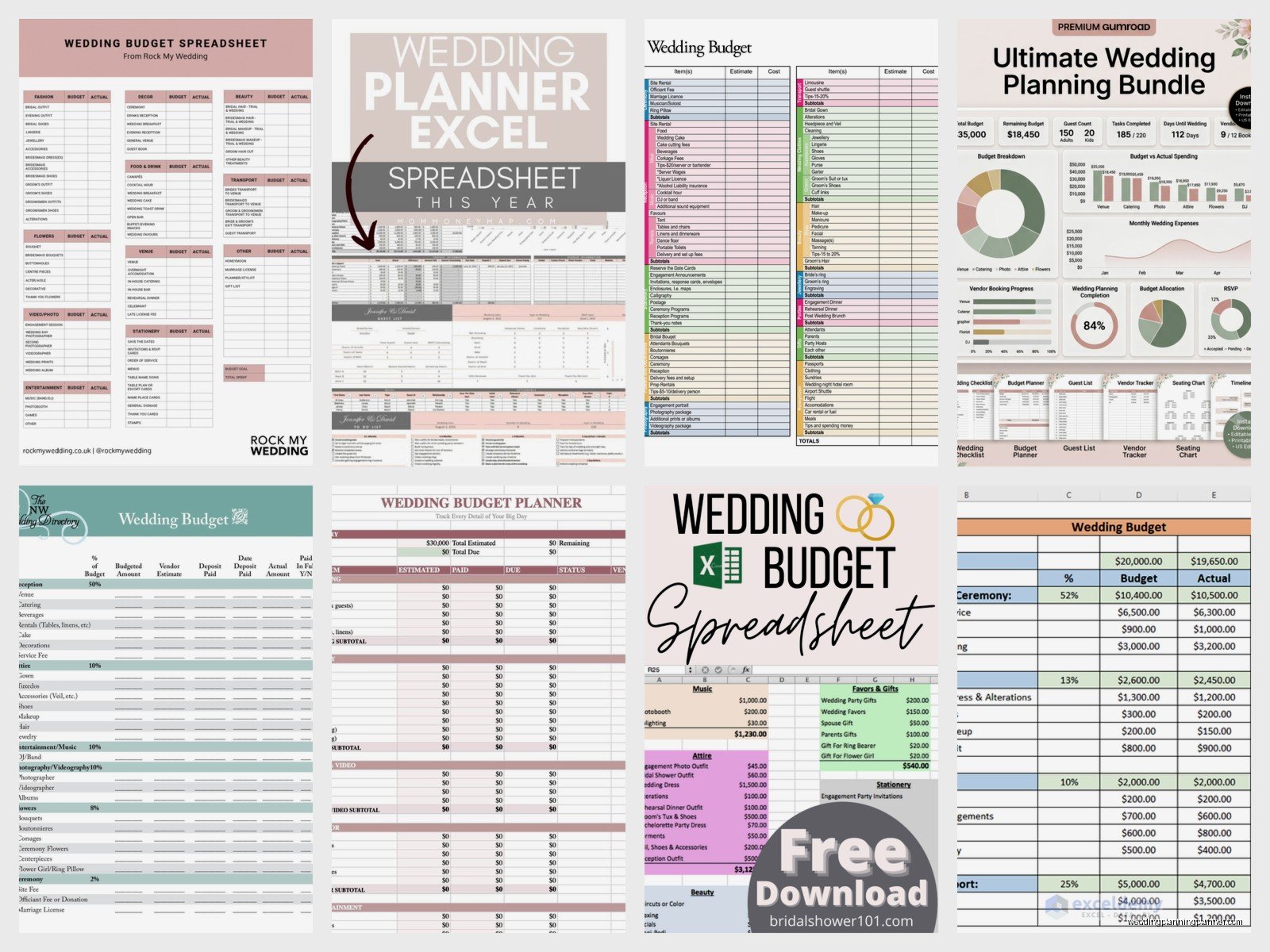
You can download wedding budget templates online and they’re honestly pretty good starting points. The Knot has one, WeddingWire has one, there are tons on Etsy. But you’ll need to customize them for your specific situation because every wedding is different.
I actually prefer building from scratch because then you understand exactly how everything works and you’re not stuck with someone else’s categories that might not apply to you. Like if you’re not doing a religious ceremony you don’t need a line item for officiant donation or whatever. If you’re eloping you probably don’t need a $3,000 floral budget unless that’s your thing.
The main advantage of templates is they remind you of things you might forget. I’ve been doing this for years and even I sometimes look at a good template and go “oh right, marriage license fee” or “oh yeah, alterations for the suit” because there are just so many tiny details that slip through the cracks when you’re planning something this big.
