
Planning Guides, Style Guide
Wedding Itinerary Template Free: Free Download Files
Aug
Why You Actually Need a Wedding Itinerary Template
Look, I’ve been planning weddings since 2012 and the number of couples who show up without any kind of timeline is honestly wild. Like, you’re spending $30k on flowers and a band but you haven’t thought about when people are gonna eat? That always gets me.
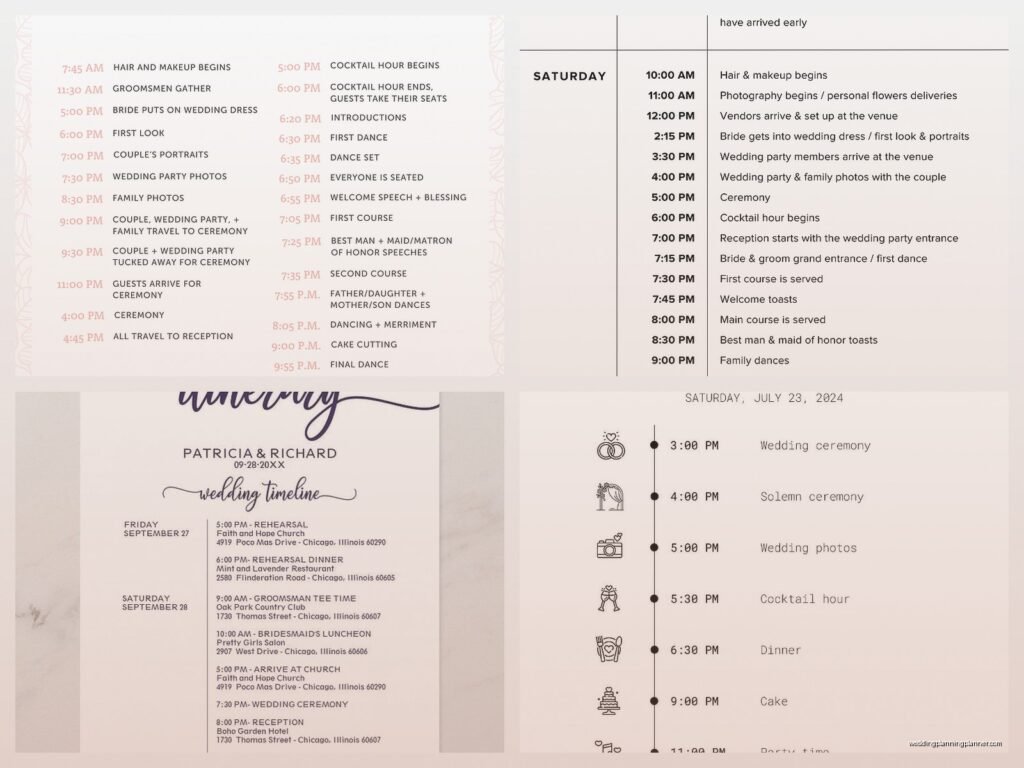
A wedding itinerary is basically your minute-by-minute breakdown of the day. Not just “ceremony at 4pm” but like… when does hair and makeup start, when do the groomsmen need to stop drinking beer and put on their suits, when does your photographer arrive, all of it. And yeah, there are tons of free templates out there that’ll save you from starting with a blank document and spiraling into anxiety at 2am.
What Actually Goes Into a Wedding Itinerary
So there are really two types of itineraries you need, which I didn’t realize until this disaster wedding in spring 2023 where the bride had made ONE timeline and given it to everyone and her grandma was reading about bustier adjustments at 6am. Not ideal.
You need a master timeline that has EVERYTHING, and then you need shortened versions for specific people. Your photographer doesn’t need to know what time the caterer arrives. Your mom doesn’t need to know when you’re doing a first look (well, she might want to know, but that’s a different issue).
Master Timeline Stuff
- Getting ready times – hair, makeup, getting dressed
- Vendor arrival times – every single one
- Photo session times – family photos, couple photos, wedding party
- Ceremony start time (and when people should actually arrive, which is like 20 minutes before)
- Cocktail hour
- Reception entrance
- Dinner service
- Toasts and speeches
- First dance, parent dances, all that
- Cake cutting
- Bouquet/garter if you’re doing that
- Last call
- Grand exit
- Vendor breakdown times
Where To Find Free Templates That Don’t Suck
Okay so here’s the thing about free templates – some of them are genuinely useful and some are just… pretty? Like they look gorgeous but they’re not actually functional when you need to share them with 15 different vendors who all use different software.
Google Docs/Sheets Templates
Honestly my favorite because everyone can access them and you can share with edit permissions. Google has a template gallery and if you search “wedding timeline” you’ll find a bunch. The spreadsheet ones are better than the doc ones in my opinion because you can sort by time and add columns for different people’s responsibilities.
I usually start with a basic one and then customize it. You’re gonna want columns for time, event, location (because if you’re doing getting ready photos at a hotel and ceremony at a church, that matters), who’s responsible, and notes.
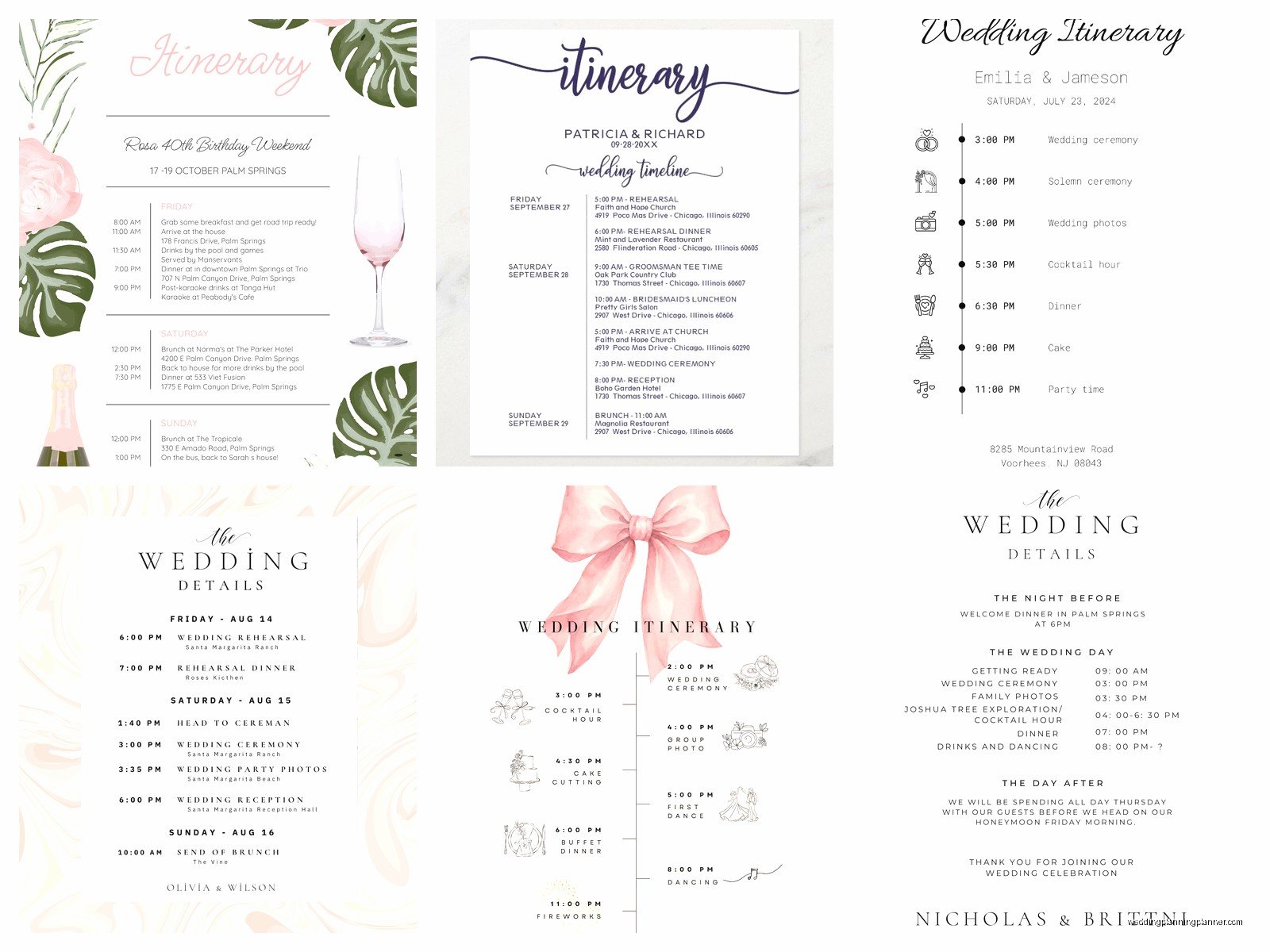
Canva Templates
Canva has free wedding timeline templates that are super pretty. Good for making a simplified version to print and put in your welcome bags or send to guests. Not great for the actual planning process because you can’t really… manipulate data? But if you want something that looks nice for your wedding website, these work.
Microsoft Office Templates
If you’ve got Office (or use the free online version), they have wedding planner templates including timelines. They’re kinda corporate looking but whatever, they work. Excel is actually great for this because you can get really detailed with formulas – like if you know hair takes 45 minutes per person, you can calculate start times automatically.
Wedding Planning Websites
Sites like The Knot, WeddingWire, Zola – they all have free timeline tools. Some are better than others. The Knot’s is pretty comprehensive but it’s also got a lot of stuff you might not need. I find them useful as a starting point to make sure you’re not forgetting anything, then I usually export and customize.
How To Actually Fill Out The Template
This is where people get stuck and honestly it’s kinda overwhelming at first. Start with the non-negotiables – your ceremony time and your venue’s end time. Everything else has to fit between those.
Work backwards from the ceremony. If you’re getting married at 4pm and photos take 30 minutes and you need 15 minutes to get to the ceremony site and you need 20 minutes to get dressed and bustled and whatever, then you need to be done with hair and makeup by like 2:45pm at the absolute latest. See how that works?
Then work forwards from the ceremony. Ceremony is usually 30 minutes (though I’ve seen 15-minute ones and I’ve seen 90-minute Catholic masses, so adjust accordingly). Then cocktail hour is typically an hour. Then reception… this is where it gets complicated because dinner service can take forever or be quick depending on your catering style.
Common Time Blocks That People Forget
- Travel time between locations – always add 15 minutes more than Google Maps says
- Bustling the dress – this takes like 10-15 minutes and someone needs to know how to do it
- Bathroom breaks – I’m serious, build these in
- Buffer time for when things run late (they will)
- Vendor meals – your photographer can’t shoot for 8 hours without eating
- Setup and breakdown time – your DJ needs like 90 minutes to set up usually
My Actual Process For Making These
So I usually start about 3 months before the wedding, though you can do it earlier if you’re super organized. I open a Google Sheet because I’m gonna be sharing it with a million people and making constant changes.
First column is time in 15-minute increments. I literally start from like 7am (or whenever the first vendor arrives) and go until midnight or whenever the venue closes. Every single 15-minute block gets a row.
Then I fill in the definites – ceremony time, reception start, venue close time. Then I add vendor arrivals based on their contracts. Then I build out the getting-ready schedule working backwards from ceremony. Then I fill in reception events based on what the couple wants.
The thing that always annoys me is when couples are like “we want a really relaxed timeline” but then they also want a first look AND family photos AND wedding party photos AND couple portraits AND they want to be at cocktail hour. Nah, you gotta pick. There are only so many hours of daylight and your photographer is one person (or two, but still).
A Real Example From Summer 2021
I had this wedding where the bride wanted everything – super detailed timeline, every minute accounted for. We spent hours on it. The day of the wedding, literally nothing went according to schedule because hair and makeup ran 90 minutes late. Like, I had built in buffers but not THAT much buffer.
What saved us was having the timeline in a shared Google Sheet so I could just… shift everything back 90 minutes in real-time and re-send it to all the vendors. The photographer adjusted, the venue coordinator pushed dinner back, the DJ knew to stretch cocktail hour. If it had been a printed timeline or a PDF, we would’ve been screwed.
So yeah, use a digital template that you can edit on the fly. Print versions are nice to have as backup but your working document should be something you can update from your phone while you’re running around with safety pins and bobby pins.
Different Versions For Different People
Like I mentioned earlier, you need different versions. Here’s what I usually create:
The Master Timeline
This is for you (the couple), your planner if you have one, and your venue coordinator. It’s got everything including vendor arrival times, payment schedules, emergency contacts, the whole deal. This thing is like 10 pages long sometimes.
Vendor Timeline
Each vendor gets a version that highlights their specific responsibilities and arrival/departure times. Your photographer gets one that shows all the photo times, family groupings, and when they can take a meal break. Your caterer gets one focused on meal service timing. Your DJ gets one with all the reception events and special dances.
Wedding Party Timeline
Your bridesmaids and groomsmen need to know when to show up, when to be ready, when photos are, when ceremony is. They don’t need to know when the florist arrives or when the cake is being cut (well, they’ll see that happen, but they don’t need it on their timeline).
Family Timeline
Parents and immediate family get a simplified version with just the key events and when they need to be where. Especially important for family photo times.
Guest Timeline
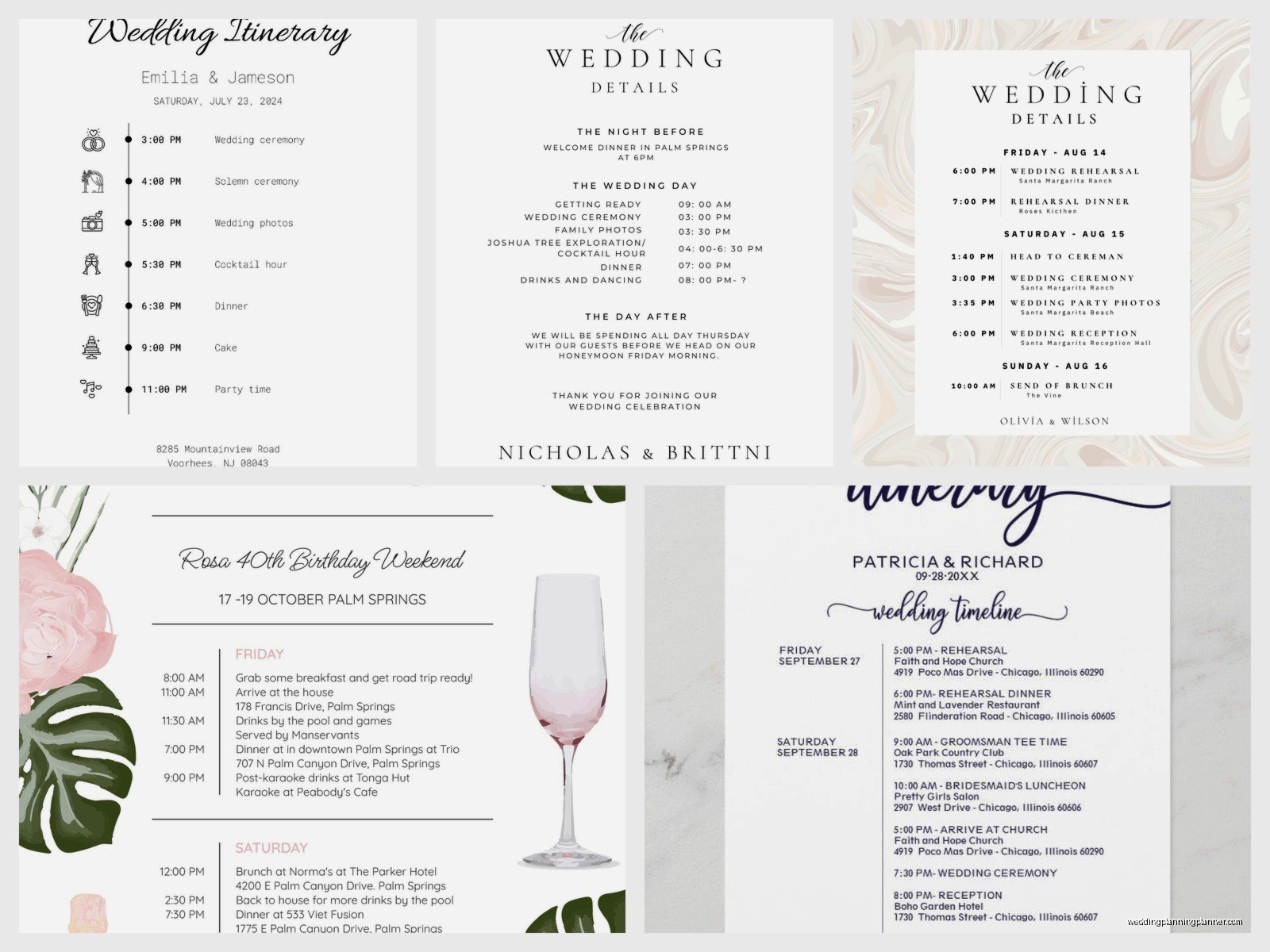
This is the simplest one – ceremony time, cocktail hour location, reception start time, end time. That’s basically it. You can put this on your wedding website or print it in your programs.
How Detailed Should You Actually Get
I’ve seen timelines that are like “4:00pm – Ceremony” and I’ve seen timelines that are like “4:00pm – Processional begins, 4:03pm – Bride enters, 4:05pm – Opening remarks” and honestly both can work depending on your wedding style and how controlling you are (no judgment, I’m a planner, I get it).
For most weddings, 15-minute increments are fine. You don’t need to schedule every single minute. Leave some breathing room. Weddings run late, people need bathroom breaks, your aunt is gonna corner you for a conversation about her hip surgery or whatever.
The things that DO need specific timing: vendor arrivals, ceremony start, dinner service, cake cutting, last dance. The things that can be flexible: getting-ready photos, cocktail hour mingles, open dancing.
Common Template Mistakes I See
Not building in enough time for family photos. This is the big one. Everyone thinks “oh we’ll just do a few quick family photos” and then you have 47 family members and everyone wants different combinations and someone’s missing and… it takes an hour. Plan for an hour.
Not accounting for travel time. If your ceremony and reception are at different locations, you need transition time. And if you’re doing photos at a third location (like a park or something), that’s more travel.
Forgetting sunset time. If you want golden hour photos, you need to know when sunset actually is and plan accordingly. This changes throughout the year obviously.
Not sharing the timeline early enough. Your vendors need this at least 2 weeks before the wedding, preferably a month. Don’t send it the day before and expect everyone to adjust their plans.
Making it too rigid. Like I said earlier, things will run late, just… accept it and build in buffers.
Digital Tools vs. Printouts
You need both honestly. Digital is your working version that you can update. But day-of, you want printed copies as backup because phone batteries die and wifi is unreliable and sometimes you just need to hand someone a piece of paper.
I print the timeline on colored paper so it stands out from other wedding day documents. Sounds silly but when you’re shuffling through contracts and vendor agreements and seating charts, having the timeline on bright yellow paper makes it easy to find.
Also my cat knocked over my coffee onto a printed timeline once and I was SO glad I had the digital backup, but that’s kinda unrelated to wedding planning specifically, just… be careful where you set your coffee.
What To Do When The Timeline Falls Apart
It’s gonna happen. Hair runs late, traffic is bad, someone forgets their shoes (yes, really, this happened). The timeline is a guide, not a law.
The key is knowing what’s flexible and what’s not. Ceremony start time? Usually not flexible because you have guests arriving. But you can shorten cocktail hour, you can skip the garter toss, you can cut a few songs from the playlist. Figure out your priorities ahead of time so when you need to make quick decisions, you already know what matters most.
Having a day-of coordinator or a really organized bridesmaid who can make executive decisions helps a lot. Someone who can be like “okay, we’re 30 minutes behind, we’re cutting the couple portraits from 45 minutes to 20 minutes and skipping the extended family photos.”
Sharing Your Timeline Effectively
Email it as both a PDF and a link to the editable version (if you’re using Google Sheets or something). Put it in a shared Dropbox or Google Drive folder. Post it in your wedding planning group chat.
Follow up with vendors individually to make sure they received it and understand their parts. I usually do a final walkthrough call with each vendor about a week before where we go through the timeline together.
For the wedding party, I like to do a printed version at the rehearsal and also text them a simplified version the morning of. Because let’s be real, they’re not reading a 10-page document but they’ll look at a text that says “be at the church at 3pm.”
Guest timeline goes on the wedding website and you can also print small cards to include in hotel welcome bags if you’re doing those. Keep it simple though – guests don’t need minute-by-minute breakdowns, just the key info.
Templates For Different Wedding Styles
A backyard wedding timeline looks different from a hotel ballroom wedding. A destination wedding has different needs than a local one. Make sure you’re starting with a template that matches your basic wedding structure or you’ll end up deleting half of it and adding a bunch of custom stuff.
For destination weddings, you might need a multi-day timeline covering welcome parties, rehearsal dinner, wedding day, and farewell brunch. For a simple courthouse wedding, you might just need a 2-hour timeline.
Religious ceremonies often have specific requirements that need to be in the timeline – unity candles, communion, special readings. Make sure you check with your officiant about what needs to happen when.
The free templates are really just starting points. You’re gonna customize them no matter what, so don’t stress about finding the “perfect” template. Just pick one that’s in a format you like working with and start filling it in with your specific details. The important thing is having something written down that everyone can reference rather than trying to keep everything in your head or scattered across different text messages and emails and… yeah, you gotta have it organized somewhere central.
