
Planning Guides, Style Guide
Islamic Wedding Card Template: Free Download Files

Sep
So You Need Islamic Wedding Card Templates
Okay so Islamic wedding invitations are basically their own universe and if you’re looking for free download files, I’m gonna tell you exactly where to look and what actually works because I’ve been down this road with probably thirty clients at this point. Maybe more. I stopped counting after that summer 2021 wedding season where literally everyone wanted bismillah calligraphy and I almost lost my mind.
The thing with Islamic wedding card templates is they need specific elements that regular templates just don’t have. You need space for bismillah at the top, you might want Quranic verses, there’s usually Arabic or Urdu text involved, and the whole aesthetic is different. Like, you can’t just slap some roses on a template and call it Islamic. Doesn’t work that way.
Where to Actually Find Free Templates That Don’t Suck
Canva is gonna be your first stop honestly. They have a bunch of free Islamic wedding templates and even though some of them are kinda basic, you can customize them pretty heavily. The pro account gives you more options but the free version has enough to work with. I use Canva for mockups all the time when clients want to see options quickly.
Then there’s Template.net which has some decent Islamic invitation templates. Some are free, some aren’t, but you can download the free ones in different formats. They have both traditional and modern styles which is helpful when you’re dealing with couples who can’t agree on anything—and trust me, that happens more than you’d think.
Freepik is actually really good for this. You need to create an account but they have tons of Islamic wedding card vectors and templates. The attribution thing can be annoying though—like you gotta credit them unless you pay, which most people don’t wanna do for personal invitations. But for printing your own cards at home or sending digital invites, it works fine.
Vecteezy is similar to Freepik. Lots of Islamic geometric patterns, mosque silhouettes, all that stuff. You can download AI files, EPS files, or JPG depending on what you need. If you’re working with a printer, they’ll probably want the vector files anyway.
The File Formats You’ll Actually Use
This is where people get confused and I get it because there’s like eight different file types and nobody explains which one does what. So here’s the deal:
- PDF files are what you’ll send to most printers. They’re universal, they don’t mess up your formatting, and they’re easy to share.
- JPG or PNG files work for digital invitations or if you’re printing at home. PNG is better if you have transparent backgrounds.
- PSD files are Photoshop files. If you know Photoshop, these give you the most control. If you don’t, they’re basically useless to you.
- AI or EPS files are vector files. Professional printers love these because they can scale without losing quality. But you need Adobe Illustrator or a similar program to edit them.
- DOC or DOCX files are Microsoft Word templates. These are honestly the easiest for most people to edit because everyone knows Word, but they’re limited in design options.
What Should Actually Be On Your Islamic Wedding Invitation
Okay so this is where I see people mess up constantly. You download a pretty template and then you’re like… wait, what information goes where? Here’s what you typically need:
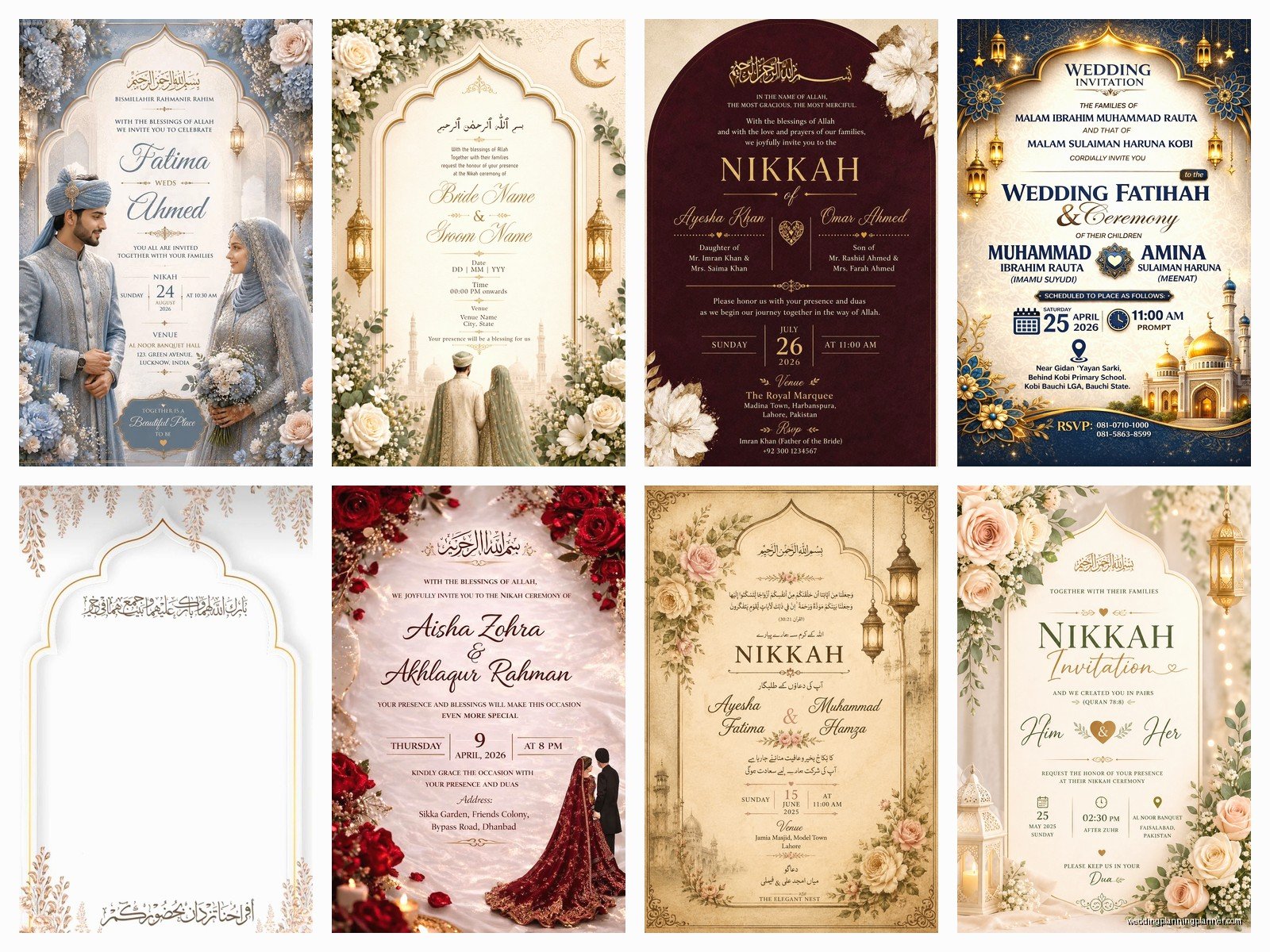
Start with “Bismillah ir-Rahman ir-Rahim” at the top. That’s basically standard. Some families are very particular about this and will be upset if it’s missing, so just include it. My cat knocked over my coffee while I was working on a template once and the bismillah was the only part that didn’t get ruined, which felt weirdly appropriate.
Then you’ve got your Quranic verse if you’re using one. Surah Ar-Rum verse 21 is super popular because it talks about marriage and love. Some families use other verses. Just make sure if you’re copying Arabic text that you’re getting it from a reliable source because getting Quranic text wrong is… not great.
The actual invitation wording comes next. This varies hugely depending on whether it’s the bride’s family hosting, groom’s family, or both. Traditional wording is different from modern wording. Some people want super formal language, others want it more casual. I had this one couple in spring 2023 who couldn’t decide and we literally had seven different versions before they picked one.
You need the names obviously—bride and groom, and usually the parents’ names too. In some cultures you list like three generations of family, in others just the couple. Know your audience.
Date, time, and venue information. This seems obvious but you’d be surprised how many people forget to include the actual time or they put the wrong address. Double check this stuff. Triple check it.
RSVP information if you’re doing that. Some Islamic weddings don’t really do RSVPs in the traditional sense because the community is just expected to come, but if you’re having a seated dinner or limited space, you gotta include this.
Dress code sometimes. Like if you want people to wear traditional attire or if there’s gender-separated seating or ceremonies, that’s good to mention.
Customizing Templates Without Losing Your Mind
So you’ve downloaded a template and now you need to make it yours. Here’s what actually works:
Colors matter in Islamic design. You’ll see a lot of emerald green, gold, royal blue, burgundy. These aren’t random—they have cultural significance and they just look right with Islamic geometric patterns. That said, I’ve done blush pink Islamic invitations and they were gorgeous, so don’t feel locked in.
The calligraphy font you choose is honestly more important than anything else. If you’re including Arabic or Urdu text, you need a font that actually supports those characters properly. Some fonts will make the text look weird or broken. Test it before you finalize anything. There are free Arabic fonts on Google Fonts but honestly the selection is kinda limited compared to English fonts which is annoying.
Islamic geometric patterns are everywhere in these templates and for good reason—they’re beautiful and they’re culturally appropriate. But don’t go overboard. I’ve seen templates where there’s so much pattern you can’t even read the text. Balance is key.

Mosque silhouettes or dome imagery can be really pretty but make sure it fits your overall design. Sometimes it can look too literal or kinda clipart-y if the template isn’t well-designed.
Actually Editing The Templates
If you’re using Canva, it’s pretty straightforward. Click on the text boxes and change the text. You can change fonts, colors, sizes, all that. The drag-and-drop interface makes it easy even if you’re not design-savvy.
For Word templates, you’re literally just typing in the designated spaces. These are the least flexible but the most accessible. If your parents are helping with the invitations and they’re not tech-savvy, Word templates are probably your best bet.
Photoshop or Illustrator templates require actual software knowledge. If you don’t have these programs or don’t know how to use them, either learn (there are YouTube tutorials for everything) or find someone who does. Don’t try to wing it the day before you need to send files to the printer. Trust me on this.
One thing that really annoyed me was when I downloaded a supposedly “free” template and then half the elements were locked behind a premium account. Like, don’t advertise something as free if it’s not actually fully free. That’s just misleading and it wastes everyone’s time.
Printing Considerations That Nobody Tells You
Okay so you’ve got your perfect template customized and ready to go. Now what? If you’re printing at home, make sure you’re using cardstock, not regular printer paper. Wedding invitations on regular paper look cheap, sorry not sorry. You can get cardstock at any office supply store.
Home printer settings matter. Set it to highest quality, make sure you’re printing in color if your design has color, and do a test print first. I cannot stress the test print enough. You don’t wanna print 150 invitations and then realize the color is off or something got cut off.
If you’re using a professional printer—which I recommend if you’re doing more than like 50 invitations because your sanity is worth it—they’ll need specific file formats and specifications. Call them first and ask what they need. Some want PDF with bleed marks, some want specific color profiles (CMYK vs RGB), some have size requirements. Just ask upfront.
Online printing services like Vistaprint or Minted can work with templates too. You usually upload your design and they handle the rest. It’s more expensive than DIY but less hassle. Some of these services have their own Islamic wedding templates you can start with.
Digital Invitations Are Actually Really Popular Now
Not everyone does physical cards anymore. Digital Islamic wedding invitations are totally acceptable now and honestly they’re way easier. You can send them via WhatsApp, email, or even create a wedding website with the invitation embedded.
For digital invites, you want JPG or PNG files usually. Make sure the resolution is high enough that it looks good on phone screens—at least 1080px wide. You can also create animated invitations using Canva or other tools which look really elegant with Islamic geometric patterns.
The advantage of digital is you can include clickable links—like a link to your wedding website, Google Maps location, RSVP form, whatever. Plus you save money on printing and postage which adds up fast.
Common Mistakes I See All The Time
Wrong Arabic text direction. Arabic reads right to left, and some templates or programs mess this up. Always have someone who reads Arabic check it before you finalize.
Using images of people in the design. Some Islamic traditions avoid depicting people in formal religious contexts, so stick with geometric patterns, floral designs, or calligraphy instead.
Forgetting about envelope sizes. You design this beautiful 5×7 invitation and then realize standard envelopes are slightly different dimensions and now nothing fits right. Check envelope sizes before you finalize your card dimensions.
Not leaving enough white space. I get it, you wanna include all the information and make it pretty, but cramming too much onto the card makes it hard to read and honestly just looks messy. Sometimes less is more or… whatever, you know what I mean.
Using too many different fonts. Pick maybe two or three fonts max. One for headings, one for body text, and maybe one for Arabic text if needed. More than that and it starts looking like a ransom note.
Resources That Actually Help
Islamic art websites often have free downloads of geometric patterns you can incorporate. Places like IslamicArtDB or even just searching Creative Commons Islamic patterns gets you good stuff.
YouTube has tons of tutorials on creating Islamic wedding invitations from scratch. If you’ve got time and wanna learn, this is a good route. Search for “Islamic wedding card design tutorial” and you’ll find hours of content.
Facebook groups for Muslim brides are surprisingly helpful. People share templates, recommendations, and you can ask questions. The community aspect is nice when you’re feeling overwhelmed.
Etsy has both free and paid Islamic wedding templates. The paid ones are usually more unique and well-designed, but you can find decent free options too. Just search “Islamic wedding invitation template free” and filter by price.
Pinterest is good for inspiration but less useful for actual downloadable files. I scroll through Pinterest when I need ideas but then I go elsewhere to find the actual templates.
Timeline Stuff You Should Know
Start looking for templates at least two months before you need to send invitations. This gives you time to customize, order samples if you’re printing professionally, make changes, and not feel rushed.
If you’re doing physical invitations, send them out 6-8 weeks before the wedding. Islamic weddings often have guests traveling from different cities or even countries, so people need time to make arrangements.
For digital invitations, you can send them a bit later—maybe 4-6 weeks out—but earlier is still better for people’s planning purposes.
Allow at least a week for printing and assembling if you’re doing it yourself. Printing, cutting, assembling, addressing envelopes, adding postage… it all takes longer than you think. I learned this the hard way with a client who wanted 200 invitations done in three days and it was just not gonna happen.
The whole process is honestly pretty manageable once you know where to look and what you’re doing. Free templates are totally viable for beautiful Islamic wedding invitations—you don’t need to spend hundreds of dollars on a designer unless you want something super custom. Just take your time, double-check everything, and ask for help when you need it because getting Arabic text or religious elements wrong is not something you wanna deal with after printing 150 cards.
