
Planning Guides, Style Guide
Wedding Expense Spreadsheet: Cost Tracking Template
Jul
Setting Up Your Wedding Budget Spreadsheet
Okay so the absolute first thing you gotta do is open up whatever spreadsheet program you have access to. Excel, Google Sheets, honestly even Numbers works if you’re on a Mac though I find it kinda annoying for collaboration. I’m partial to Google Sheets because you can share it with your partner and your parents if they’re contributing and everyone can see updates in real time without sending seventeen different versions back and forth via email.
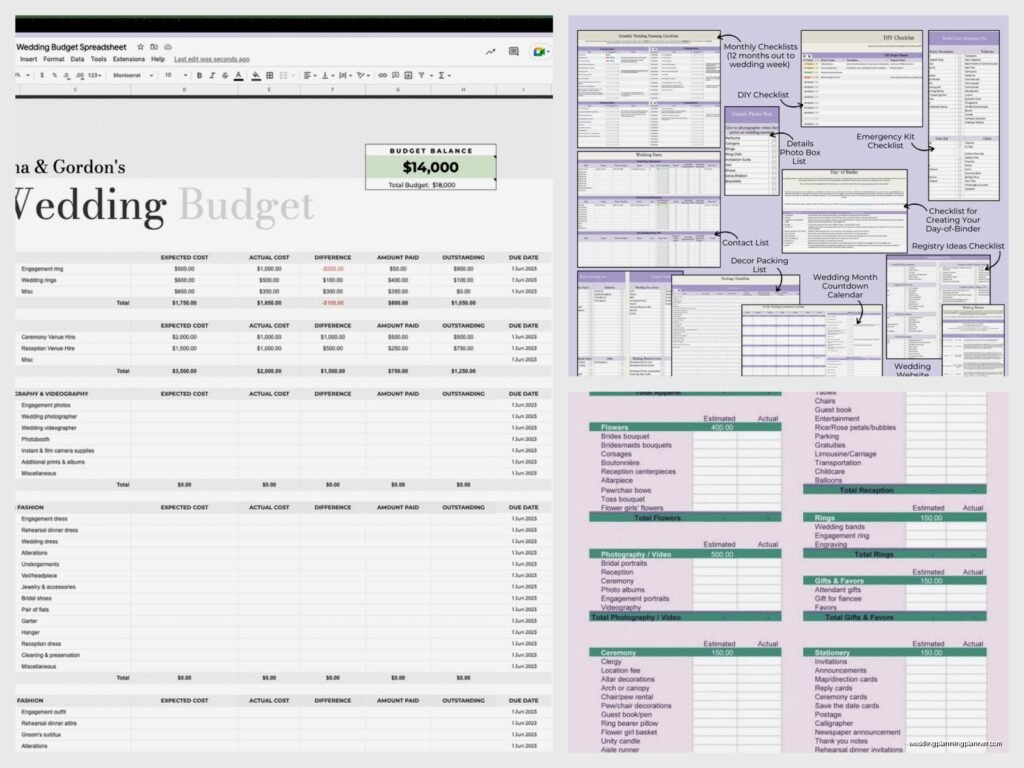
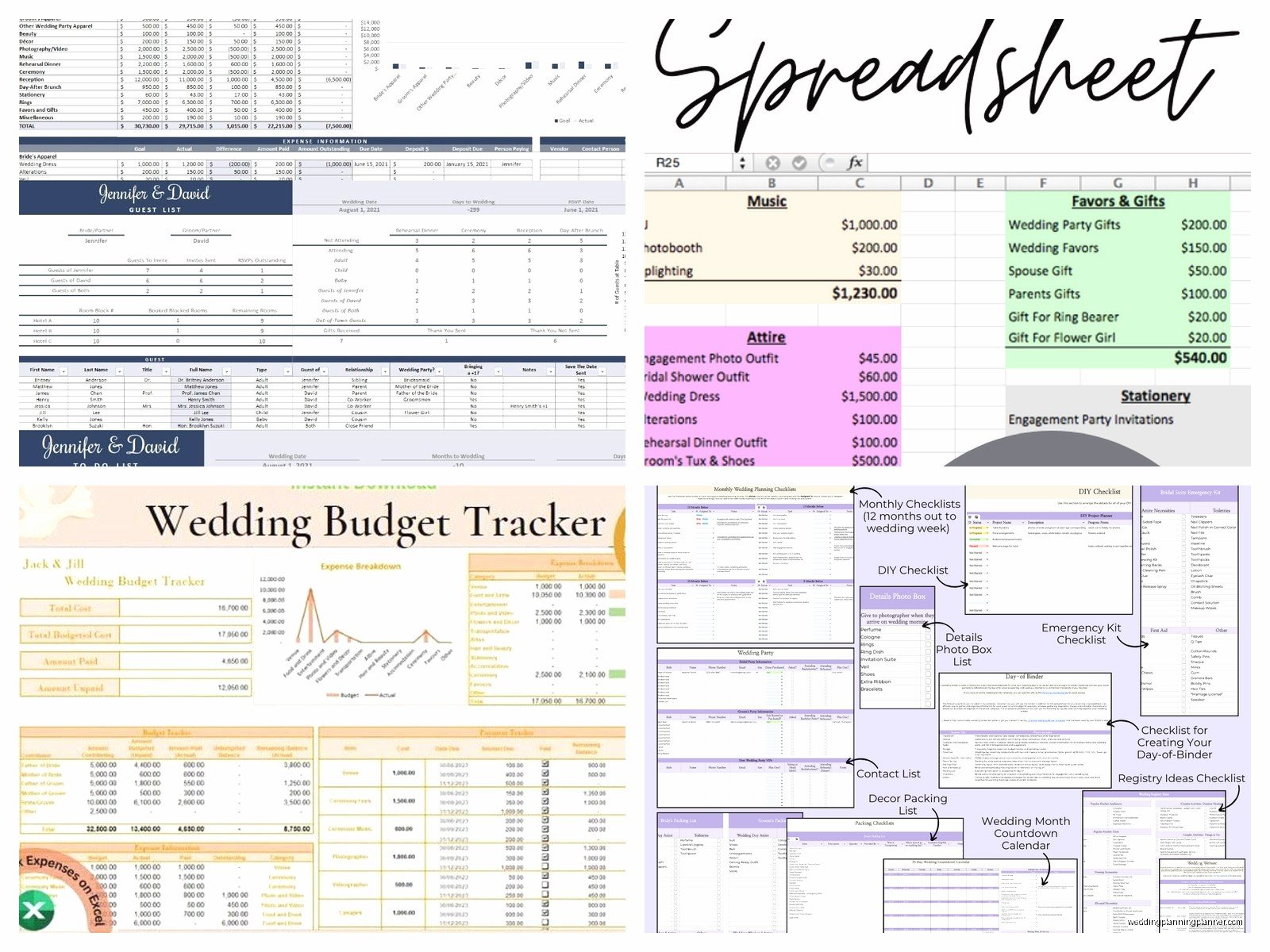
Create your main columns first. I always set mine up like this: Category, Item Description, Estimated Cost, Actual Cost, Deposit Paid, Amount Outstanding, Due Date, Vendor Name, and Notes. You might think that’s excessive but trust me when I say you’ll want all of this information in one place. During spring 2023 I had a bride who kept everything on random sticky notes and in her head and she literally forgot she’d paid a deposit to two different florists and… yeah that was a mess to untangle.
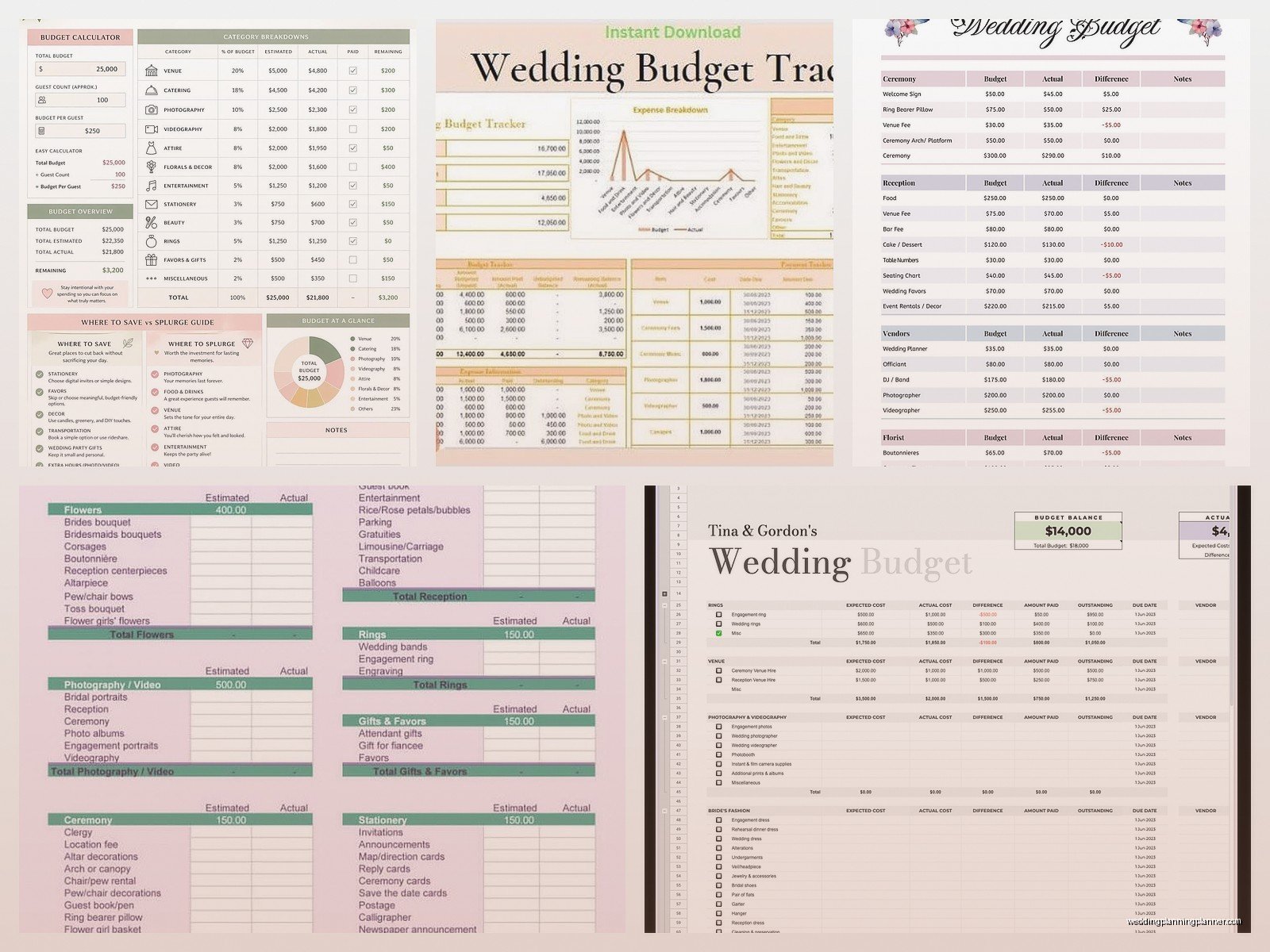
The categories should be your main spending buckets. Here’s what I usually include:
- Venue and Catering
- Photography and Videography
- Flowers and Decor
- Attire (dress, suit, alterations, accessories)
- Stationery (invitations, programs, menus, signage)
- Entertainment (DJ, band, ceremony musicians)
- Beauty (hair, makeup, nails)
- Transportation
- Favors and Gifts
- Wedding Rings
- Officiant
- Miscellaneous
That miscellaneous category is gonna save your sanity because there’s always weird stuff that pops up that doesn’t fit anywhere else.
Breaking Down the Big Categories
Under each category you need to get specific with line items. Like under Venue and Catering don’t just write “reception” because that tells you nothing useful when you’re trying to track where money is actually going. Break it down into venue rental fee, catering per person cost, bar package, cake cutting fee, overtime charges, service charges, gratuity, rentals from the venue like chairs or linens if those aren’t included.
This is where people get tripped up honestly because they see one big quote from a vendor and just plug that number in without itemizing. But then when you’re three months out and trying to figure out where you can cut costs or reallocate budget, you’re completely lost. You can’t make informed decisions without granular data.
For stationery specifically since that’s my world, your line items should include save the dates, invitations with envelopes, RSVP cards and envelopes, detail cards, postage for mailing, ceremony programs, escort cards or seating chart, table numbers, menus, welcome signs, thank you cards. I see couples forget about postage constantly and then they’re shocked when it costs $300 to mail everything.
The Estimated vs Actual Cost Columns
When you first start your spreadsheet you’re working with estimated costs obviously. Do some research on average costs in your area for each vendor type. Look at real wedding budgets online, ask recently married friends, lurk in wedding planning subreddit threads. Put realistic numbers in that Estimated Cost column even if they make you uncomfortable.
One thing that really annoyed me early in my career was when couples would put like wildly unrealistic estimates in their budget just to make themselves feel better. Like they’d budget $2000 for photography when the average in their city was $4500 and then act surprised when they couldn’t find anyone decent at their price point. I get it, wedding costs are insane, but lying to yourself in your own spreadsheet just makes the eventual reality harder to deal with.
As you start getting actual quotes and signing contracts, you fill in the Actual Cost column. This is your real number that you’re committed to. The difference between your estimated and actual becomes really important because it shows you where you have extra budget to play with or where you’re over and need to compensate.
Tracking Payments and What’s Outstanding
The Deposit Paid and Amount Outstanding columns are critical for cash flow management. Most vendors want 50% down when you sign the contract and then the remaining balance 1-2 weeks before the wedding. Some want it broken into thirds. You need to know exactly when money needs to leave your account.
I set up my spreadsheet to automatically calculate the amount outstanding. So if your actual cost is $5000 and you’ve paid $2500 as a deposit, the outstanding column shows $2500. In Google Sheets that’s just a simple formula like =C2-E2 (or whatever your column letters are). Makes it so you can see at a glance what you still owe.
The Due Date column saves lives. Or at least saves you from late fees and vendor annoyance. Put in the date when each payment is due. Then I usually sort my spreadsheet by due date once a month to see what’s coming up. You can even set up conditional formatting to highlight dates that are within 30 days in yellow and within 7 days in red if you wanna get fancy about it.
Vendor Contact Information
The Vendor Name column seems obvious but I also usually add a separate tab in my spreadsheet that’s just a vendor contact list with names, business names, phone numbers, emails, addresses, and contract dates. This becomes your central hub for everything. When you’re panicking at 9pm because you can’t remember if you confirmed something with your DJ, you don’t have to dig through email folders or… wherever else you might have stored that information.
My cat literally walked across my keyboard while I was updating a client’s spreadsheet once and somehow managed to delete an entire column of vendor emails. Thank god for Google Sheets version history because I nearly had a heart attack. Always keep backups of important information in multiple places.
The Notes Column Is Your Best Friend
This column is where you dump everything else. Contract details, payment method used, confirmation numbers, special requests, issues that came up, literally anything relevant. I had a wedding in summer 2021 where the florist had a very specific delivery window and special entrance instructions for the venue and we’d noted all of that in the spreadsheet. The day before the wedding the florist’s assistant called confused about delivery and we just pulled up the spreadsheet and read it all back to her. Crisis averted.
You can also use the notes for tracking little details like “paid via Venmo on mom’s account” or “10% discount applied for booking both photo and video” or “still waiting on contract, followed up 3/15.” It’s basically your wedding planning diary for financial stuff.
Adding Useful Calculations
At the top or bottom of your spreadsheet you want some summary calculations. Total estimated budget, total actual costs so far, total paid to date, total still outstanding. These are your big picture numbers that tell you if you’re on track or spiraling.
I also like to add a “percentage of budget” column that shows what portion of your overall budget each category represents. So if your total budget is $30,000 and you’re spending $9,000 on catering, that’s 30% of your budget. This helps you see if you’re allocating money in a way that makes sense for your priorities. If photography is super important to you but it’s only 8% of your budget while you’re spending 25% on flowers you don’t care that much about, that’s good information to have.
The formula for percentage is just =(actual cost/total budget)*100 if you want to set it up.
Building In a Buffer
Here’s something I learned the hard way: always build a 10-15% buffer into your overall budget for stuff you didn’t anticipate. I usually create a category called “Emergency Fund” or “Buffer” and just… leave that money there. Don’t allocate it to anything specific unless you actually need it.
Because you’re gonna need it. Someone’s gonna break a bridesmaid dress and need a replacement. You’re gonna decide last minute you want sparklers for the exit. The venue’s gonna charge you for extra time because cocktail hour ran long. Your makeup artist is gonna add an airbrush fee you didn’t know about. Something always comes up and if you’ve budgeted down to the last dollar you’re either going into debt or having a breakdown.
Tracking Who’s Paying For What
If you have multiple people contributing to your wedding budget—like you and your partner are splitting it, or parents are covering certain things—you need to track that too. I usually add a column called “Paid By” where you note whose money is actually paying for each item.
This prevents so many arguments and awkward conversations. I’ve seen couples nearly break up over wedding budget confusion because they weren’t tracking who paid for what and then someone felt like they’d contributed way more than the other person. Not fun. Just track it clearly from the beginning.
If parents are contributing a set amount, I put that at the top of the spreadsheet as “Parent Contribution: $10,000” or whatever it is. Then as you allocate their money to specific items you can see how much of their contribution is left. Some parents want control over where their money goes, others just hand you a check and say do whatever, but either way you need to track it properly for your own records.
Regular Updates Are Non-Negotiable
A spreadsheet is completely useless if you don’t update it regularly. I tell all my clients to set a recurring reminder on their phone for every two weeks to review and update their wedding budget spreadsheet. Add new quotes you’ve received, update costs if vendors change pricing, mark deposits as paid, adjust estimates based on new information.
It takes maybe 15 minutes every two weeks and it keeps you from having a complete panic meltdown when you suddenly realize you’re three months out and have no idea where you actually stand financially. Trust me, I’ve talked many couples down from ledges because they avoided looking at their budget for months and then finally opened it and… well, it wasn’t pretty.
Using Filters and Sorting
Learn to use your spreadsheet program’s filter and sort functions. You might wanna view just the items you haven’t paid deposits on yet. Or sort by category to see all your attire costs together. Or filter to show only items due in the next 60 days. These functions make your spreadsheet actually useful instead of just being a overwhelming wall of numbers.
In Google Sheets you can create filter views that let you save different ways of viewing your data without changing the underlying spreadsheet. So you could have a “Payment Due Soon” view and a “By Category” view and switch between them. It sounds complicated but it’s actually really straightforward once you mess around with it for like ten minutes.
What About Apps and Pre-Made Templates
There are approximately eight million wedding budget apps and templates out there. Some of them are fine. The Knot has one, WeddingWire has one, there are standalone apps. I’ve used them and they work okay for some people.
But honestly I still prefer a custom spreadsheet because you can modify it exactly how you need it. Apps are sorta rigid in their categories and structure and if your wedding doesn’t fit their template you’re stuck. Plus I don’t love having my financial information in yet another app that might change their terms or shut down or whatever.
If you wanna start with a pre-made template though, go for it. Just make sure you customize it to your actual situation. Delete categories you don’t need, add ones that are missing, adjust it so it makes sense for your brain. A budget tracking system only works if you’ll actually use it, so it needs to work for you specifically.
Sharing Access With Your Partner
Make sure your partner has access to this spreadsheet and actually looks at it. I cannot tell you how many times I’ve seen one person managing the entire budget while the other person has no idea what anything costs and then they make suggestions like “let’s add a photo booth” and the budget person is like “with what money??” and there’s this whole thing…
Have regular budget check-ins together. Maybe once a month you both sit down with the spreadsheet and go through it. Talk about what you’ve spent, what’s coming up, if you need to adjust anything. It’s not romantic but neither is fighting about money after you’re married because you never communicated about it during planning.
Some couples find it helpful to set spending limits where anything over a certain amount requires both people to approve it. Like if something costs more than $500, you both have to agree before booking. You can even note that in your spreadsheet rules at the top.
Tracking Cash Gifts and Recouping Costs
This is kinda a separate thing but some couples like to add a tab for tracking wedding gifts and cash received after the wedding. It doesn’t change what you’ve spent obviously, but it can help you see what you’ve recouped. I usually don’t include this in the main budget spreadsheet because I think it’s weird to plan your budget around gift money you haven’t received yet, but after the fact it’s interesting to track.
You can set it up with columns for gift giver, gift type (cash/check/gift), amount if cash, date received, thank you note sent. Makes it easier to ensure you’ve thanked everyone and you have a record of who gave what if you need to reference it later for any reason.
Anyway that’s basically how I set up wedding budget spreadsheets for myself and my clients. Start simple, add complexity as you need it, update it regularly, and actually use it to make decisions rather than just as a place to record regrets about money you’ve already spent. The spreadsheet is a tool to help you stay in control of your wedding budget rather than letting it control you, but only if you actually… you know, use it properly
