
Planning Guides, Style Guide
Wedding Officiant Script Template: Free Download Files

Sep
Okay So Wedding Officiant Scripts Are Actually Not That Scary
Look, I’ve been doing this wedding planning thing for over 15 years now and the number of times someone has panicked about officiant scripts is… honestly too many to count. You’d think we were writing the next great American novel or something. But here’s the thing—most couples just need a solid template they can customize without overthinking it.
So you’re probably here because either you’re officiating a wedding for a friend (congrats on that honor, seriously), or you’re a couple who wants to see what your ceremony might look like. Either way, I’m gonna walk you through what actually needs to be in these scripts and where you can grab some free downloads that don’t suck.
The Basic Structure Nobody Tells You About
Every officiant script follows pretty much the same flow, and once you see it laid out, you’ll realize it’s kinda like a recipe. There’s a specific order that just… makes sense. Here’s what you need:
- Processional moment (this is usually just a note for timing, not spoken)
- Welcome and opening remarks
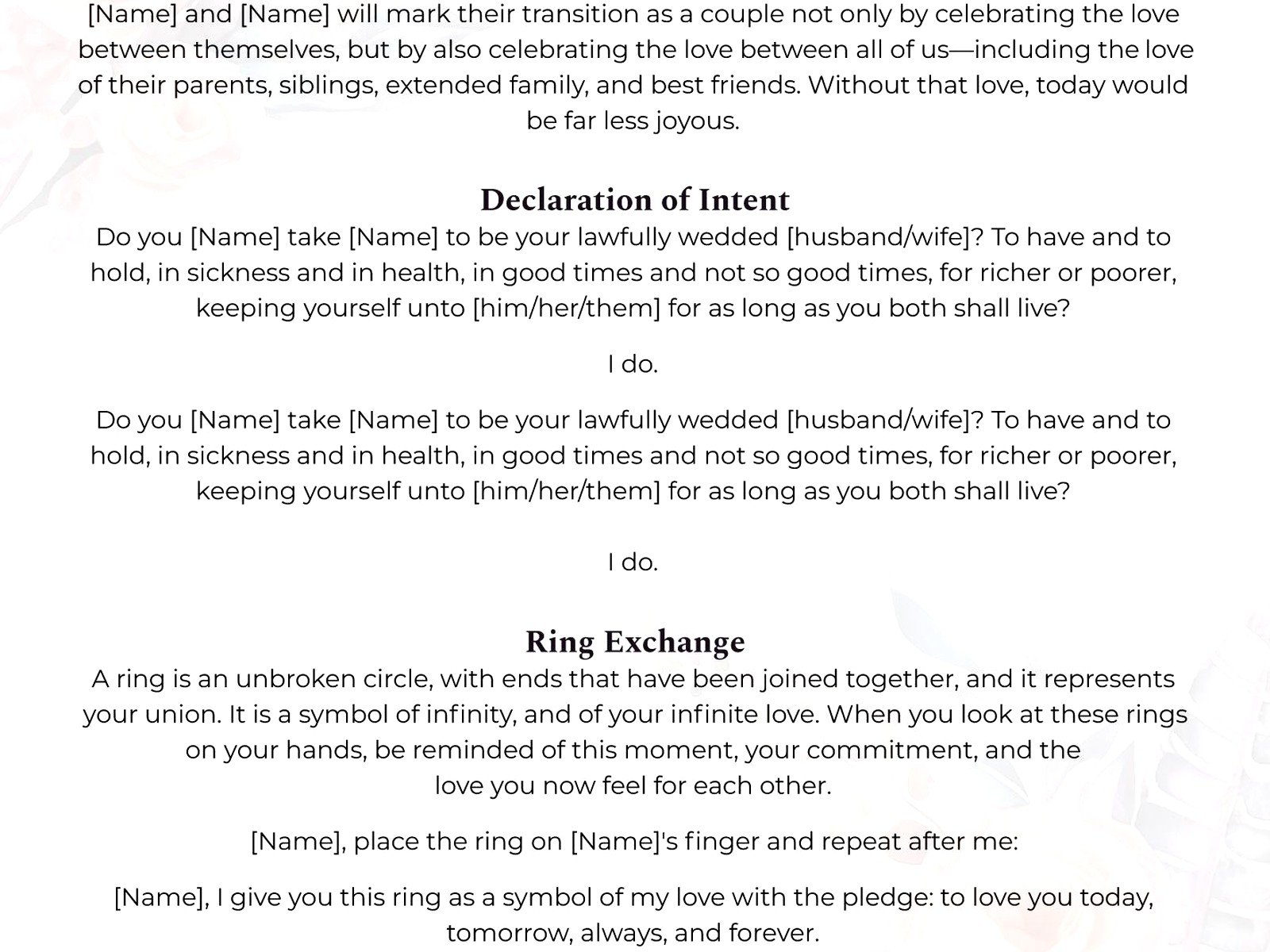
- Declaration of intent (the “do you take this person” part)
- Reading or two (optional but most people include something)
- Vows exchange
- Ring exchange
- Pronouncement (the “I now pronounce you” bit)
- The kiss
- Closing remarks and presentation of the couple
That’s it. Like, that’s literally the whole thing. But people get so weird about it because they think every word has to be perfect and meaningful and—nah. It just needs to sound like humans talking.
Where to Actually Find Free Templates That Work
Alright so here’s where I’m gonna save you like three hours of Googling. There are a few places where you can download officiant scripts for free without ending up on some sketchy website that tries to sell you essential oils or whatever.
The Knot has a pretty decent collection. They’ve got traditional, non-religious, interfaith, and even some LGBTQ+ specific scripts. You just go to their planning section and search for officiant scripts. No download required actually, you can just copy-paste into a Google Doc.
Officiant Eric (yeah that’s really what the site is called) has been around forever and has a massive library. He’s got scripts broken down by length—like 5-minute ceremonies, 10-minute ones, 20-minute ones. Super helpful when you’re trying to figure out timing.
Wedding Officiant Directory offers free PDFs you can download. They’re pretty bare-bones but that’s kinda the point? You can customize them however you want without having to delete a bunch of flowery language first.

I also tell people to check out APW (A Practical Wedding) because they have real ceremony scripts that actual couples used. Reading through those gives you a better sense of what sounds natural versus what sounds like it came from a 1950s etiquette book.
That Time in Spring 2023 When Everything Went Wrong
Okay so spring 2023 I had this couple—super sweet, very laid back—and they asked their best friend to officiate. Great idea in theory. The friend got ordained online (which takes like 10 minutes, it’s ridiculously easy), and I sent them three different script templates to choose from. Simple, right?
Wrong. This officiant decided that templates were “too impersonal” and wrote their own script from scratch without showing anyone. Day of the wedding, we’re standing there, and he starts the ceremony with this long rambling story about how the couple met… except he got half the details wrong. Then he completely forgot the declaration of intent. Like just… skipped it. Went straight from his story to the vows.
I’m standing there with my clipboard trying not to make eye contact with anyone because what am I supposed to do? Stop the ceremony? The couple was cool about it afterward but I was SO annoyed because this is exactly why templates exist. They keep you on track. They make sure you don’t forget the legally important parts.
Customizing Your Template Without Making It Weird
So you’ve downloaded a template. Now what? Here’s where people either do too much or too little, there’s like no middle ground.
The opening remarks are where you can get personal. This is where you talk about love in general, maybe mention the couple specifically, set the tone. Keep it to like 2-3 minutes max. I’ve sat through 10-minute opening remarks and everyone’s just standing there thinking about how their feet hurt.
Don’t mess with the legal parts. The declaration of intent and the pronouncement have specific wording for a reason. You can adjust it slightly—like “Do you take this person to be your lawfully wedded spouse” instead of wife/husband—but don’t get creative and turn it into poetry or something. Save that for the readings.
Readings are your friend. This is where you can include that poem everyone loves or that excerpt from “The Princess Bride” or whatever. It breaks up the ceremony and gives people something to listen to besides the officiant’s voice. Plus it’s an easy way to involve other people in the ceremony without giving them major responsibilities.
The Vows Part That Everyone Overthinks
Okay so vows. People stress about these SO much. Here’s the deal: you can do traditional vows (the “to have and to hold” ones), or you can write your own, or you can do a mix where the officiant asks questions and you say “I do.”
If you’re using a template, it’ll usually include traditional vows. Those are great because everyone knows them and they’re short and they work. If the couple wants to write their own, that’s cool too, but as the officiant you need to get those vows in advance. Like at least a week before. You need to know how long they are and whether they’re gonna make everyone cry or laugh or both.
What drives me crazy is when couples say they’re writing their own vows but then don’t actually write them until the night before. Or worse, the morning of. I’ve seen people literally scribbling vows on index cards in the getting-ready room and it’s just… stressful for everyone involved.
Ring Exchange Scripts Are Easier Than You Think
The ring exchange is probably the simplest part of the whole ceremony. The officiant says something about what the rings symbolize (circles, eternity, unbroken love, you get it), then each person puts a ring on the other person and repeats a line. That’s it.
Most templates will give you something like: “This ring is a symbol of my love and commitment to you. With this ring, I thee wed.” You can absolutely change the wording but honestly? That version works perfectly fine.
One thing though—make sure someone is holding the rings until this moment. Usually that’s the best man or maid of honor. I’ve been at ceremonies where nobody knew where the rings were and we all just stood there awkwardly while someone ran to find them. Plan that part in advance.
The Pronouncement Is Where You Get to Be Dramatic
This is the “I now pronounce you married” moment and honestly it’s kinda fun? Like this is the big moment everyone’s been waiting for. Most templates will give you the traditional “By the power vested in me by [state], I now pronounce you married” or “husband and wife” or “partners in life” or whatever version fits.
Some officiants add a little extra here like “It is my honor to present to you for the first time…” and then the couple’s names. That part’s optional but people seem to like it. My cat just jumped on my desk and is sitting on my notes so… gonna have to work around her I guess.
Free Download Sites You Should Actually Bookmark
Let me give you the actual URLs you need because just knowing the site names isn’t that helpful when you’re trying to find this stuff at 11pm:
TheKnot.com/content/wedding-ceremony-script – They update this regularly and it’s actually useful, not just SEO garbage.
OfficiantEric.com – Navigate to the “sample ceremonies” section. Everything’s free, he just asks that you credit him if you use his exact wording.
WeddingOfficiants.com under their resources tab has downloadable PDFs. They’re formatted really nicely which is helpful if you’re gonna print them out.
APracticalWedding.com search for “ceremony scripts” and you’ll find real examples with commentary from the couples about what worked and what they’d change.
What Format Should Your Final Script Be In
Okay so you’ve customized your template and now you need to actually use it during the ceremony. Here’s what works: print it out. I know we’re all digital now but trust me on this one. Print it in a large font—like 14 or 16 point—and put it in a nice binder or folder.
Some officiants use tablets or phones but I’ve seen those die mid-ceremony or the screen go dark at the wrong moment or… look, just print it. Put it in a black leather portfolio if you wanna be fancy. Mark your place with colored tabs if it’s a longer ceremony.
Also? Practice reading it out loud. Like actually stand in front of a mirror and read the whole thing. You’ll find words that are hard to say or sentences that are too long or parts where you need to pause. Mark those up with a pen. This is your script, make it work for you.
Length Matters More Than You’d Think
Here’s something nobody tells you: most wedding ceremonies are between 20-30 minutes long. That includes processional and recessional music. The actual talking part? Maybe 15-20 minutes tops.
I’ve been to 45-minute ceremonies and people get restless. They’re standing (usually), it might be hot or cold, someone’s baby is gonna start crying. Keep it moving. Your template should indicate roughly how long each section takes. A good rule is:
- Opening remarks: 2-3 minutes
- Readings: 2-4 minutes each
- Declaration of intent: 1 minute
- Vows: 2-3 minutes total
- Ring exchange: 2 minutes
- Pronouncement and kiss: 1 minute
- Closing: 1-2 minutes
That gives you about 15-20 minutes of actual ceremony content, which is perfect.
Religious vs Non-Religious Templates
Most free templates come in both versions. Religious ones will include prayers, Bible readings, mentions of God, that sort of thing. Non-religious ones replace that with secular readings, quotes from poets or philosophers, or just skip those parts entirely.
If you’re doing an interfaith ceremony, look specifically for interfaith templates. They’re designed to honor both traditions without favoring one over the other. APW has particularly good examples of these because they’re from real couples who navigated this.
The thing that annoyed me recently was finding a template labeled “non-religious” that still had like three references to God in it. Read through the whole thing before you commit to using it, basically. Don’t just skim the intro and assume it’s what you need.
Backup Plans Because Things Happen
Last thing and then I’ll stop rambling—have a backup. Email the script to yourself. Save it in Google Docs. Give a copy to the wedding planner (hi, that’s me usually). I’ve had officiants lose their scripts, spill coffee on them, have the wind blow them away during an outdoor ceremony… you gotta have a backup plan.
Also consider what happens if someone objects (probably won’t happen but you should know how to handle it), or if someone faints (happens more than you’d think), or if there’s a technical issue with the microphone. Most templates don’t cover this stuff but it’s worth thinking through.
Anyway that’s basically everything I know about officiant scripts after doing this for way too long. Download a few templates, read through them, pick the one that sounds most like how the couple actually talks, customize it, practice it, and you’ll be fine. It’s really not as complicated as people make it out to be.
