
Planning Guides, Style Guide
Wedding Playlist Template: Free Download Files

Sep
Why You Actually Need a Wedding Playlist Template
So the biggest mistake I see couples make is thinking they can just wing the music situation like two weeks before the wedding. Nah. That’s how you end up with your DJ playing “Cotton Eye Joe” three times because nobody gave them clear direction and also I once had a bride in spring 2023 who literally handed her cousin an aux cord and said “figure it out” and we had dead silence during the entire cocktail hour because he was trying to connect to the Bluetooth speaker.
A playlist template isn’t just a list of songs. It’s basically your entire music timeline for the day, broken down by moments, and it saves you from that panic where you realize at 11pm the night before your wedding that you forgot to pick a processional song for the bridesmaids.
What Should Actually Be In Your Template
Okay so I’m gonna break this down by the actual sections you need. Most free templates online are either way too complicated or they’re missing like half the important moments.
Pre-Ceremony Music
This is what plays while guests are arriving and finding their seats. You need at least 20-30 minutes worth of music here, sometimes more if you’ve got family members who are chronically late (looking at you, Uncle Steve). I usually tell couples to pick 8-10 songs that are pretty and background-y. Nothing too loud or distracting.
In your template, you wanna list the song title, artist, and the length. The length thing is important because you need to know if you’ve got enough music to cover the time.
Processional Songs
This is where it gets specific and honestly kinda annoying because there are like four different processional moments usually:
- Officiant and groom entering (sometimes)
- Wedding party walking down
- Bride’s entrance
- Any other special people like flower girls or ring bearers
You don’t need different songs for all of these but you need to decide. The template should have a spot for each possibility so you’re not forgetting anything.

Ceremony Music
Most people forget about this part. Like what plays during unity candle lighting or sand ceremony or whatever ritual you’re doing? Silence is awkward. Even if it’s just 2 minutes, pick something.
Recessional
This is your “we’re married let’s party” song as you walk back down the aisle. Usually upbeat and happy. One song is enough here.
Cocktail Hour
This needs to be like 45-60 minutes of music typically. I tell people to pick a vibe and stick with it – jazzy, acoustic covers, classical, whatever. But it should fade into the background because people are talking and eating apps and you don’t want them shouting over “Uptown Funk” during this part.
Your template should have space for like 15-20 songs here.
Grand Entrance
When you and your wedding party get introduced into the reception. This can be one song or different songs for each couple being introduced. The template needs to clarify which approach you’re taking.
First Dance
Obviously. Just one song but make sure you note if you want it edited down because if your song is 6 minutes long and you’re not professional dancers, that’s gonna feel like forever.
Parent Dances
Mother-son, father-daughter, or whatever combination works for your family. Sometimes people do a group parent dance to one song. Your template should have spots for all possibilities.
Dinner Music
Another section people forget about. You need like 45-60 minutes here too, depending on how long dinner service takes. Similar vibe to cocktail hour usually – background music that’s pleasant but not demanding attention.
Special Dances and Moments
Anniversary dance, bouquet toss, garter toss (if you’re doing that which honestly most people skip now), cake cutting. Each of these might need a song or at least a music cue.
Open Dancing
This is the bulk of your reception music. You need like 2-3 hours worth of songs here, and your template should help you organize them by energy level or era or whatever makes sense. I usually suggest breaking it into:
- High energy dance songs
- Medium energy (still danceable but not intense)
- Slow songs (you need some of these scattered throughout)
- Must-play songs
- Do NOT play songs (this is important – tell your DJ what to avoid)
Last Dance
The final song of the night. Usually something meaningful or a big group sing-along situation.
Where to Find Free Template Files
Alright so there are actually decent free options out there, you just gotta know where to look.
Google Sheets Templates
Honestly Google Sheets is your best friend for this. You can find free wedding playlist templates that are already set up with all the sections I mentioned. The nice thing about Sheets is you can share it with your DJ or band, your partner can edit it from their phone, and it’s automatically saved in the cloud so you’re not gonna lose it when your laptop decides to update at 3am.
Search for “wedding playlist template Google Sheets” and you’ll find options. Look for ones that have columns for song title, artist, length, and notes. Some fancy ones even have a column for Spotify links which is actually super helpful.
Excel Templates
If you prefer Excel, Microsoft actually has free wedding planning templates including music planning sheets. You can download them from the Microsoft Office template library. They work basically the same as Google Sheets but you’ll need to save it yourself and share it manually.
Spotify Playlist Structure
Okay this isn’t technically a template file but hear me out. You can create a Spotify playlist and use the description field to note what section each group of songs is for. Like I’ll put “—CEREMONY STARTS HERE—” as a playlist title between sections. It’s not as organized as a spreadsheet but if you’re already living in Spotify anyway it works.
The downside is Spotify doesn’t let you add notes about specific timing or instructions, so you’d still need a separate document for that information to give your DJ.
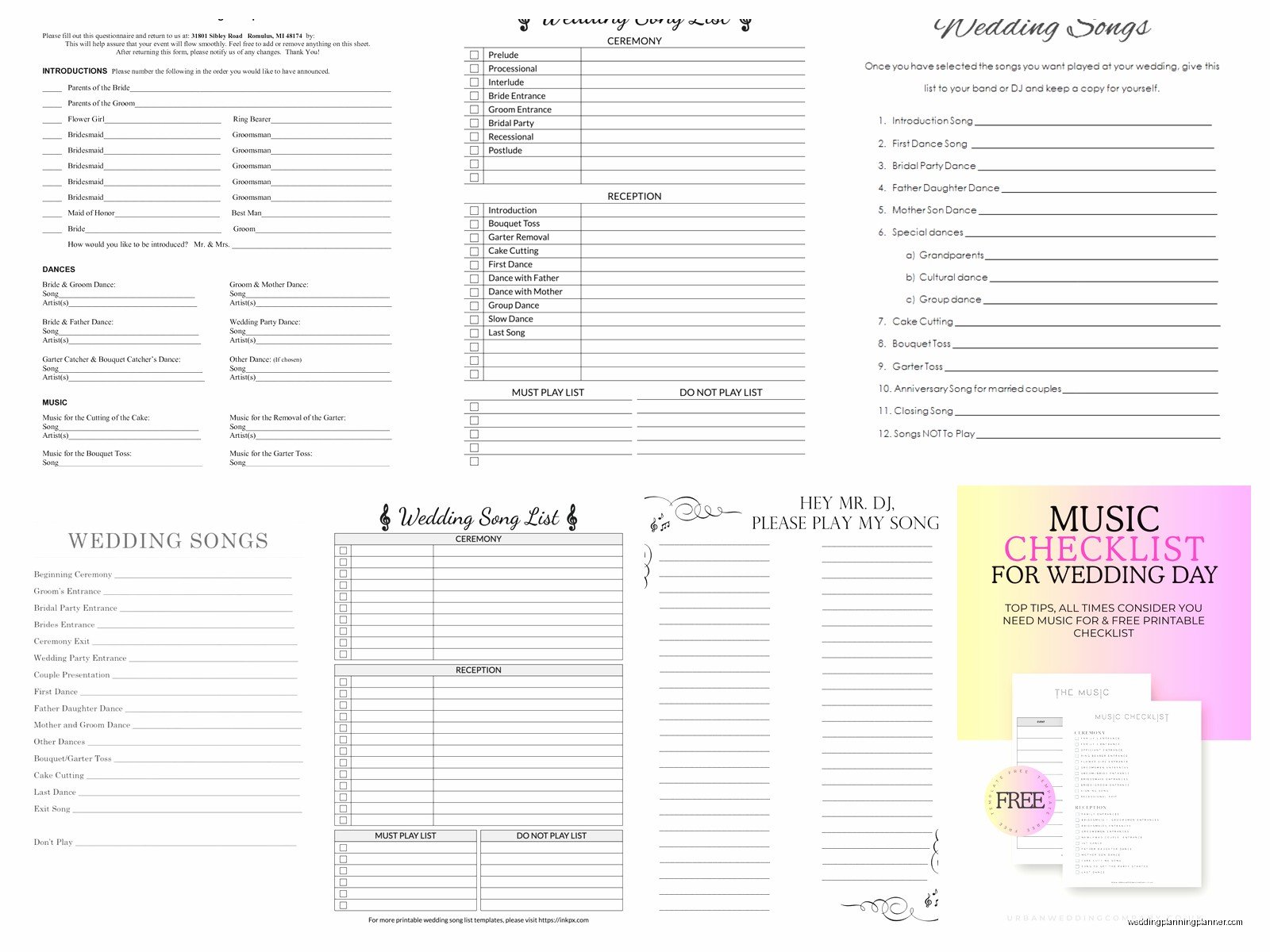
Canva Templates
Canva has free wedding playlist templates that are more visual and pretty. They’re better for printing out a pretty version to put in your wedding binder or whatever, but they’re not as functional for actual planning. I’d use these AFTER you’ve finalized everything in a spreadsheet.
How to Actually Use the Template
So you’ve downloaded a template, now what? This is where I see people get stuck or they just… abandon the whole thing because it feels overwhelming.
Start With Your Must-Haves
Before you fill in every single slot, sit down with your partner and list out the absolute must-play songs. Like the 10-15 songs that HAVE to be at your wedding. These are usually the big moment songs – first dance, father-daughter dance, that one song from your first date, whatever.
Put those in the template first in their appropriate spots. Now you’ve got anchors and the rest is just filling in around them.
Consider Your Timeline
You need to know your actual wedding timeline to fill this out properly. If cocktail hour is only 30 minutes, you don’t need 20 songs for it. If dinner is gonna be 90 minutes because you’re doing a plated service with multiple courses, you need more dinner music.
Work with your planner or venue coordinator to get realistic time estimates for each part of the day.
Think About Your Guests
This is something that annoyed me so much at a wedding I planned in summer 2021 – the couple picked literally only indie folk music that they loved, which is fine for them, but their guests ranged from age 8 to 85 and nobody was dancing because nobody knew any of the songs. By 9pm the dance floor was empty except for like three people swaying awkwardly.
You gotta balance what you love with what will actually get people dancing. Throw in some classics, some current hits, some songs that different age groups will recognize. Your template should reflect this variety.
Use the Notes Section
Most templates have a notes column and people just leave it blank. Don’t do that. Use it for stuff like:
- “Fade out at 2:45” if you want a song edited
- “Play during cake cutting”
- “Only if dance floor is packed” for songs you’re unsure about
- “DO NOT PLAY the explicit version”
- “Special request from Mom”
These notes help your DJ understand the why behind your choices.
Be Realistic About Quantity
You don’t need to fill every single slot immediately. For sections like open dancing, you can give your DJ 30-40 songs and let them read the room and fill in the gaps. They’re professionals (hopefully) and they know what works.
What you DO need to be specific about is the formalities and special moments. Those need exact songs chosen in advance.
Common Template Mistakes
Let me just rapid-fire some things I see people screw up constantly:
Picking songs you don’t actually know the full lyrics to. I cannot tell you how many times someone picks a song because they like the chorus and then it starts playing at their wedding and there’s a verse about breaking up or drugs or something wildly inappropriate. Listen to the WHOLE song before adding it.
Not checking song lengths. Your first dance song is 7 minutes long? Really? You wanna slow dance for 7 minutes while everyone watches? Probably not.
Forgetting to mark clean versions. If you’re having kids at your wedding or conservative family members, you gotta specify clean versions of songs. Your DJ might default to the radio edit but maybe not.
Having no variety in tempo. You can’t just play bangers for 3 hours straight. People need breaks. Slow songs give people a chance to rest, chat, get drinks, whatever.
Not including your do-not-play list. This is just as important as your must-play list. If you absolutely hate “Cupid Shuffle” or you never wanna hear “Wonderful Tonight” again or there’s a song that reminds you of an ex, PUT IT ON THE DO NOT PLAY LIST. My cat walked across my keyboard while I was typing this section which feels appropriate because weddings are chaotic and you need systems.
Sharing Your Template With Your DJ or Band
Once you’ve filled out your template, you need to actually get it to the people who are playing the music. Seems obvious but you’d be surprised.
If you’re using a DJ, send them the template at least 2-3 weeks before the wedding. Not the night before. They need time to acquire songs they might not have, create the actual playlists in their system, and reach out if they have questions.
If you’re using a band, understand that they can’t play every single song exactly like the recording. They’ll do their version. Your template for a band should focus more on the vibe and energy level you want rather than exact song choices for every moment. Although you can definitely specify the big moments like first dance.
If you’re doing the DIY route with a friend or family member running playlists, you need to be even MORE detailed in your template. Include instructions about when to fade songs, when to switch playlists, what to do if something goes wrong. Basically assume they know nothing about wedding music flow.
Updating Your Template
Here’s the thing nobody tells you – you’re gonna change your mind like fifteen times. That’s normal. This is why digital templates are better than printed ones.
I usually tell couples to consider their playlist template a living document up until about 2 weeks before the wedding. After that, you gotta lock it in and stop second-guessing yourself or you’ll drive yourself and your DJ crazy.
But before that deadline, if you hear a song that’s perfect or you realize that song you picked for your mother-son dance actually makes you cry in a bad way, change it. That’s what the template is for.
The Backup Plan
Even with the most detailed template, things can go wrong. Technology fails, DJs misunderstand instructions, Spotify crashes, whatever.
Have a backup plan. This usually means:
- Giving your DJ or band a USB drive with your must-have songs downloaded
- Having the first dance song downloaded on your phone just in case
- Designating someone (your planner, a bridesmaid, someone organized) who has a copy of the template and can make decisions if needed
At a wedding last fall, the venue’s wifi went out completely and the DJ’s streaming service wouldn’t work. Thank god he had everything downloaded as backup files. Always have a backup.
Template Customization Ideas
The basic template structure I outlined works for most weddings, but you might need to customize based on your specific situation.
If you’re having a cultural ceremony with specific traditional music requirements, add a section for that. If you’re doing a lunch wedding instead of an evening reception, you might not need as much dancing music. If you’re having a surprise performance by a family member, you need to note that in the timeline.
Your template should reflect YOUR wedding, not some generic wedding structure. Feel free to delete sections that don’t apply and add ones that do.
Some couples add a section for “songs that tell our story” where they note songs from significant moments in their relationship. Some add a “guilty pleasure” section for songs they’re kinda embarrassed they love but want played anyway. Some organize their dancing music by decade instead of energy level.
The template is just a tool. Make it work for you.
Working With Your Partner On This
Music is one of those things where couples can have really different tastes and priorities. One of you might care deeply about every single song choice and the other might be like “just play whatever.”
If you’re the person who cares more, that’s fine, but at least run the final template by your partner. Make sure there aren’t any songs on there that they hate or that remind them of something weird. And make sure their must-have songs are included too, even if you don’t love them.
I usually suggest each person gets veto power over like 5 songs and must-play power over 5 songs. Everything else is negotiable or you defer to whoever cares more about that particular section.
The template actually helps with this because you can divvy up sections. Like maybe one person handles all the ceremony music and the other handles cocktail hour, or whatever makes sense for you.
