
Planning Guides, Style Guide
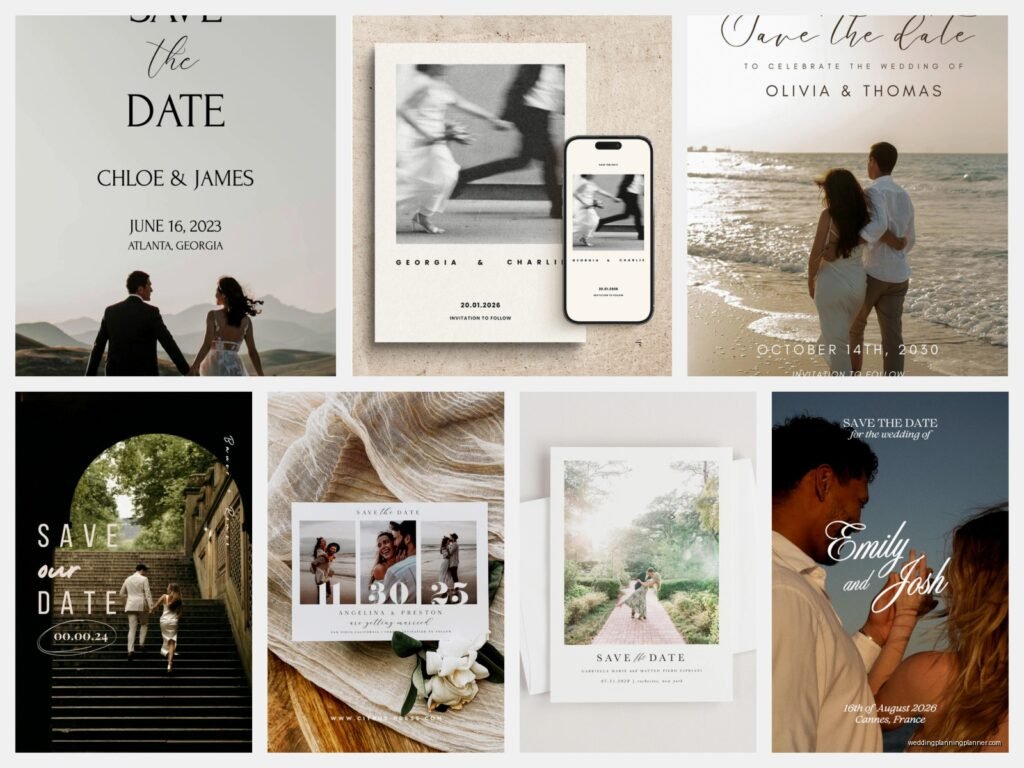
Digital Save the Date Wedding: Electronic Announcements
May
Getting Your Digital Save the Dates Actually Sent Out
So digital save the dates are honestly one of those things that sound super simple until you’re sitting there at 11pm wondering why your email design looks perfect on your laptop but completely broken on your mom’s iPhone. I learned this the hard way in spring 2023 when I had a couple who wanted to send their save the dates exactly 8 months before their destination wedding in Portugal, and we spent THREE DAYS troubleshooting why the date was showing up wrong for anyone viewing it in a different timezone. Fun times.
First thing—you gotta decide what platform you’re actually gonna use. There’s like a million options now and they all claim to be the best, which is kinda annoying because they’re all good at different things. Paperless Post is probably the most popular and honestly their designs are gorgeous, but you’re paying per recipient which can add up fast. Greenvelope is similar vibes, very elegant. Then you’ve got Evite which people associate more with birthday parties but they have wedding options that are actually pretty nice. Withjoy and Minted both do digital save the dates as part of their bigger wedding website packages.
Picking Your Design Direction
The design part is where I see people get stuck because there’s this weird pressure to make your digital save the date match your “aesthetic” perfectly. And like… it should coordinate with your overall wedding vibe, sure, but it doesn’t need to be this masterpiece of graphic design. You’re literally just telling people to hold a date.
What you DO need to think about is whether you want it to feel more formal or casual. A video save the date is gonna read as pretty casual and fun—even if you’re wearing formal clothes in it, there’s something inherently relaxed about video. A sleek animated design with your engagement photo can feel more upscale. A simple text-based email with a nice header image sits somewhere in the middle.
I had this couple once who spent $400 on a custom illustrated digital save the date and then… it was so file-heavy that half their guest list couldn’t even open it on their phones. Their guests were getting error messages or it would just load forever. So we ended up having to send a simpler version anyway, which meant they basically paid for something twice.
Timing Is Weird With Digital
Okay so traditional save the dates go out 6-8 months before the wedding, sometimes up to a year for destination weddings. With digital ones, you can technically do the same timeline, but I’ve noticed people tend to send them a bit later? Like 4-6 months out is pretty common because there’s no printing delay or mailing time, so couples wait longer thinking they have more time. Which is fine, except then you run into holiday weekends or busy seasons where people are less likely to actually open and read emails.
Send them on a Tuesday or Wednesday afternoon. Not Monday morning when everyone’s inbox is a disaster. Not Friday when people are mentally checked out. Not Sunday evening when it’ll get buried under work emails overnight.
And here’s something that annoys me SO MUCH about digital save the dates—people don’t treat them with the same importance as physical mail. I’ve seen guests literally miss weddings because they deleted the email or it went to spam and they never saw it. So you need to think about follow-up communication, which I’ll get to in a sec.
What Actually Needs To Be On It
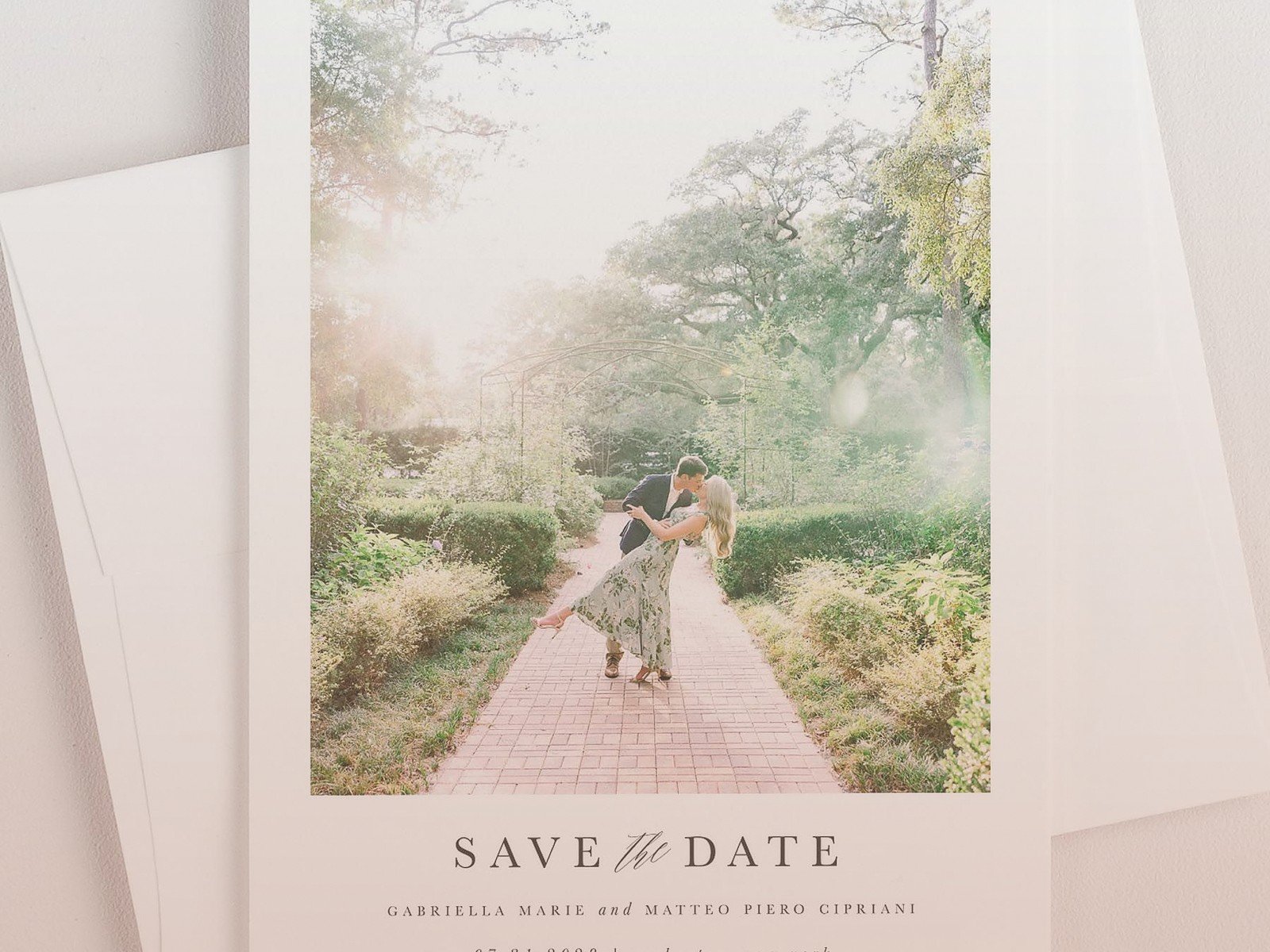
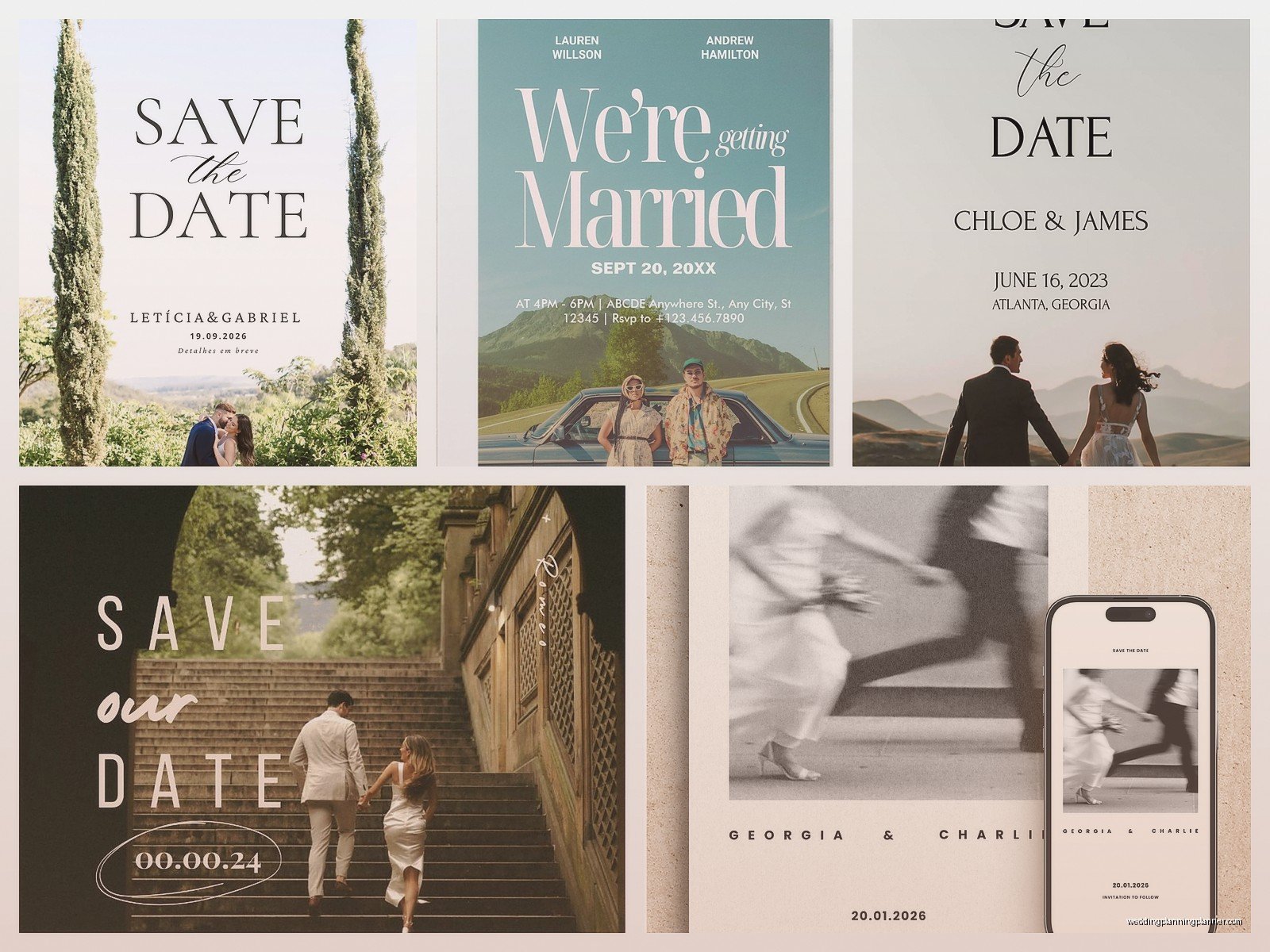
Your names (obviously). The date. The location—at minimum the city and state, you don’t need the full venue address yet. That’s it, those are the requirements.
But you should also include: your wedding website URL if you have one, because people WILL have questions immediately. Like I promise you, the second you send save the dates, you’re gonna get texts asking about hotel blocks and whether kids are invited and what the weather is like there in October. Having a website ready to go saves you from answering the same questions 47 times.
Some people include a note like “invitation to follow” which feels a bit formal for digital but whatever works for you. If it’s a destination wedding or a holiday weekend, definitely mention that prominently so people understand why you’re giving them advance notice.
Photo or no photo is totally up to you. Engagement photos are classic and cute. A photo of the location is nice for destination weddings. No photo at all is completely fine too, especially if you’re going for a minimalist design.
The Technical Stuff That’ll Make You Want To Scream
If you’re using a platform like Paperless Post or Greenvelope, they handle most of the technical backend stuff for you. But if you’re doing something custom or using a general email service, you need to think about:
Mobile optimization. Like I mentioned earlier, MORE THAN HALF of your guests will probably open this on their phone first. Your design needs to look good on a small screen. Text needs to be readable without zooming. Buttons need to be actually clickable with a thumb.
Image file sizes. Keep your images under 1MB total if possible. Large files = slow loading = people giving up and closing it.
Email client compatibility. This is the annoying one. Your save the date might look perfect in Gmail but totally broken in Outlook or Apple Mail. Most platforms test this for you, but if you’re DIYing it, you gotta check multiple email clients yourself or use a testing service.
Link tracking. If you include your website link, you want to be able to see if people are actually clicking it. Most platforms include this automatically. It helps you know if people are engaging or if your emails are going to spam.
Video Save The Dates Are A Whole Thing
Video save the dates got super popular during the pandemic and they’re still going strong. They’re fun! They’re personal! They’re also more work than you think!
You can go the professional route and hire a videographer to shoot something, which might run you $300-800 depending on your location. Or you can DIY it with your phone, which is free but requires decent lighting and probably multiple takes because you’ll hate how you sound on camera. Everyone hates how they sound on camera, it’s universal.
Keep it SHORT. Like 30-45 seconds max. Maybe 60 seconds if you’re doing something really creative. Nobody wants to watch a 3-minute save the date video, I don’t care how cute you think your dog is. (My cat Pepper walked through the frame during a video call with a client last month and the client literally said “can we include the cat in your save the date design?” so apparently pets are popular right now.)
For video hosting, you can upload to YouTube as unlisted, Vimeo with password protection, or some wedding platforms have built-in video hosting. Don’t email the actual video file unless it’s under 10MB, and even then it’s kinda risky.
Building Your Guest List For Digital Sending
You need everyone’s email addresses, which sounds obvious but is actually a pain. You’re gonna be texting people like “hey what’s your email?” and they’ll give you their work email or some ancient AOL address they haven’t checked since 2015.
Start collecting emails early. Create a spreadsheet. Include first name, last name, email address, and maybe a note about whether it’s Mr. and Mrs. or two separate people if you’re sending individual ones. If you’re inviting couples, decide now whether you’re sending one email to both of them (using one email address) or separate emails. There’s no wrong answer but you gotta be consistent.
Double-check for typos in email addresses. One wrong character and it bounces. Most platforms will tell you if something bounced, but then you gotta track down the correct address and resend.
The Spam Folder Problem
This is what keeps me up at night with digital save the dates. Email spam filters are AGGRESSIVE now, and wedding-related emails sometimes trigger them because they often include links, images, and words like “save the date” that can seem promotional.
Here’s what helps: Send from a real email address, not a no-reply address. “replies@ourwedding.com” looks spammy. “sarah.and.james@gmail.com” looks like real people. Ask guests to add your email to their contacts. Include this in your message: “Please add this email to your contacts so you don’t miss future updates!”
Don’t use all caps in your subject line. Don’t use excessive exclamation points. Don’t include too many links. These all trigger spam filters.
Subject line matters more than you think. “Save the Date: Sarah & James Wedding” is clear and straightforward. “You’re Invited!!!! 🎉💒👰” might end up in spam. Keep it simple.
Following Up Without Being Annoying
So you sent your digital save the dates and… now what? You’re gonna have people who didn’t see it, didn’t open it, or opened it and immediately forgot about it because digital stuff is easy to dismiss.
I usually recommend a follow-up text or phone call to your VIPs—immediate family, wedding party, closest friends. Just a quick “hey, sent the save the date by email, make sure you got it!” This catches any spam folder issues with your most important people.
For everyone else, your wedding website becomes your friend. Post about sending the save the dates on social media if you’re comfortable with that. “Save the dates are out! Check your email 💕” or whatever. This serves as a gentle reminder for people to look for it.
Some platforms let you see who opened your save the date and who didn’t. If someone hasn’t opened it after a week, it’s totally fine to resend with a note like “resending in case this ended up in spam!”
Adding Interactive Elements
One cool thing about digital save the dates is you can make them actually DO stuff. You can add a button that links to your website. You can include an “add to calendar” function that lets people save the date directly to their phone calendar with one click. You can embed a map showing where the wedding is.
The “add to calendar” thing is genuinely useful because it creates a calendar event with all the details you include, and it works across different calendar systems—Google Calendar, Apple Calendar, Outlook, whatever. Most wedding platforms include this feature automatically.
You can also include RSVP functionality right in the save the date, though I usually don’t recommend this because save the dates aren’t supposed to require a response. They’re just… saving the date. But some couples do it anyway, especially for very small weddings where the save the date basically IS the invitation.
Making It Feel Special Even Though It’s Digital
Look, some people are gonna be disappointed they’re not getting physical mail. My aunt literally complained to me about this at Thanksgiving even though it wasn’t my wedding. “Everything’s so impersonal now,” she said while scrolling through Facebook on her phone. The irony was lost on her.
But you can make digital feel special by personalizing it. Some platforms let you customize each save the date with the guest’s name. “Sarah and James are getting married! We hope you’ll be there, Aunt Carol!” That little personalization makes it feel less mass-email-y.
If you’re crafty or design-savvy, you can create something really custom and unique that you couldn’t do with print. Animations, color changes, interactive elements, stuff that moves or changes when you click it… or maybe that’s all too much and you just want something clean and simple. Both are totally valid.
Cost Comparison Because That Matters
Digital save the dates are generally cheaper than printed ones, but they’re not always FREE like people assume. Paperless Post charges per recipient—usually around $1-3 per save the date depending on the design. For 100 guests, that’s $100-300. Greenvelope is similar pricing.
Free options exist though. Evite has free designs (with ads) or premium designs for around $15-30 total regardless of guest count. Canva lets you design something yourself for free and then you can email it using your regular email. Google Forms or your wedding website platform might include free save the date sending.
Compare that to printed save the dates which run anywhere from $150-600 for 100 depending on printing method, paper quality, and whether you’re including envelopes and postage. So yeah, digital is usually cheaper, but it’s not necessarily pennies.
Mixing Digital and Physical
You don’t have to pick just one. I’ve had couples who sent digital save the dates to most guests but mailed physical ones to older relatives who don’t check email regularly. Or they sent digital first and then followed up with a postcard version for people who didn’t respond.
If you’re doing both, send the digital ones first since they’re faster. Then send physical ones a week or two later. This way people get the info quickly but also have something tangible if they want it.
Just make sure the information matches exactly across both versions because otherwise you’ll confuse people and end up answering questions about which date is correct. Ask me how I know this. Actually don’t, it was a mess, summer 2021, still traumatized.
Accessibility Stuff People Forget
Make sure your text has enough contrast against the background. Light gray text on white background might look elegant but people with vision issues can’t read it. Use alt text for images if your platform supports it. Keep your language clear and straightforward.
If you’re including important information in an image (like the date or location), also include it in actual text in the email body. Some email clients don’t load images automatically, so people won’t see it otherwise.
Font size matters too. Nothing smaller than 14pt for body text, bigger for the important stuff like the actual date and your names. I know everyone wants that delicate elegant font, but if people can’t read it, what’s the point?
Alright so that’s basically everything I’ve learned from sending approximately one million digital save the dates for clients over the past few years. The main thing is just… test it before you send it to everyone. Send it to yourself on different devices. Send it to a friend. Make sure everything works. Because once you hit send to 150 people, you can’t really take it back, and fixing mistakes means sending another email which just clutters everyone’s inbox and makes you look disorganized even though you’re probably actually very organized and this is just one small technical hiccup that anyone could have made but still
