
Planning Guides, Style Guide
Wedding Budget Spreadsheet: Free Excel Template Downloads
Jun
Okay So Wedding Budget Spreadsheets Actually Matter
Look I’m just gonna say it upfront – if you’re planning a wedding without a proper budget spreadsheet you’re basically driving with your eyes closed. I learned this the hard way back in spring 2023 when a couple came to me three months before their wedding and had been tracking expenses in their Notes app. Their NOTES APP. We sat down and when I asked them how much they’d spent so far they literally had to scroll through like 47 different entries and do mental math. It was painful for everyone involved.
The thing about wedding budgets is they get messy fast. You’ve got deposits, final payments, tips, taxes, random fees that vendors spring on you at the last minute (don’t even get me started on “cake cutting fees”), and suddenly your $30,000 budget is actually $37,500 and you’re sitting there wondering where it all went wrong.
Why Excel or Google Sheets Actually Works Better Than Apps
I know there are like a thousand wedding planning apps out there and some of them have budget features built in. But honestly? A spreadsheet is gonna give you way more control. You can customize literally everything, you’re not locked into someone else’s categories that don’t make sense for your wedding, and you can share it easily without making people download yet another app.
Plus spreadsheets don’t suddenly disappear when a startup runs out of funding. I’ve had clients lose all their planning data when an app shut down. Not fun.
What Should Actually Be In Your Wedding Budget Spreadsheet
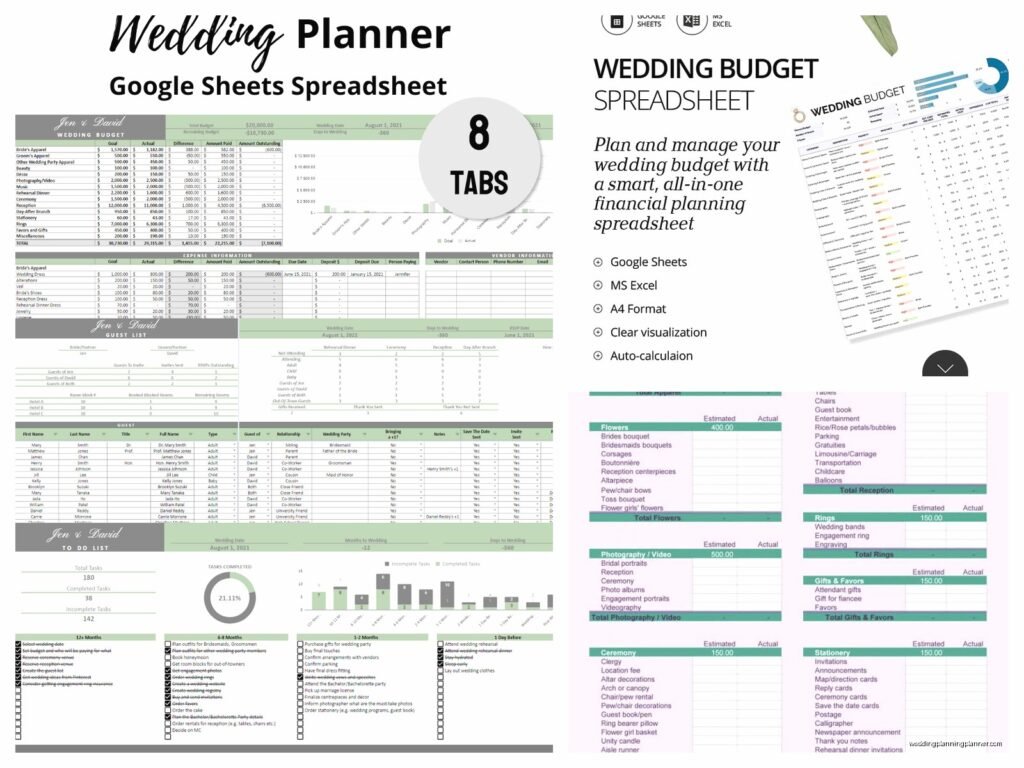
Alright so here’s what I include in the templates I make for clients. You need these columns at minimum:
- Category (venue, catering, flowers, etc.)
- Item description (be specific – not just “flowers” but “bridal bouquet” and “centerpieces” as separate lines)
- Estimated cost
- Actual cost
- Deposit paid
- Deposit date
- Balance due
- Due date
- Payment status
- Vendor contact info
- Notes
The notes column is where you put stuff like “includes setup fee” or “20% gratuity already included” because trust me you will NOT remember these details six months later.
The Categories Everyone Forgets
This is what annoys me SO much about those free templates you find on random websites – they always leave out the categories that end up costing you hundreds or even thousands of dollars. Here’s what actually needs to be in there:
- Alterations (this can easily be $500-800)
- Postage for invitations (if you’re doing fancy invites with wax seals or heavy cardstock, this adds up FAST)
- Marriage license and officiant tip
- Vendor meals at reception
- Overtime fees for vendors
- Hotel room for wedding night
- Transportation between ceremony and reception if they’re different locations
- Day-of emergency kit supplies
- Hair and makeup trials (not just the wedding day)
- Undergarments and shoes that nobody sees but you still gotta buy
- Thank you cards and postage
- Gifts for wedding party
- Preserving your bouquet after
I once had a bride call me crying because she’d budgeted $200 for invitation postage and it ended up being $680 because her invitations were thick and oversized. We could’ve avoided that if she’d gone to the post office with a sample first or… if her budget template had reminded her that postage was even a thing to think about.
Free Templates You Can Actually Download Right Now
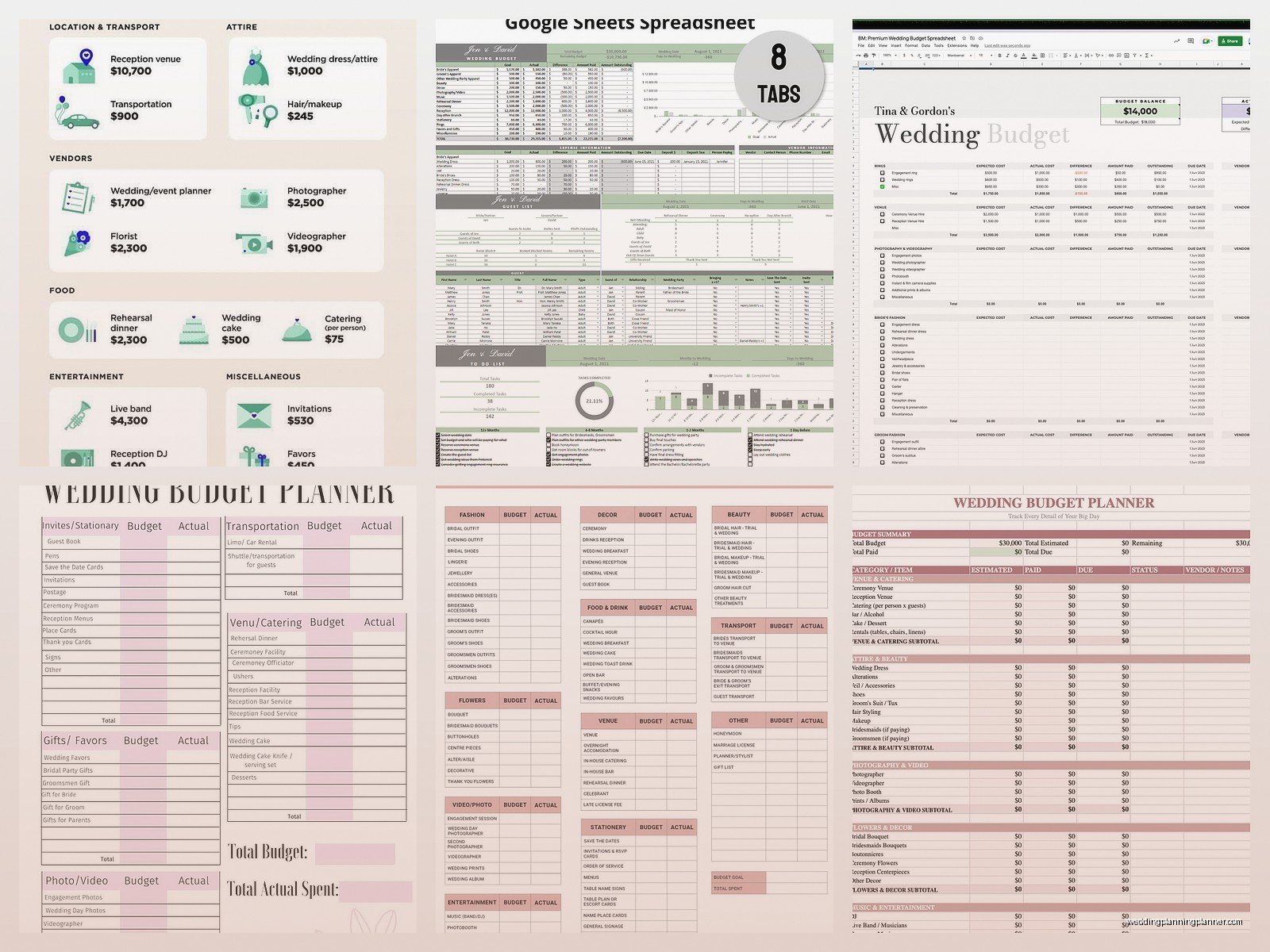
So there are a bunch of places to get free Excel or Google Sheets templates. I’m gonna be honest about which ones are actually good versus which ones look pretty but are useless.
Microsoft Office Templates
If you have Excel, just open it and search their template library for “wedding budget” – there are probably a dozen options. The one called “Wedding Budget Planner” is pretty solid. It has formulas already built in so it calculates your totals automatically and shows you how much you’re over or under budget in each category. The color coding is kinda ugly (very 2015 vibes) but who cares, it works.
Google Sheets Template Gallery
In Google Sheets, go to the template gallery and look for their wedding budget template. The nice thing about Google Sheets is you can share it with your partner or your parents if they’re contributing money, and everyone can update it in real time. I had a groom once who was traveling for work constantly and he could check deposits and payments from his phone between meetings. Made my life easier too because I could see their updated numbers without playing phone tag.
The Knot and WeddingWire
Both of these sites offer free downloadable budget spreadsheets. They’re fine. They’re very comprehensive which is good but also kinda overwhelming if you’re having a simpler wedding. Like they have categories for “ice sculpture” and “cigar roller” and I’m just like… most people don’t need these? But you can delete rows so whatever.
Vertex42
This is a website that makes Excel templates for everything, and their wedding budget spreadsheet is actually really well designed from a functionality standpoint. It’s not pretty but it has good formulas and even tracks who’s contributing what if you’ve got parents or other family members helping pay for stuff. That feature saved my sanity during one wedding where the bride’s parents, groom’s parents, and the couple themselves were all paying for different things and nobody could remember who was covering what.
How To Actually Use The Spreadsheet Without Losing Your Mind
Okay so you’ve downloaded a template. Now what? Because I’ve seen people download these things and then never touch them again or use them wrong and end up just as confused as before.
Set It Up During Your First Planning Session
Like literally sit down with your partner, open the spreadsheet, and start filling in what you know. Your total budget number goes at the top. Then start allocating money to categories based on your priorities. If you care more about photography than flowers, put more money there. The spreadsheet doesn’t judge you.
Put in estimated costs even if you’re just guessing. You can always adjust later. The point is to have SOMETHING written down so you’re working with actual numbers instead of vague ideas.
Update It Every Single Time Money Moves
This is where people fail. They set up the spreadsheet all nice and then… never update it. Or they update it once a month and forget half the transactions. Nah, you gotta update it immediately. Paid a deposit? Put it in the spreadsheet right then. Got a quote from a vendor? Add it that day.
I keep my laptop open during client meetings specifically so I can watch them update their spreadsheet while we talk. Otherwise they nod and say “yeah I’ll add that later” and then they don’t and we’re back to square one.
Add A Buffer Category
Here’s something that should be in every template but usually isn’t – a miscellaneous/buffer category that’s like 10-15% of your total budget. Because stuff WILL come up. You’ll decide you want uplighting at the last minute. Your bridesmaid will drop out and you’ll need to resize dresses. The weather will be bad and you’ll need to rent heaters or… I don’t know, my cat knocked over a vase the morning of a wedding once and we had to emergency buy replacements, these things happen.
If you budget for the unexpected, it’s less stressful when something unexpected actually happens.
Formulas That’ll Make Your Life Easier
If you’re even slightly comfortable with Excel formulas, add these to your spreadsheet. If not, most good templates will have them already but it’s worth understanding what they do.
SUM formula to total up each category and your overall spending. This is basic but essential. You need to see at a glance how much you’ve spent versus how much you budgeted.
A formula that calculates the difference between estimated and actual costs. This shows you where you’re going over or under budget. Usually it’s something like =C2-D2 where C is estimated and D is actual.
Conditional formatting that turns cells red when you go over budget in a category. This is more of a visual thing but it helps you spot problems quickly without reading through every line item.
A formula that calculates outstanding balances automatically. Like =ActualCost-DepositPaid so you can see how much you still owe each vendor without doing mental math.
Sharing And Permissions Settings
If you’re using Google Sheets, think carefully about who you give edit access to versus view-only access. Your wedding planner (hi) should probably have edit access. Your opinionated aunt who keeps suggesting you spend more on chair covers probably should not.
I usually recommend couples give their parents view-only access if the parents are contributing money. They can see where things stand but they can’t accidentally delete your formulas or change numbers without you knowing. Trust me on this – I’ve had parents “helpfully” update spreadsheets in ways that messed up all the calculations and then nobody could figure out what the real numbers were anymore.
Make A Copy Before Making Major Changes
Before you do any major reorganization of your spreadsheet, save a copy. File > Make a Copy in Google Sheets, or just Save As in Excel. That way if you accidentally delete something important or mess up a formula, you can go back to the previous version. I learned this during summer 2021 when a couple accidentally sorted one column without sorting the others and suddenly all their vendor names were attached to the wrong dollar amounts and it was a whole thing.
What To Do When You’re Going Over Budget
Your spreadsheet is gonna tell you pretty quickly if you’re overspending. Here’s what you do – and I mean actually do, not just worry about it.
First, look at your priorities list. What actually matters to you? If photography is your top priority and flowers are last, maybe you can cut back on florals to make room in the budget. Your spreadsheet should help you see where you have flexibility.
Second, check for duplicate expenses or things you’re paying for that you don’t actually need. Do you really need both a DJ and a live band? Are you paying for both a videographer and a photo booth when maybe one would be enough? Sometimes when I review budgets with clients I find they’ve budgeted for the same thing twice under different category names.
Third, negotiate with vendors or look for alternatives. Your spreadsheet gives you concrete numbers to work with when you’re having these conversations. Instead of saying “we need something cheaper,” you can say “we have $3,000 for catering and your quote is $4,200, is there a way to adjust the menu to hit our number?”
Tracking Payments And Due Dates
Use your spreadsheet as a payment schedule too. Sort by due date so you can see what’s coming up. I usually tell couples to check their budget spreadsheet every Sunday and look at what payments are due in the next two weeks. Set phone reminders if you need to.
Missing payment deadlines can cost you – some vendors charge late fees, or worse, they’ll give your date to someone else if you don’t pay your deposit on time. Your spreadsheet should prevent this from happening if you actually look at it regularly.
Also track payment methods. Did you put the deposit on a credit card? Write that down. Some credit cards have fraud protection or extended warranties that might matter later. Plus you’ll need to know which card to pay off.
The Stuff Nobody Tells You About Wedding Budgets
Your budget will change. Like constantly. I’ve never seen a couple stick to their exact original budget distribution. You’ll get quotes that are different than you expected, you’ll change your mind about priorities, you’ll discover you need things you didn’t know existed. That’s normal. The spreadsheet just helps you track those changes so you don’t lose control of the overall spending.
Taxes and fees will add 20-30% to most vendor quotes. Your spreadsheet should have a place to note whether a quote includes tax and gratuity or not. I cannot tell you how many couples have budgeted $5,000 for catering and then been shocked when the actual bill is $6,500 after tax, service charges, and gratuity.
You’ll probably go over budget somewhere. Almost everyone does. The goal isn’t perfection, it’s awareness. If you know you’re going $1,000 over on photography, you can consciously decide to cut $1,000 from somewhere else or adjust your overall budget. Without a spreadsheet you just… wouldn’t know until it was too late.
Mobile Access Because You’re Not Always At Your Computer
Download the Google Sheets app or Excel app on your phone. You’ll want to check your budget while you’re at vendor meetings or when you’re out shopping for wedding stuff. I’ve had couples pull up their spreadsheet in the middle of a cake tasting to check if they could afford to add another tier. That’s the kind of real-time decision making that keeps you on track.
Just be careful about editing on your phone because it’s easy to accidentally change a cell or mess up a formula when you’re tapping around on a small screen. Maybe give yourself view-only access on your phone and only edit from a computer? Or just be really careful, I don’t know, I’m not your mom.
The main thing is just HAVE a spreadsheet, USE it consistently, and don’t lie to yourself about the numbers. Your budget spreadsheet is like… it’s not there to judge you or stress you out, it’s there to give you information so you can make good decisions. And also so you don’t end up eating ramen for a year after your wedding because you overspent without realizing it.
