
Planning Guides, Style Guide
Ceremony Program Template: Order of Service Downloads
Jul
Okay So Ceremony Programs
Right so you need a ceremony program template and honestly this is one of those things that seems super straightforward until you’re actually doing it and then you realize there are like seventeen decisions to make. I’ve been doing wedding planning for almost two decades now and the number of times couples have emailed me at 11pm three weeks before their wedding asking “wait what actually goes IN a program” is… a lot.
The basic order of service is pretty standard but here’s the thing – you can totally customize it and honestly should because cookie-cutter programs are kinda boring? But let me walk you through what typically goes in there and then we can talk about where to actually download templates that don’t look like they’re from 2003.
The Standard Order That Actually Works
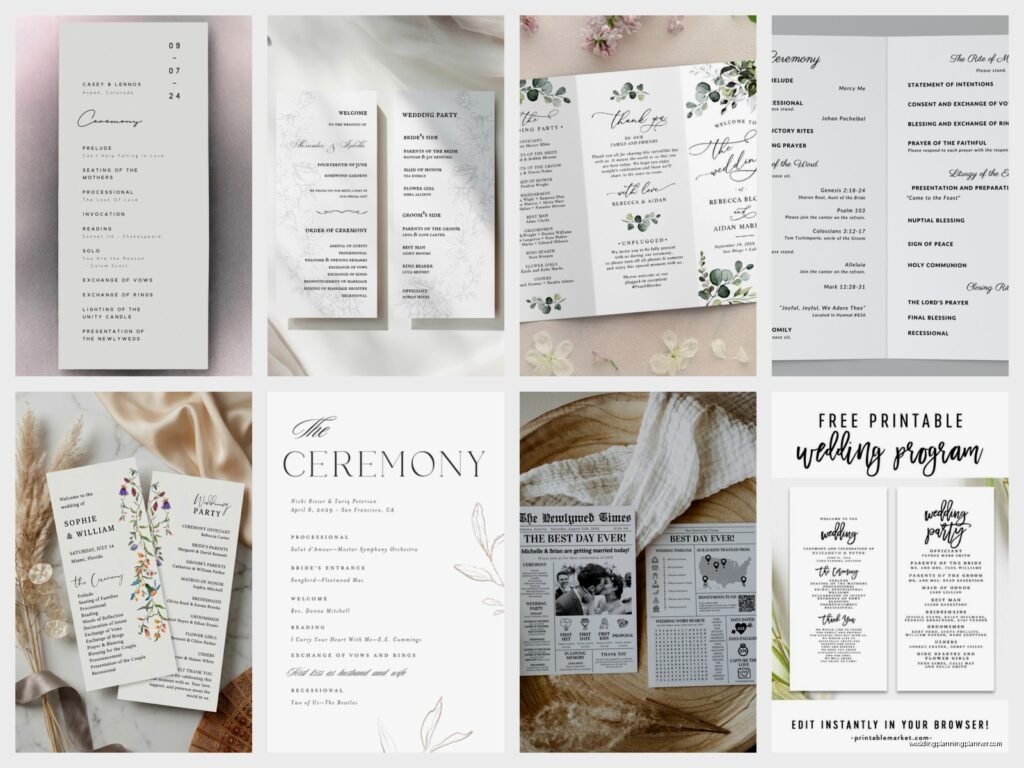
Most ceremony programs follow this flow and I gotta say it exists for a reason. You’ve got your cover page which should have your names, the date, and the location. Simple stuff. Then inside you’re looking at:
- Welcome message or opening statement
- Processional order (who’s walking down the aisle and when)
- The actual ceremony order like readings, vows, ring exchange
- Recessional (who exits first)
- Wedding party names with their relationship to you
- Thank you notes to parents or special people
- Reception details if it’s not obvious
In spring 2023 I had this couple who wanted to include their dog’s name in the program as “Ring Security” and honestly it was adorable but it made me realize people really do read these things more carefully than I thought. Like guests were coming up to them later asking where the dog was during cocktail hour.
What Annoys Me About Most Templates
Can we talk about how most free ceremony program templates online are absolutely terrible? They’re either way too formal with like calligraphy fonts you can’t read from two feet away, or they’re so casual they look like a birthday party invitation. And don’t even get me started on the ones that are technically “free” but then you can’t edit them without buying the premium version of whatever software they’re pushing.
The worst ones are the PDFs that aren’t actually editable. You download them thinking you’re gonna just type in your info and… nope. You need special software or you have to print and handwrite everything which is fine if that’s your aesthetic but most people want something they can customize digitally.
Where To Actually Download Good Templates
Alright so here’s where I send people when they ask. Canva is honestly your best friend here – they have hundreds of ceremony program templates and you can edit everything right in your browser. The free version has plenty of options but if you want the really gorgeous ones you might need Canva Pro which is like $13 a month or something. Worth it if you’re designing multiple wedding items.
I also really like Template.net because they have both Word and Google Docs versions. You can literally just click, make a copy, and start typing. They’ve got traditional, modern, rustic, all that stuff.
Etsy is where you wanna go if you need something specific to match your theme. You’ll pay anywhere from $5 to $25 usually but you’re getting something that actually looks professionally designed. Just make sure the listing says it’s editable in a program you actually have. I’ve seen too many people buy a template that only works in Adobe InDesign and they don’t have InDesign and then they’re panicking.
Microsoft Office templates are free if you have Office already and they’re not terrible? They’re very… safe. Very traditional. If you’re having a classic church wedding they’re perfect. If you’re getting married in a brewery or a forest or something they might feel too stuffy.
The Actual Content You Need To Include
So beyond just the order of events you’ve gotta think about what explanations you’re including. This is especially important if you’re having a religious ceremony or cultural traditions that not everyone will understand. I always tell couples to write a sentence or two explaining what’s happening during key moments.
Like if you’re doing a unity ceremony – whether it’s candles or sand or whatever – put a little note about what it symbolizes. Your guests aren’t mind readers and it makes the ceremony more meaningful when they understand what they’re witnessing.
The Processional Section
List everyone who’s walking down the aisle in order. Standard format is:
- Officiant (if they’re not already up there)
- Groom/Partner and parents or whoever
- Grandparents if they’re being seated specially
- Wedding party members
- Flower girl and ring bearer
- Bride/Partner and whoever’s walking them down
But honestly do whatever makes sense for your family situation. I had a wedding last summer where the bride walked herself down the aisle and met both her parents halfway and they all walked together the rest of the way. It was beautiful and we made sure to note that in the program so guests knew it was intentional and not just… chaotic.
The Ceremony Order Itself
This is where you get specific about what’s actually happening. Something like:
- Welcome and opening remarks
- Invocation or prayer (if religious)
- Reading #1 with reader’s name
- Reading #2 with reader’s name
- Exchange of vows
- Ring exchange
- Unity ceremony (if doing one)
- Pronouncement
- The kiss
- Introduction as married couple
You don’t have to include the actual text of readings or vows unless you really want to, but I’ve seen programs that do and they end up being like eight pages long which is… a choice. Most people just list what’s happening and who’s doing it.
Design Tips That Actually Matter
Okay so you’ve got your template downloaded and you’re filling it in. Here’s what I’ve learned works and what doesn’t. Font size matters way more than you think. Nothing smaller than 10pt for the main text. I know you wanna fit everything on one page but if your 75-year-old grandmother can’t read it without her reading glasses it’s too small.
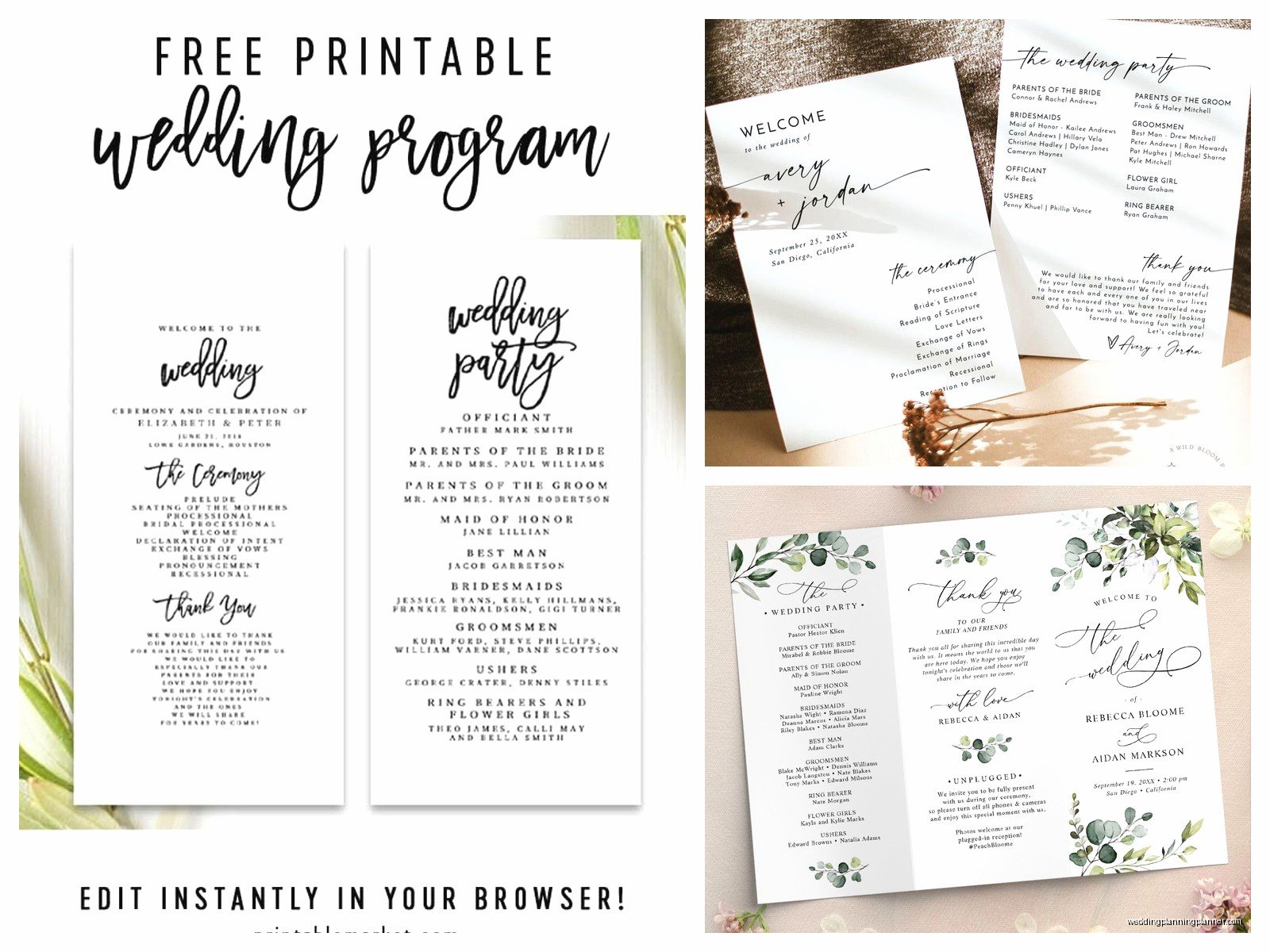
Stick to two fonts maximum. One for headings and one for body text. Mixing like four different fonts makes it look like a ransom note. I saw this happen in real life at a wedding in 2021 and I’m still thinking about it honestly.
White space is your friend. Don’t cram every inch of the page with text. Let it breathe. It’s more elegant and also easier to read.
Printing Considerations
If you’re printing at home test print at least one full version before you commit to printing 150 of them. I cannot stress this enough. Check that everything’s aligned, that nothing’s getting cut off, that the colors look right.
Most ceremony programs are either 5×7 inches or 8.5×11 folded in half. The 5×7 size is cute and feels more formal but you’re limited on space. The standard letter size folded gives you four pages to work with which is usually plenty.
Cardstock is worth the extra money. Regular printer paper feels flimsy and cheap. Get 80lb cardstock minimum. Your local print shop can do this for pretty reasonable prices if you don’t wanna deal with it yourself. Usually like $2-3 per program which adds up but… it looks professional.
What About Digital Programs
So this is becoming more common and honestly I’m here for it from a practical standpoint even though I love paper goods. You can create a program and share it via your wedding website or even as a QR code that guests can scan when they sit down.
The advantages are obvious – no printing costs, you can update it right up until the ceremony if something changes, and it’s better for the environment. The disadvantage is that not everyone is gonna pull out their phone during your ceremony and also older guests might not be comfortable with it.
I usually suggest a hybrid approach if you’re trying to save money. Print like 50 programs for older guests and people who you know will want a physical keepsake, then have the digital version available for everyone else.
Common Mistakes I See All The Time
People forget to include the actual location on the program. Like they put the date and their names but not where this is happening. If you’re having ceremony and reception at the same venue it might seem obvious but put it anyway.
Another thing is not proofreading names. Triple check the spelling of everyone’s name in the wedding party. I’ve seen programs go out with names spelled wrong and it’s awkward. Someone’s gonna be hurt about it even if they don’t say anything.
Also timing – don’t wait until the week before to figure this out. You need at least two weeks for printing, maybe three if you’re ordering online. More if you’re doing something custom or fancy.
The Thank You Section
This is optional but I think it’s a nice touch. A short paragraph thanking your parents, or anyone who helped significantly with the wedding, or even acknowledging family members who’ve passed away. Keep it brief though – this isn’t your Oscar acceptance speech.
Something like “We’d like to thank our parents for their love and support throughout our lives and especially during this wedding planning journey. We’re so grateful to celebrate with all of you today.” That’s plenty.
File Formats And Technical Stuff
When you’re downloading templates pay attention to what format they come in. PDF is usually not editable unless it specifically says it’s a fillable PDF. Word docs (.docx) and Google Docs are easiest for most people to work with. If you’re comfortable with design software, InDesign or Illustrator files give you the most control but there’s definitely a learning curve.
Save your file in multiple places. Email it to yourself. Put it in Google Drive. Save it on your computer. I’ve had too many panicked calls from people who lost their program file three days before the wedding because their laptop died or whatever.
When you’re ready to print save it as a PDF first. This locks everything in place so fonts and formatting won’t shift when you send it to the printer. Most print shops want PDFs anyway.
Budget Considerations
You can totally do this for cheap. Free template from Canva, print at home on cardstock from Staples, done. You’re looking at maybe $30 total for 100 programs. Or you can spend $500 having them professionally designed and printed on fancy paper with letterpress or foil stamping. Both are valid choices depending on what matters to you.
The middle ground is using a nice Etsy template (around $15) and having them printed at a local print shop (maybe $100-150 for 100-150 programs on good cardstock). That’s what I recommend to most couples who want something nice but aren’t trying to spend a fortune.
Alternative Ideas
Some people are skipping programs entirely and just having the officiant explain things as they go. This works fine for smaller weddings or very casual ceremonies. For larger or more formal weddings though, programs help keep everyone on the same page literally and figuratively.
I’ve also seen people do a large displayed program instead of individual ones – like a big poster or sign near the entrance that shows the order of service. Saves money and paper but then only the people who arrive early will actually see it.
Oh and one couple I worked with did a single-page program that was also a fan since their ceremony was outside in August. Practical and solved two problems at once which I thought was kinda genius actually.
My cat just knocked over my coffee while I’m writing this so excuse me while I… okay it didn’t spill on anything important we’re good.
Wording Examples
If you’re stuck on how to actually word things here are some examples that work. For the welcome section you can do something simple like “Welcome! Thank you for joining us as we celebrate our marriage. Please silence your cell phones and enjoy this special moment with us.”
For explaining a unity ceremony: “The bride and groom will light a unity candle together, symbolizing the joining of their two families into one.”
For religious elements you might need to include more explanation depending on your audience or maybe less if everyone attending shares your faith tradition…
The recessional section usually just lists who exits first (the married couple) then the wedding party in pairs, then parents. Pretty straightforward.
Last Minute Changes
Things happen. Readers drop out, you decide to add a song, whatever. If you’re printing at home this is easy to fix. If you’ve already sent files to a printer you might be stuck with the original version unless you wanna pay rush fees for reprinting.
This is another reason why I think having some flexibility is smart. Don’t include every tiny detail – just the main elements. That way if your cousin Sarah can’t do the reading anymore and your friend Mike steps in instead, it’s not a huge deal if the program says Sarah.
Actually it is kinda a big deal people will notice but like… they’ll survive. The ceremony will still happen. Nobody’s gonna stand up and protest because the program listed the wrong reader.
