
Planning Guides, Style Guide
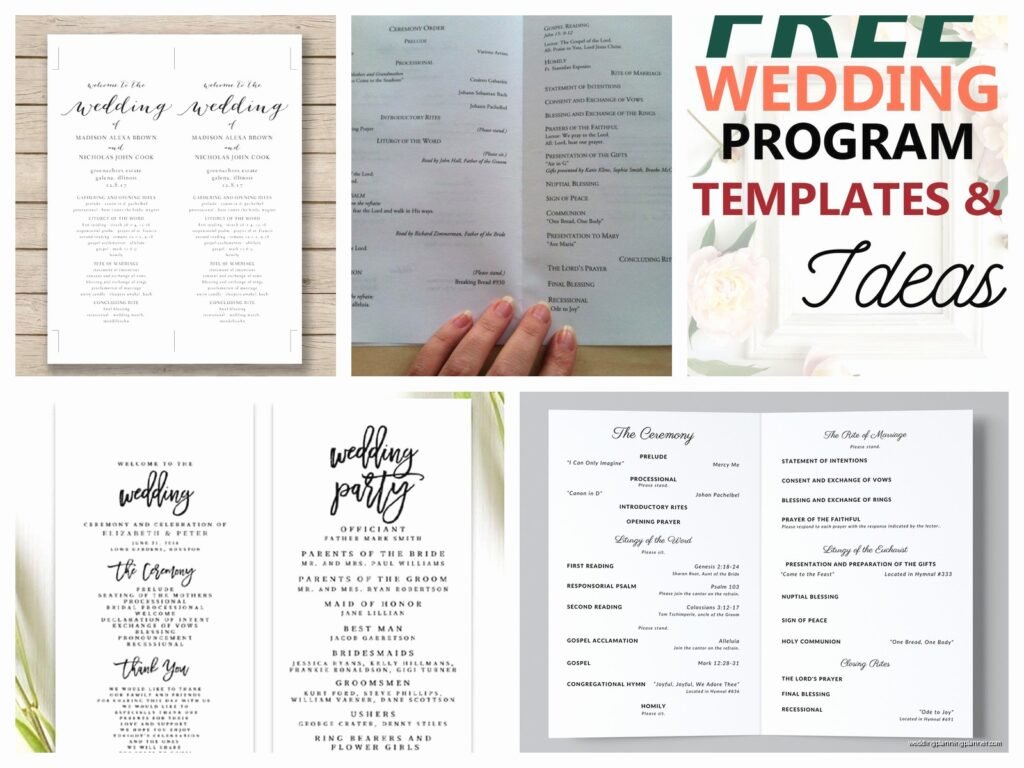
Free Wedding Ceremony Program Template: Free Download Files
Aug
Okay So Wedding Programs Don’t Have to Cost You Anything
Look, I’ve seen couples drop like $400 on ceremony programs and honestly it makes me a little crazy because there are SO many free templates out there that look just as good. You just gotta know where to look and how to customize them without making them look like you slapped them together in five minutes.
Free wedding ceremony program templates are basically pre-designed layouts that you can download, edit with your own ceremony details, and print at home or through a print shop. They come in different file formats—usually PDF, Word, Canva templates, or sometimes PowerPoint which is kinda old school but whatever works.
Where to Actually Find Good Free Templates
So the first place most people go is Canva and yeah, it’s gonna be your best friend here. They have literally hundreds of wedding program templates and while some require their Pro subscription, tons are completely free. I had this bride back in spring 2023 who was SO stressed about her budget, like crying-on-the-phone stressed, and I walked her through Canva and she ended up designing these gorgeous bifold programs herself in about 45 minutes.
Other solid options include Template.net which has a weird interface but decent designs, and Microsoft Office templates if you’re more comfortable with Word. Etsy also has free templates sometimes but you have to search specifically for “free” because most are paid. Pinterest is… well it’s a rabbit hole but you can find links to free downloads if you’re willing to click through seventeen different blogs.
What File Format Should You Download
This matters more than you’d think. PDF templates are the easiest to print but hardest to edit unless you have Adobe Acrobat Pro. Word or Google Docs templates are super easy to edit but sometimes the formatting gets wonky when you print. Canva templates stay in Canva which is actually great because the formatting stays locked—what you see is what you get.
I usually tell couples to go with Canva if they want something foolproof, or Word if they’re comfortable with basic document editing and want more control.
Different Program Styles You’ll See
Wedding programs basically come in a few standard formats and each one prints differently so pay attention:
Bifold programs are the classic—one sheet folded in half so you get four panels total. Front cover, two inside panels, and a back. These are what like 70% of weddings use because they’re simple and you can fit a decent amount of info without cramming.

Trifold programs fold twice and give you six panels. Honestly these are overkill unless you have a super long ceremony or want to include a bunch of family photos or something. They also use more ink.
Single sheet programs are just flat—no folding. Usually printed on both sides. These are having a moment right now because they look more modern and minimalist. My cat knocked over my coffee on a stack of these once and I wanted to cry… but anyway they’re easier to print at home.
Booklet programs are multiple pages stapled together and these are really only for like Catholic ceremonies or very traditional religious services with lots of readings and responses. Most free templates aren’t in this format.
Fan programs are mounted on sticks or handles and double as actual fans for outdoor summer weddings. The free templates for these are harder to find but they exist—you just have to buy the fan handles separately from Amazon or craft stores.
What Info Actually Goes In Your Program
Okay so this is where people overthink it. Your ceremony program needs to tell guests what’s happening and who’s involved—that’s literally it. Here’s what I include in the templates I give clients:
Cover: Your names, wedding date, location, and maybe a photo or design element. Some couples do “The Wedding of Sarah and Mike” and others just do their names with an ampersand. Whatever feels right.
Wedding party: List your bridesmaids, groomsmen, flower girls, ring bearers, officiant. Include their relationship to you if you want like “Best Man – Brother of the Groom” but honestly that’s optional.
Order of ceremony: This is the actual timeline of events. Processional, welcome remarks, readings, vows, ring exchange, pronouncement, recessional. If you’re having unity ceremonies or cultural traditions, list those too.
Thank you note: A quick paragraph thanking guests for coming and maybe honoring deceased family members. Keep it short—this isn’t your vow renewal speech.
Some couples also include song titles, reading excerpts, or explanation of cultural traditions. One thing that lowkey annoys me is when couples write like a full page essay about their love story in the program because no one reads that during the ceremony and it just wastes space and ink.
Customizing Your Downloaded Template
So you found a free template you like—now what. First thing is make sure you download it in a format you can actually edit. Some “free” templates are just JPG images which are useless unless you have design software.
Open the file and start replacing the placeholder text with your actual information. This sounds obvious but I’ve seen people print programs with “Bride Name Here” still in them so… just double-check everything. Triple-check name spellings of your wedding party because Aunt Linda will definitely notice if you spelled her daughter’s name wrong.
Change the colors to match your wedding palette if the template allows it. In Canva this is super easy—just click the color and choose a new one. In Word it’s a bit more annoying but doable through the design or format tabs, I think it depends on which version you have or…
Add your own photos if you want. Engagement photos work great for program covers. Just make sure the image quality is high enough—at least 300 DPI for printing. Blurry programs look really homemade in a bad way.
Printing Your Programs Without Losing Your Mind
You’ve got a few options here and they all have pros and cons. Home printing is the cheapest but most time-consuming. I had a groom print 150 programs on his home printer summer 2021 and he said it took like six hours because the printer kept jamming and he ran out of ink twice. But he saved probably $200 so he was happy.

If you’re printing at home, invest in good cardstock—at least 80lb weight, preferably 100lb. Regular printer paper looks cheap and flimsy. Staples, Office Depot, or Amazon all sell cardstock in various colors. White and ivory are classic but you can also get blush, navy, kraft paper, whatever matches your vibe.
Make sure your printer can handle cardstock thickness. Most home printers can do 80lb but struggle with anything heavier. Check your printer manual or just do a test print first.
Print shops like FedEx Office or local printers are the middle option. You upload your file, they print it on nice paper, and you pick it up. Usually costs like $1-3 per program depending on paper quality and whether you want color or black and white. They can also cut and fold for you which saves tons of time.
Online print services like Vistaprint or Minted will print and ship to you. Takes longer and costs more but the quality is usually really good. Some of them have their own free templates too so you might design and print all in one place.
Design Mistakes People Keep Making
Using fonts that are too small or too decorative. Your grandma needs to be able to read this without her glasses, ideally. I recommend nothing smaller than 10pt for body text and 14pt+ for headers. And that super swirly calligraphy font you love? Use it for names only, not for paragraphs of text.
Overcrowding the layout. White space is your friend. If you’re cramming text into every available inch, your program looks cluttered and stressful. It’s okay to have breathing room.
Not accounting for bleed and margins when printing. If your design goes right to the edge of the page, you need to set up bleed properly or the printer will cut off parts of your design. Most templates account for this already but if you’re heavily customizing, watch out.
Forgetting to proofread. Seriously just read through it like five times. Have someone else read it. Spell check doesn’t catch everything—like if you wrote “maid of honor” instead of “matron of honor” for your married best friend.
Free Template Resources I Actually Recommend
Canva has the biggest selection and easiest editing. Search “wedding program” and filter by free. You can customize everything from your browser, no software needed.
Template.net has both simple and fancy options. The site design is kinda outdated but the templates themselves are decent. Download as Word or PDF.
Microsoft Office templates are built into Word if you have it. Go to File > New > Search “wedding program” and you’ll get maybe a dozen options. They’re basic but functional.
The Knot and Wedding Wire both offer free printable programs. They’re pretty traditional in style but well-designed and easy to customize.
Greetings Island has cute illustrated designs and you can personalize and print right from their site. Free with their watermark or pay like $3 to remove it.
Timeline for Getting Programs Done
Don’t wait until the week before your wedding to think about programs. I’ve had clients try to throw these together two days before and it’s just stressful and unnecessary. Here’s a reasonable timeline:
Six to eight weeks before: Start looking at templates and choose your design. Gather all the information you need—finalize your wedding party list, confirm the ceremony order with your officiant, write your thank you note.
Four weeks before: Customize your template with all your details. Proofread. Have your partner proofread. Have your mom or a bridesmaid proofread.
Three weeks before: Do a test print of one program. Check how the colors look, make sure everything fits on the page, verify the paper quality is what you want. Make any adjustments.
Two weeks before: Print all your programs or place your order with a print shop. Build in buffer time in case something goes wrong with printing or shipping.
One week before: Programs should be completely done. Folded if needed, maybe tied with ribbon if you’re doing that. Ready to hand off to your ceremony coordinator or whoever’s distributing them.
Do You Even Need Programs Though
Honestly this is worth asking. Wedding programs are traditional but not required. If you’re having a short ceremony, small guest count, or want to go more eco-friendly, you can skip them entirely. Some couples do a big printed sign at the ceremony entrance instead with the wedding party and ceremony order. Others project the information on a screen if the venue has that capability.
I’d say programs are most useful for religious ceremonies where guests might not know when to stand or sit, ceremonies with cultural traditions that need explanation, or when you have a large wedding party and want to formally recognize everyone.
For a simple 20-minute ceremony with like 30 guests? Nah, probably don’t need them. For a full Catholic mass with 200 guests? Yeah, programs are helpful.
Extra Touches That Don’t Cost Extra
If you want your free template to look more custom, there are little things you can add. A photo of you two on the cover personalizes it immediately. A meaningful quote or song lyric that relates to your relationship. A small timeline of your relationship (“Met 2018, Engaged 2023, Married 2024”). A QR code linking to your wedding website or online photo sharing.
You can also get creative with how you present them. Tie them with ribbon in your wedding colors. Place them in a cute basket or display. Attach them to small flowers or greenery. These extras cost a bit but the template itself is still free so you’re saving money overall.
One couple I worked with printed their programs on kraft paper and tied them with twine and little sprigs of lavender from their garden—looked expensive but cost basically nothing because the template was free and they already had the lavender. People kept commenting on how beautiful they were.
The whole point is that free templates give you a professional starting point without the designer price tag. You’re paying with your time instead of money, which works perfectly if you’re on a budget and don’t mind spending a few hours on DIY projects. Just start early, proofread everything, and don’t overthink it too much.
