
Planning Guides, Style Guide
Wedding Day Schedule Template Free: Free Download Files

Aug
Look, You Need a Wedding Day Timeline Template Yesterday
So basically every single couple I’ve worked with thinks they can just wing the wedding day timeline and then like three weeks before the wedding they’re texting me at 11pm asking when the cake cutting should happen. This literally happened in spring 2023 with a bride who had been SO organized about everything else but completely ignored my emails about creating a schedule until she suddenly panicked.
Here’s the thing about wedding day schedule templates – you absolutely need one, and I’m gonna walk you through where to find free ones and how to actually use them because downloading a pretty PDF and filling it out are two completely different skill sets apparently.
Where to Actually Download Free Templates
Alright so first off, there are like a million places online but most of them are either trying to sell you something or they’re so basic they’re useless. Here’s where I actually send my clients:
- Google Docs Template Gallery – seriously just search “wedding timeline template” in Google Docs and there are dozens that you can copy and customize right there without downloading anything
- Canva – they have free wedding timeline templates that are actually pretty and you can edit them even if you have zero design skills
- Microsoft Office Templates – if you have Word or Excel these are already built in, just search the template library
- The Knot and WeddingWire – both have free downloadable Excel and PDF versions though honestly they’re kinda cluttered with their branding
- Pinterest – I know I know but actually if you search “free wedding timeline template download” you’ll find tons of Etsy sellers offering freebies to get you on their email list
What really annoys me is when websites make you create an account and give them your email and answer like seventeen questions about your wedding just to download a basic Excel file. Like just let me have the template without joining your newsletter that I’m gonna unsubscribe from immediately anyway.
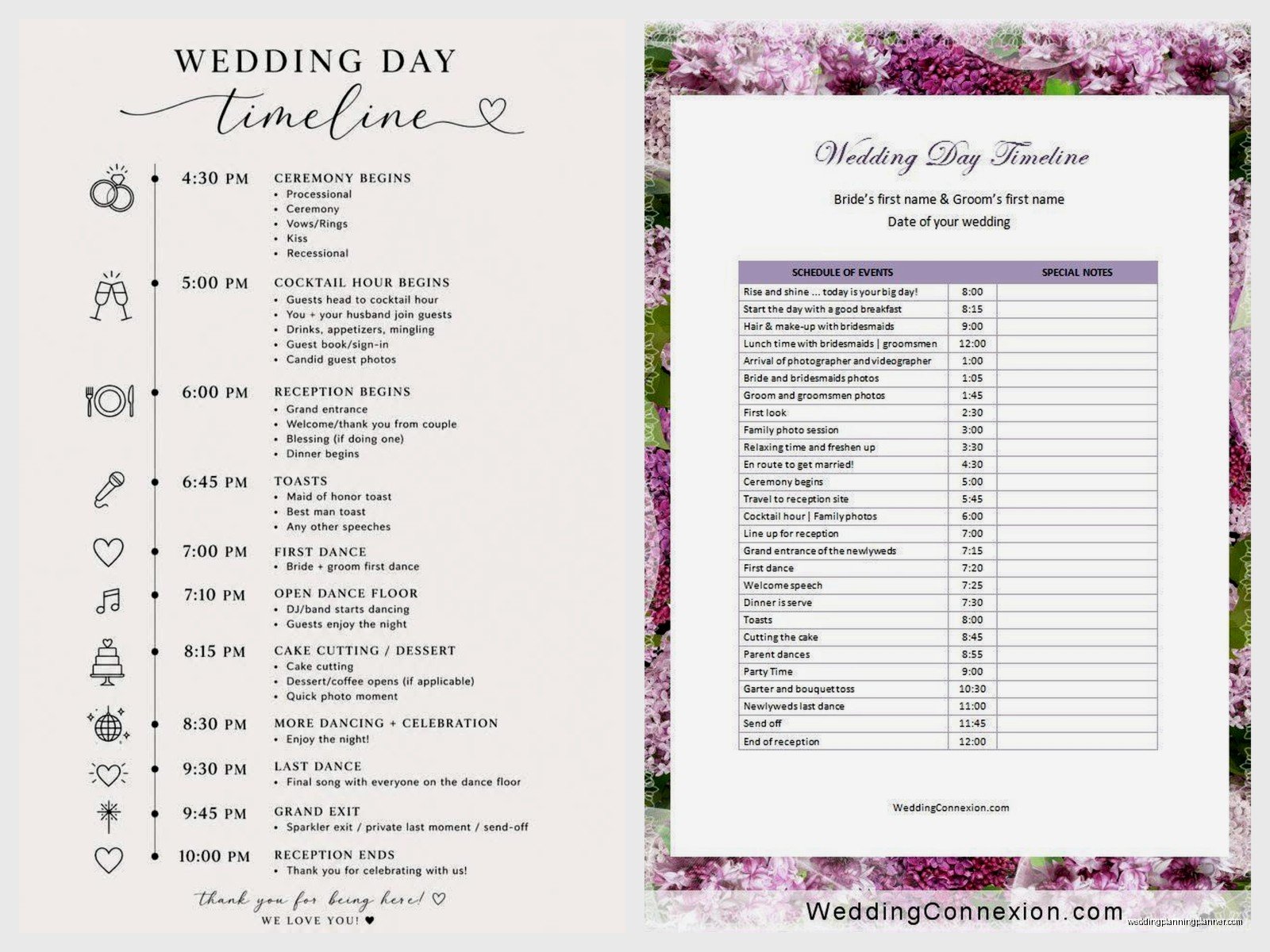
What Should Actually Be On Your Timeline
Okay so you’ve downloaded something, now what? Most templates are gonna have the basics but lemme tell you what absolutely needs to be on there because I’ve seen some disasters where people forgot crucial stuff:
The Morning Of
You need times for when hair and makeup starts, like the actual START time not when you think you might roll out of bed. Include each person getting their hair done – if you’ve got six bridesmaids and only two stylists, do the math because that’s gonna take way longer than you think. I learned this the hard way when… actually I’ve learned this the hard way about twelve times because people never believe me.
Also put in when the photographer arrives. And when you’re eating breakfast or lunch because everyone forgets to eat and then someone passes out during the ceremony which happened at a wedding I planned in 2019 and it was the groom’s sister and it was a whole thing.
Getting Ready Photos
Block out like 30-45 minutes for this. The photographer needs time to get detail shots of the dress, rings, shoes, invitations, all that stuff. Then getting-ready candids, then probably some posed shots with your bridesmaids. You’re gonna want to look at your phone during this time but trust me, just let the photographer do their thing.
First Look (If You’re Doing One)
This needs its own time slot – usually 20-30 minutes. And it needs to be at a specific location that you’ve scouted beforehand because scrambling to find a pretty spot while your photographer is losing natural light is not fun for anyone.
Ceremony Start Time
Here’s where you gotta work backwards. If your ceremony starts at 5pm, your processional music starts at 5pm, which means everyone needs to be lined up and ready by 4:50pm at the latest, which means you need to be in your dress and completely ready by like 4:30pm, which means… you see where I’m going with this.
Also build in a 15-minute buffer because I’ve never seen a wedding ceremony start exactly on time. Ever. Guests are late, the groom’s boutonniere falls off, someone needs to pee, whatever. It happens.
Cocktail Hour
This is usually when you’re doing family photos and wedding party photos if you didn’t do a first look. Standard cocktail hour is 60 minutes but if you have a huge family photo list it might need to be 75-90 minutes. Just make sure your caterer knows because the timing affects when they need to start serving dinner.
My cat just jumped on my keyboard sorry – anyway, make sure your photographer has the family photo list like two weeks before the wedding so they can plan the order efficiently.
Reception Timeline
This is where it gets tricky and where most couples either over-schedule or under-schedule. Here’s a basic flow:
- Grand entrance (5 minutes)
- First dance (one song, so like 3-4 minutes)
- Welcome speech if you’re doing one (5-10 minutes max please)
- Dinner service (plan for 45-60 minutes depending on service style)
- Toasts during dinner (keep these to 3-4 people max, 3-5 minutes each)
- Parent dances (6-8 minutes total)
- Cake cutting (10 minutes including photos)
- Open dancing (however much time you have left)
- Bouquet/garter if you’re doing that (10-15 minutes)
- Last dance and exit (15 minutes for the song plus exit photos)
You don’t have to do all of these things, and honestly the more stuff you cut, the more time for dancing which is usually what people actually remember about a wedding.
How to Customize Whatever Template You Downloaded
So you’ve got this template and it’s probably got times that don’t match your wedding at all. Here’s how to make it actually useful:
Start with your ceremony time because that’s usually locked in based on your venue availability. Then work backwards for getting ready and forwards for the reception. I use a Google Sheet for this with my clients because multiple people can edit it and you can see changes in real-time which is super helpful when you’re coordinating with your photographer, DJ, and coordinator.

Add a column for who’s responsible for each thing. Like “DJ announces first dance” or “coordinator cues cake cutting” or “maid of honor has the marriage license.” This is SO important because otherwise everyone assumes someone else is handling it and then nothing happens.
Include contact info at the top – all your vendors’ phone numbers should be on this document. When you’re in the moment and something goes wrong (and something always goes slightly wrong), you don’t wanna be searching through emails for your florist’s number.
The Vendor Timeline vs. The Personal Timeline
Okay this is something I don’t think people realize – you actually need two versions of your timeline. One for you and your wedding party that has like “bride gets in dress” and “groomsmen stop at Taco Bell” (yes this was on a real timeline I received), and one for your vendors that just has the professional stuff they need to know about.
Your vendor timeline should include:
- Load-in and setup times
- When each vendor arrives
- Key moments they need to capture or facilitate
- Tear-down time
- Venue end time (super important)
Send the vendor timeline to everyone about a week before the wedding, then again two days before. Some vendors are gonna say they didn’t get it anyway but at least you tried.
Common Mistakes People Make With These Templates
I’ve seen a lot of timeline disasters so lemme just save you from the most common ones:
Not accounting for travel time. If your ceremony is at a church and your reception is at a venue 20 minutes away, you need to build in like 30-40 minutes for everyone to get there because people drive slow and get lost and need to stop for gas or whatever. This seems obvious but I’ve had couples schedule cocktail hour starting 15 minutes after the ceremony ends and then wonder why no one’s at the reception yet.
Scheduling things too tightly. You need buffer time between everything. If hair starts at 9am and takes 45 minutes per person and you have five people, that’s not done at 12:45pm, that’s done at like 1:15pm because people are late and the hairstylist needs to take a break and someone’s gonna need a redo.
Forgetting about sunset. If you want golden hour photos, you need to know when sunset actually is and block out 20-30 minutes for that. Your photographer will love you for this. Check the actual sunset time for your specific date and location, not just like “around 7pm” or whatever.
Not sharing the timeline with the right people. Your timeline is useless if only you and your partner have it. Send it to your wedding party, your parents, all your vendors, your coordinator if you have one, and anyone else who needs to be somewhere at a specific time. I usually tell couples to create a Google Doc and share the link in a group text or email.
The “Oh Crap” Buffer
This is my secret weapon and I wish more couples would do this – build in a 30-minute “buffer” block somewhere in your timeline, usually right after the ceremony or during cocktail hour. Don’t tell anyone what it’s for, just leave it blank or label it “photos” or something vague. This is your cushion for when things run late, which they will, and it means you won’t be behind schedule for the entire reception trying to catch up.
I started doing this after a wedding in summer 2021 where the ceremony ran 40 minutes late because the groom’s grandmother’s car broke down and they waited for her (which was sweet but also chaos). Because we didn’t have any buffer time, the entire reception was rushed and stressful and dinner was cold because we couldn’t delay it any more and it was just… not great.
Making Your Timeline Actually Pretty
Look, the Excel spreadsheet version works fine but if you’re gonna print these and put them in your bridesmaids’ emergency kits or whatever, you might want something that doesn’t look like a corporate meeting agenda. That’s where Canva comes in clutch – they have templates that match different wedding aesthetics and you can change colors and fonts and add little graphics.
But honestly? Your DJ doesn’t care if it’s pretty. They just need to know what time to play the first dance song. So like, make it pretty for your personal copy if you want but the vendor version can just be a Google Doc and that’s totally fine.
Apps vs. Paper Timelines
Some couples use wedding planning apps that have timeline features built in. I’ve used most of them with clients and they’re… fine? The problem is not everyone has the app downloaded, and on the wedding day you might not have your phone on you (you’re in a dress with no pockets), and your vendors definitely don’t wanna download an app just to see your timeline.
I’m kinda old school about this – print out physical copies and have them in key locations. One with the DJ, one with your coordinator, one in each getting-ready room, one with your maid of honor. And yeah, have a digital version shared via Google Docs or email, but paper backups have saved me so many times when someone’s phone dies or they can’t get wifi at the venue.
When to Actually Create This Thing
I tell couples to do a rough timeline about 3-4 months before the wedding once you know who your vendors are and what your general plan is. Then finalize it about 3-4 weeks before and send it to vendors. Then update it one more time the week before if anything has changed.
Don’t wait until the week before to START creating your timeline because that’s when you realize you’ve scheduled 8 hours of activities into a 5-hour reception and then you’re stressed and making bad decisions about what to cut. Ask me how I know this happens constantly.
The template itself takes like 20 minutes to fill out if you have all your information ready. The hard part is actually having all your information ready – knowing how long hair and makeup takes, when your photographer arrives, what time the venue needs to be cleared, all that stuff. So gather that info first, then plug it into whatever template you downloaded.
Special Situations That Mess Up Standard Templates
Most free templates assume a pretty standard wedding format but what if you’re doing something different? Here’s how to adjust:
Outdoor ceremony with weather backup: You need two timelines, one for perfect weather and one for if you move inside. Include the decision time for which one you’re doing – usually this is like 2 hours before the ceremony.
Courthouse or elopement: The standard templates are gonna be way too detailed. Just make a simple one-column list with times and activities. You probably only need like 8-10 line items total.
Destination wedding: Account for time zone confusion if guests are traveling in. Also build in extra time for literally everything because you’re in an unfamiliar location and nothing goes as smoothly as it would at home.
Brunch or lunch wedding: Reverse engineer the standard template – people are more awake and energetic earlier in the day so you might not need as long of a dance party, but you might want more time for lawn games or other activities.
I had this one couple who did a 10am ceremony and then brunch reception and they were done by 2pm and honestly? It was kinda genius because they got to enjoy the rest of their wedding day relaxing instead of being exhausted.
Anyway, the main thing is just download a template that has the basic structure, customize it for your actual wedding, share it with everyone who needs it, and then build in buffer time because Murphy’s Law is very real when it comes to weddings. Don’t overthink it – a timeline on a basic Google Doc that everyone actually follows is way better than a gorgeous Canva design that no one looks at.
