
Planning Guides, Style Guide
Vow Renewal Invitations Templates Free: Anniversary Downloads
Jul
Where to Actually Find Free Vow Renewal Invitation Templates
Okay so you’re looking for free vow renewal invitation templates and honestly there are SO many options out there but also a lot of them are kinda… not great? Like I had this couple in spring 2023 who came to me after they’d already downloaded like fifteen different templates and none of them printed correctly because the sizing was all weird. That was a whole mess.
The best free resources I always send people to are Canva, Greetings Island, and Adobe Express. Canva has hundreds of anniversary invitation templates and most of them are actually free, though some elements might be premium. You can customize colors, fonts, photos, everything. Greetings Island is less well-known but they have really specific vow renewal templates that you can personalize online and then download as a PDF. Adobe Express used to be called Adobe Spark and it’s gotten way better over the past year or so.
There’s also Evite if you’re doing digital invitations only, which honestly more people should consider because it tracks RSVPs automatically and you don’t have to deal with stamps or… wait I’m getting ahead of myself.
What You Need to Know Before Downloading Anything
Before you start downloading every pretty template you see, figure out what format you actually need. Are you printing these yourself at home? Going to a print shop? Sending them digitally? This matters SO much because a template that looks gorgeous on your screen might be sized wrong for standard invitation paper.
Standard invitation sizes are usually 5×7 inches or 4×6 inches. Some templates are A4 or letter size which is fine if you’re gonna trim them down but you gotta know that upfront. I’ve seen people waste so much money printing the wrong size and then trying to cut them with regular scissors and it just looks… not good.
Also check the file format. PDF is usually safest for printing. PNG works too but make sure the resolution is at least 300 DPI (dots per inch) or it’ll look blurry when printed. JPG can work but sometimes loses quality. And this really annoyed me once – some websites advertise “free templates” but then only let you download a low-res version unless you pay, which like, just say it’s not free then?
Customizing Your Template Without Losing Your Mind
So you found a template you like. Now you need to make it yours. The wording for vow renewal invitations is different from regular wedding invitations and I think that trips people up sometimes.
You don’t need formal “honour of your presence” language unless that’s your style. Most vow renewals are more relaxed. Something like:
Please join us as we celebrate our love and renew our vows
Sarah and Michael Chen
20 years of marriage
Saturday, June 15th, 2024
4:00 in the afternoon
Riverside Gardens
That works perfectly fine. You can add “hosted by” if your kids are organizing it, which is actually really sweet when that happens. Include the important details: who, what, when, where, and RSVP info. Don’t forget the RSVP info – you need to know how many people are coming.
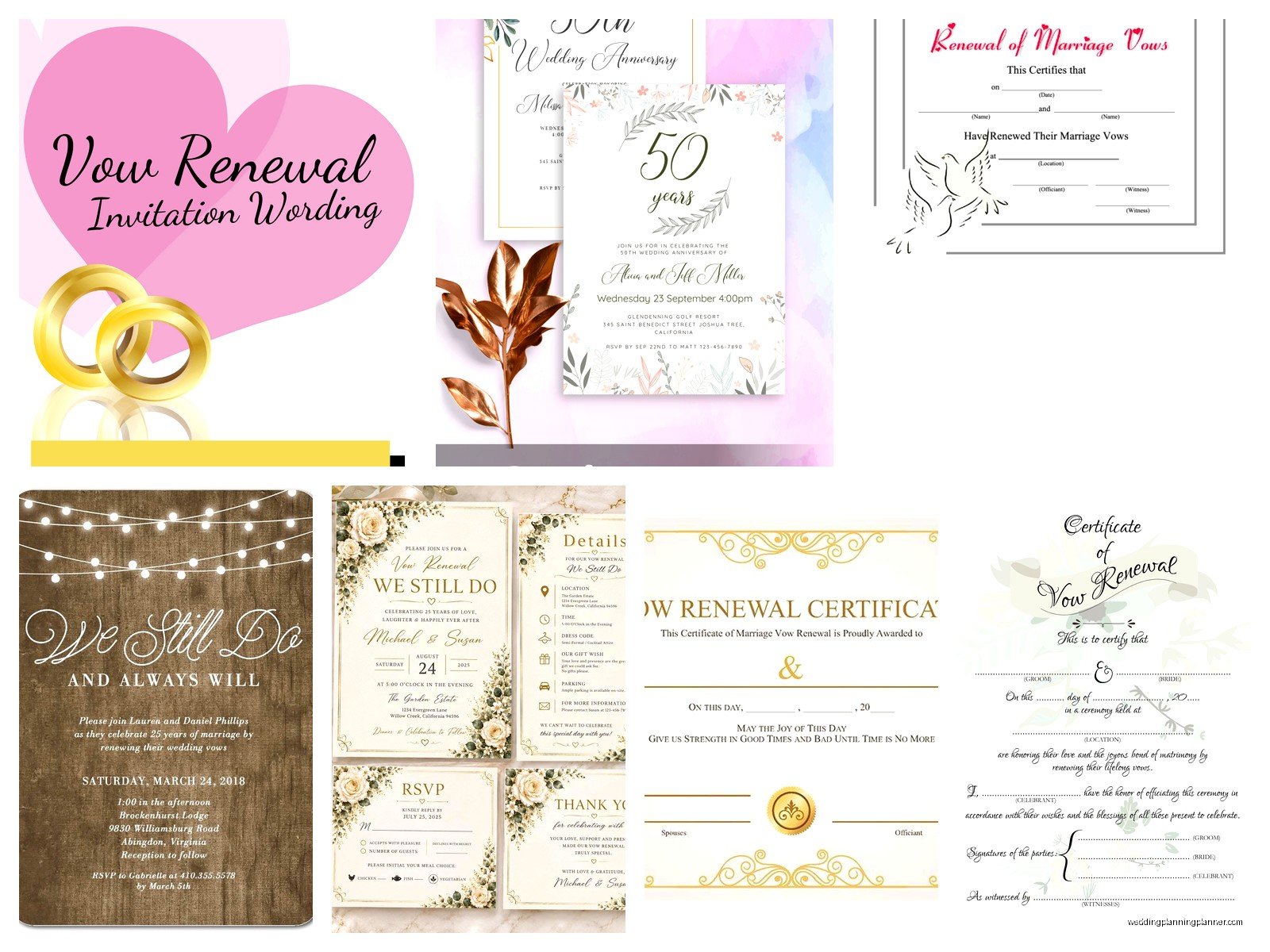
When I’m customizing templates in Canva, I usually change the colors to match either the original wedding colors (if they remember them) or whatever colors they’re using for the renewal celebration. Fonts matter more than you’d think. Don’t use more than two different fonts on one invitation – it gets chaotic. One for headings, one for body text, done.
Photos: To Include or Not Include
A lot of free vow renewal templates have spaces for photos. You can use an engagement photo, a current photo, a throwback from your wedding day, or both. The “then and now” style is really popular and honestly it’s sweet without being too sappy.
If you’re adding photos to a template, make sure they’re high quality. Phone photos are usually fine if they’re recent (like from the last few years) but don’t try to scan an old printed photo with your phone camera – it never looks good. If you only have printed photos from your wedding, take them to a print shop and get them properly scanned at high resolution. Or skip the photo entirely, some of the prettiest vow renewal invitations I’ve seen were just elegant text designs.
Digital vs. Printed Invitations
Let’s talk about whether you should actually print these or just send them digitally because this is kinda a personal preference thing but also practical.
Digital invitations are free to send (obviously), easier to track RSVPs, better for the environment, and you can send them like a week before if you’re running late on planning. My cat knocked over my coffee on a client’s printed invitations once and we had to rush order reprints, so digital definitely has its advantages in terms of stress levels. Plus older relatives who you think “won’t understand email” probably text and use Facebook now, so don’t automatically assume you need paper.
But printed invitations feel more special to some people. They’re tangible, you can display them, they feel more like an “event” than an evite. For milestone anniversaries like 25 or 50 years, printed might be worth it. For smaller celebrations or 5-10 year renewals, digital is totally acceptable.
If you’re printing at home, you’re gonna need good cardstock. Get at least 80lb weight, preferably 100lb or 110lb. Regular printer paper looks cheap and flimsy. Staples, Michael’s, or any office supply store sells cardstock in individual sheets. Print a test copy on regular paper first to make sure everything lines up correctly before you waste the good paper.
My Actual Favorite Free Template Sources
Okay so specifically, here’s where I tell clients to look:
Canva: Search “vow renewal invitation” or “anniversary invitation” and filter by free. You’ll get tons of options. The editor is super user-friendly even if you’ve never done graphic design. You can download as PDF, PNG, or JPG. Free account lets you download but there’s a daily limit I think.
Greetings Island: More traditional designs usually, which works great for formal renewals. You customize online, download the PDF, and print. They have matching RSVP cards and thank you cards too which is helpful for keeping everything coordinated.
Adobe Express: Really clean modern templates. The customization options are solid and it integrates with Adobe Fonts so you get way more font choices. Free tier is pretty generous.
Etsy freebies: Some Etsy sellers offer free templates to showcase their style, hoping you’ll buy other stuff. Search “free vow renewal invitation template” and filter to show only free items. You’ll usually get a Word doc or PDF you can edit.
Template.net: Has some free options though you gotta scroll past the premium ones. The free ones are more basic but if you just need something simple and printable, it works.
Wording Ideas That Don’t Sound Cheesy
The hardest part for most people isn’t finding the template, it’s figuring out what to write. Here are some phrases that work without being too over-the-top:
- “Join us as we celebrate [number] years of marriage and renew our commitment to each other”
- “We did it once, we’re doing it again” (if you’re more casual)
- “Because our love story deserves a sequel”
- “Still saying yes after all these years”
- “Together we’ve built a beautiful life, join us as we celebrate”
You don’t have to mention the specific anniversary year if you don’t want to, but most people do. It’s also nice to include a line about how guests have been part of your journey, like “We’d love for you to witness this special moment as we’ve been blessed by your love and support over the years” but honestly that might be too formal depending on your vibe.
What Details People Always Forget
I see the same missing info on DIY invitations all the time. Don’t forget:
Dress code: Even if it’s casual, say that. People stress about what to wear. “Cocktail attire,” “Beach casual,” “Garden party attire” – just give them something to work with.
Reception details: If there’s dinner or dancing after the ceremony, mention it. “Dinner and dancing to follow” or “Light refreshments will be served” or whatever applies.
Kids or no kids: If you don’t want children there, you gotta say “Adult reception” or address the envelopes only to the adults. People will bring kids unless you’re clear.
Registry or gift info: This is tricky because you don’t put it on the invitation itself, but you can include a separate card or put it on your wedding website if you have one. A lot of people doing vow renewals say “no gifts” or “donations to [charity] in lieu of gifts” which is totally fine.
Parking or venue details: If the venue is hard to find or parking is limited, include a details card or put the info on a website. You can add a QR code to the invitation that links to a Google Doc with all the extra info.
Printing Tips From Someone Who’s Seen It Go Wrong
If you’re printing at home, do a test print in black and white on regular paper first. Check that nothing is cut off at the edges. Printers have margins they can’t print to, usually about a quarter inch on each side, so make sure your design accounts for that.
Print in batches. Don’t try to print all 50 invitations at once – your printer will jam or run out of ink halfway through. Do like 10 at a time, check the quality, then continue.
Let the ink dry completely before handling them, especially if you’re using an inkjet printer. Laser printers are better for this because the toner doesn’t smudge, but inkjet is fine if you’re patient.
If you’re going to a print shop like FedEx Office or a local printer, bring your file on a USB drive and also email it to yourself as backup. Ask them to print one sample first before they run the whole batch. It costs like two bucks and can save you from wasting money if something looks wrong.
Envelopes Are Surprisingly Annoying
You need envelopes that fit your invitation size. A 5×7 invitation needs A7 envelopes (5.25 x 7.25 inches). A 4×6 invitation needs A6 envelopes. You can buy these at craft stores or online. Get a few extra because you’ll mess up addressing some of them, guaranteed.
For addressing envelopes, you can handwrite them (looks personal but time-consuming), print labels (practical but less elegant), or print directly on the envelopes if your printer can handle it (test this first because some printers jam with thick envelopes).
There are free envelope addressing templates too – you can use mail merge in Word or Google Docs to print addresses. Search “mail merge envelope template” and you’ll find tutorials. It’s kinda tedious to set up but once you do it, printing 50 envelopes takes like five minutes.
Timeline for Getting These Done
Vow renewal invitations should go out about 6-8 weeks before the event. That gives people time to plan, especially if they’re traveling. For destination renewals or holiday weekends, send them 3 months ahead.
Work backwards from your event date. If your renewal is August 1st, you want invitations mailed by mid-June. Which means you need them designed and printed by early June. Which means you should start looking at templates in May. Don’t wait until the last minute – I had a couple try to throw together invitations two weeks before their renewal and it was just stressful for everyone involved, the printing place messed up their order and there wasn’t time to fix it properly.
Digital invitations can go out closer to the date, like 4 weeks before, since there’s no mail time. But still give people reasonable notice.
Save the Dates: Do You Need Them?
For vow renewals, save-the-dates are optional. If you’re having a big celebration or people need to travel, send them. If it’s a smaller gathering with mostly local guests, you can skip straight to the invitation. Save-the-dates would go out 4-6 months before the event.
There are free save-the-date templates too, same sources as invitations. They’re usually simpler – just names, date, location, and “formal invitation to follow.” You can send these digitally even if you’re doing printed invitations, nobody cares about that.
Matching RSVP Cards and Other Inserts
Some free invitation templates come with matching RSVP cards, which is nice for keeping everything coordinated. If yours doesn’t, you can usually find a blank template in a similar style or just make your own.
RSVP cards should include a “reply by” date (usually 2-3 weeks before the event), space for names and number of guests attending, and meal choices if you’re serving dinner. Include a pre-addressed, stamped envelope for the RSVP card to come back to you – yes, you have to pay for those stamps, but otherwise people won’t send them back.
Or honestly, just put “RSVP to [email] or
” on the invitation and skip the RSVP cards entirely. Way easier, way cheaper, and in 2024 most people would rather text or email their response anyway. I’m gonna be real, half the people won’t mail back RSVP cards even if you include them, so digital responses are just more reliable.Other inserts you might need: directions card if the venue is tricky to find, accommodations card with hotel info for out-of-town guests, or a details card with your wedding website. Keep it minimal though – too many cards and papers and people lose track of what’s important.
Common Mistakes I Keep Seeing
Don’t use white text on a light background or dark text on a dark background. It needs to be readable. I’ve seen some gorgeous designs that were literally impossible to read because the contrast was terrible.
Don’t make the text too small. If you’re over 40 like me, you know that tiny text is the enemy. Keep body text at least 10-11pt font size, preferably 12pt. Older guests especially will appreciate this.
Don’t forget to proofread. Have someone else read it too because you’ll miss your own typos. Check dates, times, addresses, spelling of names. Triple-check the venue address – I’ve seen invitations with wrong street numbers and that’s just a disaster waiting to happen.
Don’t use too many design elements. Less is more. A pretty border, nice font, maybe a photo – that’s enough. Don’t add flowers AND ribbons AND sparkles AND multiple photos. It gets cluttered fast.
What If You’re Not Tech-Savvy?
If templates and computers aren’t your thing, here are your options: ask a friend or family member who’s good with this stuff (offer to buy them dinner or something in exchange), hire someone on Fiverr to customize a template for you (usually like $20-50), or just go with a very simple text-only design that you can create in Word.
A simple invitation with just text, no graphics, printed on nice cardstock, is completely fine. You don’t need anything fancy. The important part is getting the information to your guests, not winning a design award.
Microsoft Word has invitation templates built in – open Word, click “New,” search “invitation” and you’ll find some basic options. They’re not specifically for vow renewals but you can adapt them easily. Same with Google Docs templates.
Digital Delivery Methods
If you’re going digital, you’ve got options for how to send them. Email is most common – just attach the invitation as a PDF or image. In the email body, include the key details too in case someone can’t open the attachment.
Text message works too, especially for smaller gatherings. You can text the image directly or use a link to a Google Drive or Dropbox file.
Facebook Events are free and work well if all your guests use Facebook. You can upload your invitation design as the event image, and Facebook handles RSVP tracking automatically. The downside is it feels less formal and some people might not check Facebook regularly.
There are services like Paperless Post, Punchbowl, and Evite that let you send designed invitations and track RSVPs. Some designs are free, some cost “coins” or require a subscription. These look nicer than a regular email and feel a bit more special… I mean they’re still digital but they have that virtual envelope opening animation thing which is kinda fun I guess.
Whatever method you choose, send it from an email address or account you actually check because people will reply with questions. Create a new email specifically for the renewal if you want to keep everything organized, like “[email protected]” or whatever.
