
Planning Guides, Style Guide
Wedding Budget Template Free: Free Download Files
Aug
So You Need a Wedding Budget Template
Okay look, I’ve been planning weddings since like 2009 and the number one thing that stresses couples out isn’t the centerpieces or the seating chart drama—it’s the money. Every single time. And honestly, most people don’t even know where to start tracking everything, which is how you end up spending $400 on escort cards when you swore your stationery budget was $150 total.
I’m gonna walk you through the free budget templates that actually work, where to download them, and how to use them without wanting to throw your laptop out the window. Because trust me, I’ve seen couples try to track a $35,000 wedding in their Notes app and it never ends well.
Why You Actually Need This Thing
Spring 2023 I had this couple—super sweet, both teachers—and they came to me three months into planning completely panicked. They’d been using a napkin. Like an actual napkin from their engagement dinner with numbers scribbled on it. They were $8,000 over budget and didn’t even realize it because they weren’t tracking deposits versus final payments. I wanted to cry for them.
A budget template isn’t just about adding numbers. It’s about seeing where your money is actually going, tracking what you’ve paid versus what you still owe, and not having a heart attack when your venue sends the final invoice.
What Makes a Good Template
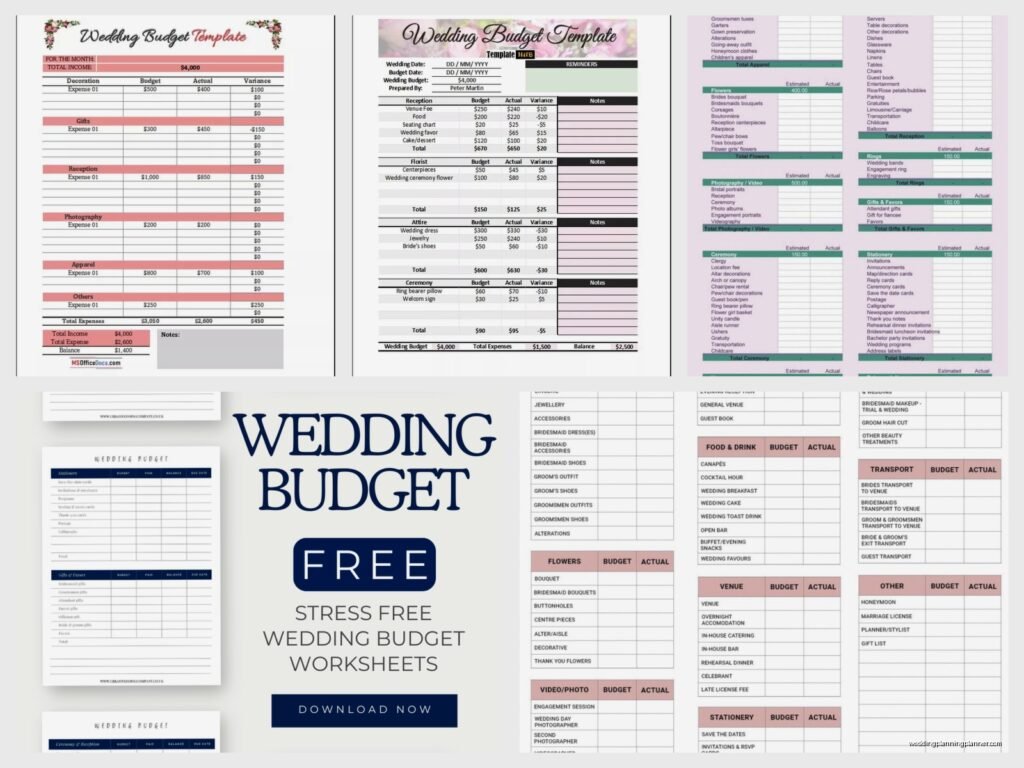
You need something that tracks:
- Estimated costs for each category
- Actual costs (because they’re never the same, ugh)
- Deposits paid
- Outstanding balances
- Payment due dates
- Who’s contributing what if you have family help
The templates that just have “flowers: $____” are completely useless. You need the breakdown or you’re gonna forget that the florist also charges delivery, setup, and breakdown fees.
The Free Templates That Don’t Suck
Google Sheets Templates
Honestly this is what I recommend to like 80% of my clients. Google has free wedding budget templates that you can access through Google Sheets. Just go to Google Sheets, click on “Template Gallery” and search for wedding budget. They’ve got a couple options.
The main one is pretty comprehensive—it’s got all the major categories already set up, formulas that actually work, and it automatically calculates your totals. Plus you and your partner can both access it from anywhere, which is kinda essential when you’re making decisions at 11pm lying in bed scrolling through vendor Instagram accounts.

What I like: It’s cloud-based so you can’t lose it. The formulas are already built in. You can customize the categories. And you can share it with your planner or your mom or whoever without emailing seventeen versions back and forth.
What annoys me about it: The default categories are sometimes too broad. Like they’ll have “reception” as one category when really you need to break that into venue, catering, bar, rentals, etc. But you can edit it pretty easily.
Microsoft Excel Templates
If you’re more of an Excel person (I see you, spreadsheet nerds), Microsoft has free templates too. You can find them at templates.office.com and search for wedding budget. They’ve got several options with different layouts.
The Excel ones tend to be more detailed actually—they often include percentage breakdowns showing what portion of your budget goes to each category, which can be helpful when you’re trying to figure out if spending 40% on the venue is reasonable or completely bonkers.
Download it, save it to OneDrive or your computer, and you’re set. Some of them even have built-in charts and graphs if you’re into that visual stuff.
The Knot’s Budget Tool
Okay so this is technically online rather than a download, but The Knot has a free budget tool that’s actually pretty solid. You create an account, plug in your total budget and guest count, and it suggests how much to allocate to each category based on averages.
I have mixed feelings about this one because the “average” allocations don’t work for everyone—like if you’re having a backyard wedding, you’re not spending 40% on a venue, you know? But it’s a good starting point and it integrates with their other planning tools.
You can’t download it as a file though, which drives me crazy when couples want to bring a printed version to vendor meetings. You’d have to export it or screenshot it or something.
WeddingWire Budget Tool
Similar to The Knot—free account, online tracker, suggested allocations. Also has a mobile app which is convenient when you’re at a venue tour and need to check your numbers real quick.
Same issue with not being able to download a traditional Excel or PDF file, but you can access it from anywhere and it saves automatically.
My Personal Favorite Setup
I’m gonna be honest, I usually create a custom Google Sheet for my clients because I’ve been doing this so long I know exactly what categories to include and how to break things down. But if you want to DIY it, here’s what I’d do…
Start with the Google Sheets template, then customize it. Add these categories if they’re not already there:
- Venue (ceremony and reception separate if different)
- Catering (food and beverage separate)
- Bar/Alcohol
- Photography
- Videography
- Music/Entertainment (ceremony musicians, DJ, band—all separate)
- Flowers and Decor (break this into ceremony flowers, bridal party flowers, centerpieces, other decor)
- Invitations and Paper Goods (save the dates, invitations, programs, menus, place cards, thank you cards)
- Wedding Cake/Desserts
- Attire (dress, alterations, accessories, groom outfit, all separate)
- Hair and Makeup
- Rings
- Transportation
- Accommodations
- Officiant
- Wedding Planner/Coordinator
- Rentals (tables, chairs, linens, etc.)
- Favors and Gifts
- Miscellaneous (trust me, you need this—there’s always random stuff)
Then add columns for: Estimated Cost, Actual Cost, Deposit Paid, Deposit Date, Balance Due, Balance Due Date, Paid in Full Date, and Notes.
That Notes column is where you put stuff like “includes setup and breakdown” or “gratuity not included” or “need to tip separately” because you will forget these details, I promise you.
How to Actually Use the Thing
Getting the template is the easy part. Using it consistently is where people fall apart. Summer 2021 I had a client who downloaded three different templates and then never filled out any of them because she felt overwhelmed. Like she’d open it, stare at all the blank cells, and close her laptop.

Start With What You Know
Don’t try to fill everything out at once. Start with your total budget number at the top. Then fill in any vendors you’ve already booked with their actual numbers. Then—and this is important—go back and estimate the rest based on research.
Spend an hour looking at photographer prices in your area. Check out florist Instagram accounts and see what they charge. Get actual numbers, not fantasy numbers. Your Pinterest-perfect floral installation probably costs $4,000, not $800.
Update It Immediately
This is the part that everyone skips and then regrets. Every time you book a vendor, update the template that same day. Put in the deposit amount, the due date for the final payment, everything. My cat literally walked across my keyboard while I was typing this and I almost lost my train of thought but anyway—
Set reminders for yourself for payment due dates. Put them in your phone calendar. Because missing a payment deadline can sometimes mean losing your deposit or getting charged late fees, and that’s just throwing money away.
Track the Little Stuff
This is what kills people. They track the big vendors but forget about the $75 here and $150 there. Guest book? Card box? Ring bearer pillow? Flower girl basket? Welcome sign? Table numbers? Those little things add up to like $500-1000 before you know it.
I had a bride spend $600 on decor from Etsy in tiny purchases over two months and she didn’t realize it until I made her add it all up. She nearly died.
What to Do When You’re Over Budget
Okay so you’ve filled out your template and you’re $5,000 over budget. Don’t panic. This happens to literally everyone because vendors are expensive and weddings cost more than you think they will, even when you think you’ve accounted for that.
Look at your spreadsheet and sort by highest to lowest cost. Your biggest expenses are probably venue, catering, and photography. Those are the hardest to reduce without major changes. Look at the middle-tier expenses—that’s usually where you can make cuts.
Do you really need a videographer? Do you need flowers for the ceremony AND the reception or can you move them? Can you DIY anything? Do you need a full bar or would beer and wine work?
The miscellaneous category is also usually bloated. You don’t need everything you think you need.
The Annoying Truth About “Free” Templates
Here’s what kinda bugs me about the whole free template situation—they’re all slightly different and none of them are perfect for everyone. You’re probably gonna need to customize whatever you download, which means you need to be at least somewhat comfortable with spreadsheets.
And the templates that come from wedding websites are sometimes designed to make you think you need to spend more than you do. Like they’ll have “welcome bags” as a standard category with a suggested budget of $500, and suddenly you’re thinking you need welcome bags when maybe you don’t?
Just remember that any template is a starting point. Your wedding doesn’t have to include every single category. If you’re not doing favors, delete that row. If you’re doing a courthouse ceremony, you don’t need ceremony musicians.
Sharing Your Budget
If your parents or in-laws are contributing, you’ll need to share this somehow. Google Sheets is great for this because you can give people view-only access or editing access. I usually recommend view-only unless you want your mom going in and changing numbers without telling you.
Some couples keep a “public” version that they share with family with less detail, and a private version with everything. That’s totally valid if you don’t want everyone knowing exactly what you’re spending on everything.
Backing Up Your Budget
I shouldn’t have to say this but I’m gonna say it anyway—back up your budget file. If you’re using Google Sheets it’s automatically saved, but if you’re using Excel, save it to cloud storage. I’ve had clients lose their budget spreadsheet when their computer crashed and they had to recreate it from memory and vendor emails. Don’t be that person.
Also maybe print a copy and put it in your wedding binder? I know that sounds old school but sometimes it’s nice to have a physical backup, plus you can scribble notes on it during vendor meetings.
Extra Features Some Templates Have
Some of the fancier free templates include guest list tracking, payment tracking for who’s contributed what if multiple people are paying, and even vendor contact information sections. These can be helpful but they can also make the spreadsheet feel overwhelming.
I usually tell couples to keep the budget separate from other planning tools because trying to track everything in one massive spreadsheet gets messy. But if you’re super organized and love a good comprehensive spreadsheet, go for it.
There are also templates that connect to apps or have automatic calculations for things like per-person costs. Those are helpful when you’re trying to figure out if adding 20 more guests is feasible or not.
Just remember that the best template is the one you’ll actually use. If it’s too complicated, you won’t keep it updated. If it’s too simple, it won’t give you the information you need. Find something in the middle that works for your brain and your planning style, and stick with it from engagement to final payment and you’ll be so much less stressed about money throughout the whole process.
