
Planning Guides, Style Guide
Wedding Ceremony Program Template: Order Service Downloads
Jul
Okay So Wedding Ceremony Programs
Look, I’m just gonna jump right in because ceremony programs are one of those things couples either completely forget about until two weeks before the wedding or they obsess over for months. There’s like no in-between and honestly both approaches kinda stress me out.
The basic order of service template is actually pretty straightforward once you know what you’re doing. You need the front cover with names and date obviously, then the actual ceremony timeline inside, then maybe a thank you section or wedding party list. The problem is everyone downloads these templates and then has absolutely no idea what order things actually happen in a ceremony because—and this annoyed me SO much in spring 2023—people just assume all weddings follow the same format. They don’t.
What Actually Goes In The Program Order
So the typical ceremony flow goes something like this and you can adjust based on your specific situation. Processional comes first which is when everyone walks down the aisle. You’ll wanna list this as “Processional” and maybe include the song title if you want. Then opening remarks or welcome from your officiant. After that you’ve got readings if you’re doing any—poetry, religious texts, that one passage from The Notebook that everyone uses, whatever.
Then you hit the main event stuff: the vows exchange, ring exchange, maybe a unity ceremony like candle lighting or sand pouring or… I had a couple once who did a whiskey blending ceremony which was actually pretty cool. Declaration of marriage comes next where the officiant says you’re married. Then the kiss obviously. Recessional is last when you walk back up the aisle as a married couple.
But here’s where it gets tricky and where templates can actually screw you up. Religious ceremonies have different orders. Catholic ceremonies have a full mass sometimes. Jewish ceremonies have the ketubah signing and the breaking of the glass. Hindu ceremonies are like hours long with multiple components. So you gotta actually talk to your officiant about what YOUR ceremony includes before you finalize any template.
Template Downloads That Don’t Suck
I’ve used probably hundreds of templates over the years and most are fine but some are genuinely terrible. Canva has a bunch of free ones that are pretty customizable—you can change colors, fonts, add photos. The nice thing about Canva is you don’t need to be a designer to make something that doesn’t look like it was made in 1997 Microsoft Word.
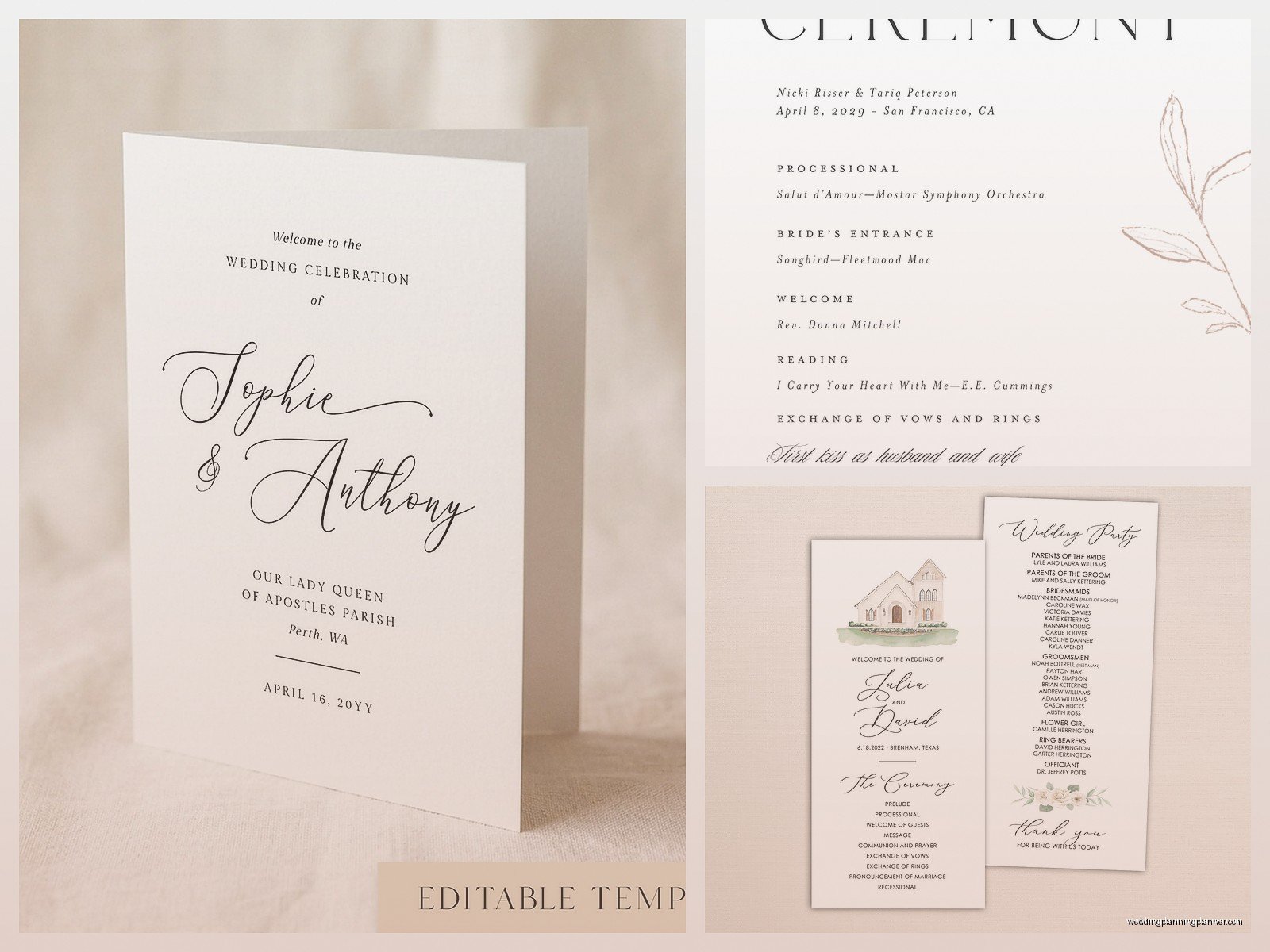
Etsy has tons of templates too, usually between 5 and 20 dollars. You download them as PDFs or Word docs or sometimes Photoshop files if you’re fancy. The Etsy ones often come with matching invitation designs which is nice for cohesion. Just make sure you’re buying an editable template and not just a jpeg because I’ve seen people make that mistake and then they’re stuck.
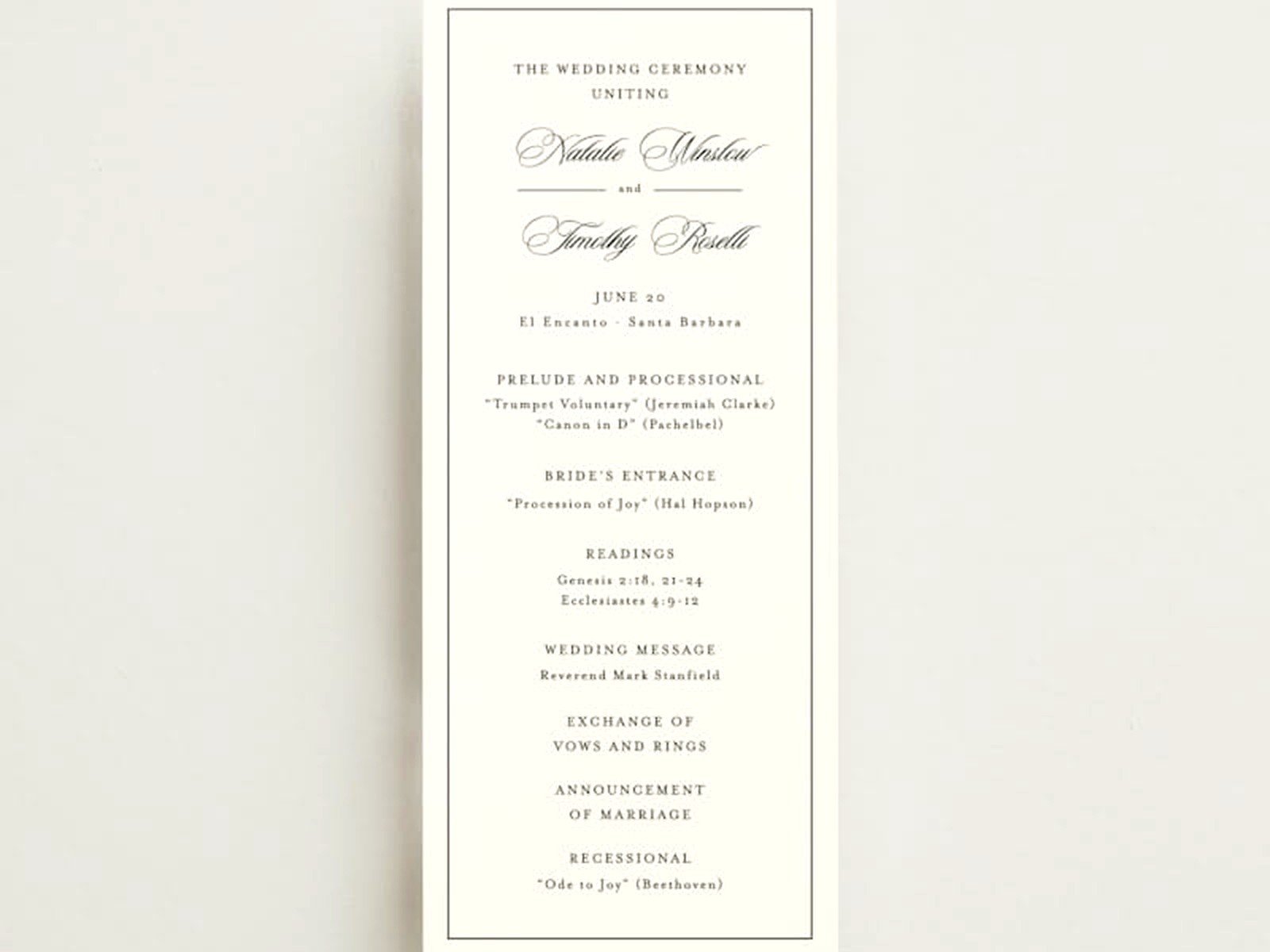
Minted and Zazzle also have program templates but they’re more set up for you to order printing through them. Which is fine if that’s what you want but if you’re trying to DIY print at home or through a local printer, you want actual downloadable files you can edit yourself.
The Actual Information To Include
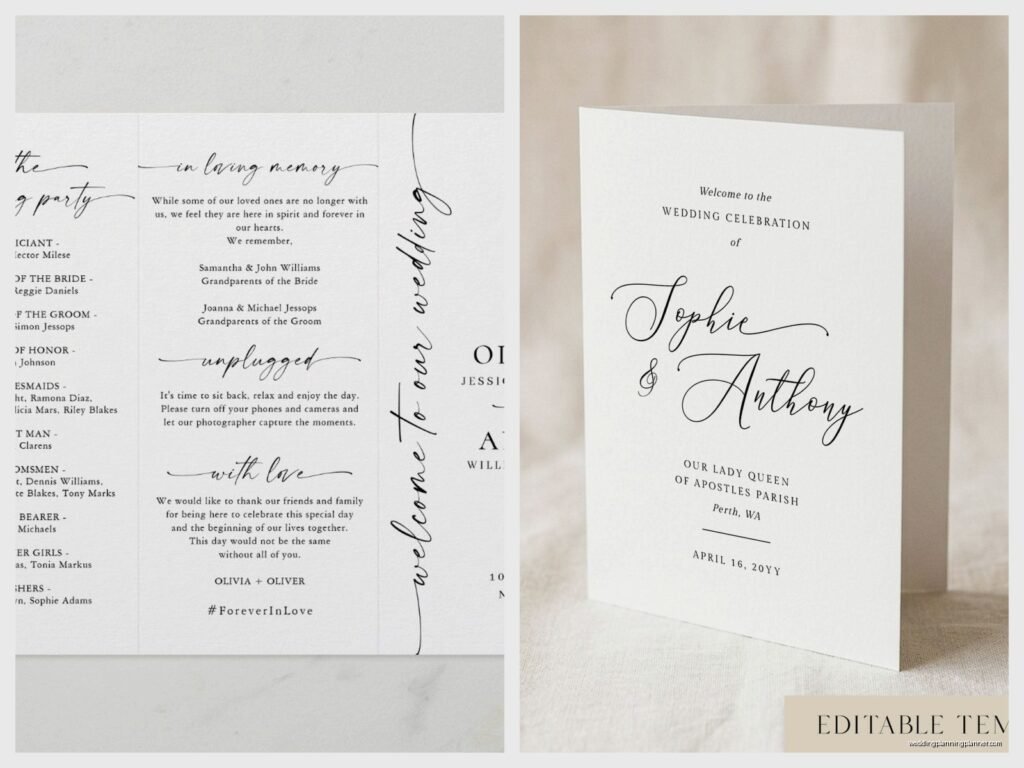
Front cover needs: your names, wedding date, location (at least the city or venue name), and maybe a small design element or photo. Some people do “The Wedding of Jane and John” and some just do “Jane & John” with the date. Either works, it’s literally just preference.
Inside left panel (if you’re doing a bifold) or second page (if you’re doing a booklet): this is where the order of service goes. List each element of your ceremony in order with maybe a sentence description if needed. Like:
- Processional
- Welcome and Opening Remarks
- Reading: “Union” by Robert Fulghum, read by Sarah Mitchell
- Exchange of Vows
- Exchange of Rings
- Pronouncement of Marriage
- The Kiss
- Recessional
You can include song titles next to processional and recessional if you want. Some couples list every single song played during the ceremony which feels like overkill to me but hey, your program.
Inside right panel or third page: wedding party names and their roles. “Maid of Honor: Jessica Chen, Best Man: Michael Torres” etc. You can also include parents’ names here, officiant name, musicians if you have them. Some people write a little thank you note to guests. Some people explain cultural or religious traditions that might be unfamiliar to some guests which is actually really thoughtful.
Back cover: this can be a quote, a photo, a note about your reception location if it’s different from ceremony site, or just a nice design element. Or leave it blank, that’s fine too. My cat knocked over my coffee onto a stack of programs once during a client meeting and honestly the back cover being blank meant we could just… flip them over and pretend nothing happened.
Format Options Because There’s More Than You Think
Bifold is the most common—one sheet folded in half so you have four panels total. This is what most templates are designed as. It’s economical and easy to print at home. You can do standard 8.5×11 paper folded in half or 5×7 cardstock.
Booklet style is multiple pages stapled or tied together. This is better if you have a lot of information to include or if your ceremony is longer. Like if you’re having a full Catholic mass with all the readings and responses, you might need more space. These look more formal but they’re more expensive and complicated to assemble.
Single sheet flat programs are less common but I’ve seen them work well for very short ceremonies or very minimalist weddings. Just one page, printed front and back or sometimes just front.
Fan programs are popular for outdoor summer weddings because they’re functional. They’re usually printed on cardstock and attached to a wooden handle. Guests can actually use them to cool off during the ceremony which is smart if you’re getting married in like August in Texas or something.
The Printing Situation Which Is Always Complicated
If you’re printing at home, test print FIRST. I cannot stress this enough. Print one copy, fold it, look at it, make sure everything lines up correctly. Margins are gonna be your enemy here. Most home printers can’t print edge to edge so you need to account for that in your template design.
Cardstock works better than regular paper for programs because it feels more substantial and doesn’t flop around. 80lb or 100lb cardstock is good. You can get this at any office supply store or order it online. Make sure your printer can handle cardstock thickness though—some home printers can’t.
For printing, you’ve got options. Home printing is cheapest but most time consuming and you’re limited by your printer quality. FedEx Office or Staples can print for you pretty cheaply and the quality is decent. Local print shops often give better quality and can do more custom finishes but cost more. Online services like Vistaprint or Catprint are middle ground—good quality, reasonable prices, but you gotta plan ahead for shipping time.
Order extra programs. Like at least 10-15% more than your guest count. People take them as keepsakes, they get dropped in puddles, you’ll want extras for your own memory box. Better to have too many than run out.
Design Stuff That Actually Matters
Font size needs to be readable. Nothing smaller than 10pt for body text, preferably 11 or 12pt. Your older guests will thank you. I had this bride in summer 2021 who insisted on 8pt font in this elaborate script and I’m pretty sure nobody over 50 could read a single word. It looked pretty but like… what’s the point if people can’t read it?
Match your wedding aesthetic but don’t go crazy. If your invitations were rustic kraft paper with greenery, your programs should probably follow that vibe. But you don’t need to match exactly. Close enough is fine.
White space is your friend. Don’t cram every inch of the program with text or designs. Let it breathe. Crowded programs look messy and are hard to read.
Photos are optional but can be nice. Some couples put an engagement photo on the cover or back. Just make sure it’s high enough resolution that it doesn’t look pixelated when printed.
Things People Always Forget
Pronunciation guides for names. If your officiant or wedding party members have names that might be unfamiliar to guests, include a pronunciation guide. Like “Siobhan (shi-VAWN)” or whatever.
Honoring deceased family members. A lot of couples want to include a small note remembering grandparents or parents who passed away. This usually goes in the back or bottom of a page. Something simple like “In loving memory of…” with names.
Explaining your traditions. If you’re incorporating cultural or religious elements that half your guests won’t recognize, a brief explanation is helpful. Like if you’re doing a handfasting or jumping the broom or circling seven times, just a sentence or two about what it means.
Program timeline. Sounds obvious but people mess this up—make sure the order you list matches the order things will actually happen. Confirm with your officiant. I’ve seen programs printed with the wrong order and it’s awkward when guests are following along and suddenly things are happening out of sequence.
Actual Template Resources You Can Download Right Now
Okay so here’s where you can actually get templates without losing your mind searching. Canva like I mentioned has a whole wedding section with tons of free program templates. You just need a free Canva account. Search “wedding program” and filter by free if you don’t wanna pay. You can edit everything online and then download as PDF to print.
Template.net has both free and paid options. The free ones are pretty basic but functional. You download them as Word docs usually which is nice because most people know how to use Word.
Microsoft Office templates—if you have Word, they have built-in templates you can access. Click File > New > search “wedding program” and a bunch come up. These are very traditional looking but they work and they’re free with your Office subscription.
Etsy is where you’ll find the most variety and the prettier designs. Search “wedding program template editable” to make sure you’re getting something you can customize. Read the reviews before buying. Most sellers include instructions for editing and will help if you get stuck.
Creative Market has professional designer templates that are really high quality but they cost more, usually 10-30 dollars. These often come in multiple format options like Photoshop, InDesign, Word, and Pages so you can use whatever software you have.
DIY Assembly Tips Because Nobody Tells You This Part
If you’re doing bifold programs, fold them all the same direction. Sounds obvious but when you’re folding 150 programs you’ll get sloppy. Use a bone folder or the edge of a ruler to make crisp creases.
Assemble them while watching TV or something because it’s mind-numbing work. I usually recommend couples have a program-folding party with wedding party members and some wine. Makes it less tedious.
For booklet programs that need stapling, a long-reach stapler is essential. Regular staplers won’t reach the center fold. You can buy these at office stores for like 20 bucks or sometimes print shops will let you use theirs if you’re nice.
Store finished programs flat in a box until wedding day. Don’t stack them too high or the bottom ones will get crushed. Keep them somewhere dry—moisture will make them wrinkle or warp.
Digital Programs Are A Thing Now Apparently
Some couples are doing digital programs instead of printed which… I have mixed feelings about. You create a PDF and either email it to guests beforehand or have a QR code at the ceremony entrance that links to it. Saves money and paper which is nice. But it requires guests to have their phones out during the ceremony which feels weird to me? Like we spend so much time asking people to unplug and be present and then we’re telling them to pull up a PDF?
That said, digital programs work well as a supplement to printed ones. Maybe you print fewer programs and have the digital version as backup. Or you do digital only for a small intimate wedding where you know everyone’s tech-savvy.
If you go digital, make sure the file is mobile-friendly. Test it on different phone sizes. Keep the file size small so it loads quickly. And have someone (coordinator, venue staff, wedding party member) ready to help guests who can’t figure out how to access it because there will be some.
When You Actually Don’t Need Programs
Real talk—you don’t always need programs. If your ceremony is super short and straightforward, programs might be unnecessary. If it’s a tiny wedding with like 20 people, probably don’t need them. If you’re having a cocktail-style ceremony where people are standing or moving around, programs are more hassle than they’re worth.
Programs are most useful when: your ceremony is longer than 20 minutes, you’re incorporating traditions that need explanation, you have a large wedding party you want to recognize, or you just really want them for aesthetic reasons. All valid.
But if you’re feeling stressed about programs and they’re not important to you, just… don’t do them. Guests will be fine. Nobody’s gonna leave your wedding like “well that was lovely but I’m devastated there wasn’t a printed program.” Seriously.
I’ve planned weddings with elaborate letterpress programs that cost 8 dollars each and weddings with no programs at all and the marriages are equally valid. The ceremony is what matters, not the paper goods, even though I literally work in paper goods and stationery which is sort of ironic I guess.
Timeline For Getting Programs Done
Start looking at templates like 2-3 months before the wedding. That gives you time to customize, order any printing, and not feel rushed. Finalize the actual ceremony order with your officiant at least 4-6 weeks out. That’s when you can fill in the specific details.
If you’re ordering printing online, do it at least 3 weeks before the wedding to account for production and shipping time. If you’re printing at home or locally, you can wait until 2 weeks out but honestly why wait? Just get it done when you have time.
Assemble programs at least a week before the wedding. Don’t leave this for the day before, you’ll have a million other things to do. The week before is when you’ve got the mental space to fold programs while half-watching The Office reruns or whatever.
Bring programs to your rehearsal if you’re having one, or deliver them to your venue the day before the wedding. Assign someone specific to hand them out—usually ushers or a venue coordinator. Don’t just leave them in a pile and hope for the best because they’ll get messy or people will take like five each for no reason.
Anyway that’s pretty much everything I know about ceremony programs after doing this for way too long. They’re really not that complicated once you break it down, you just gotta actually sit down and do it instead of overthinking it which is what most couples do including the ones who swear they’re not overthinkers…
