
Planning Guides, Style Guide
Wedding Reception Itinerary Template: Free Download Files
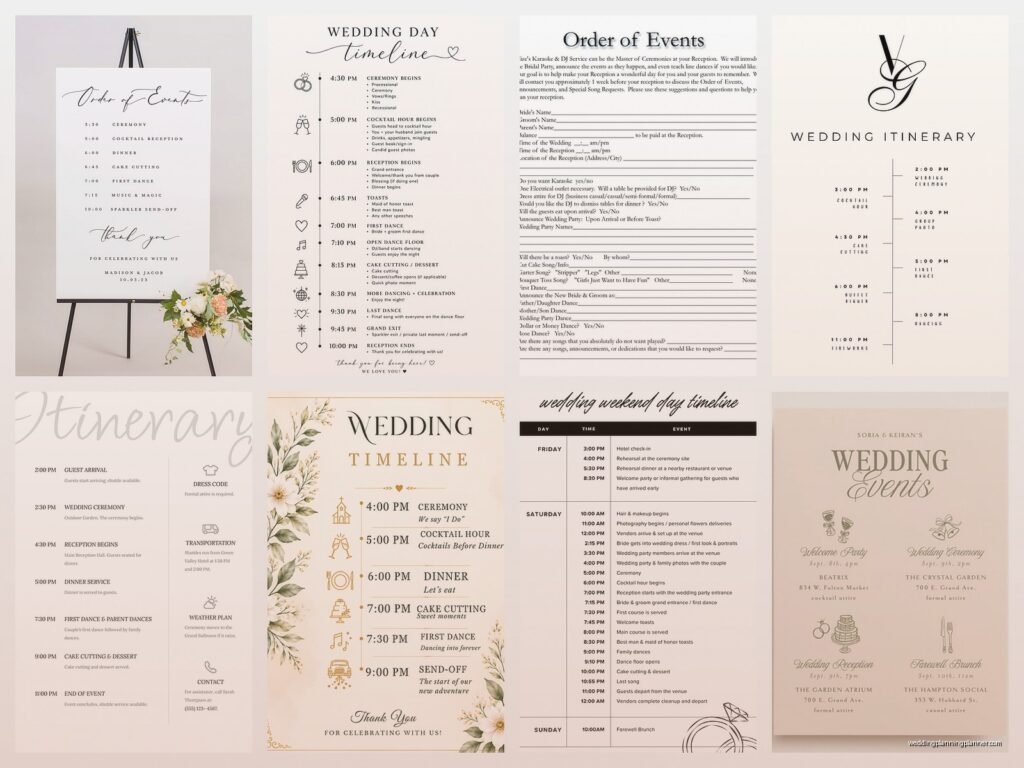
Aug
So You Need a Reception Itinerary Template
Okay so reception timelines are honestly one of those things that every single couple thinks they don’t need until like three weeks before the wedding when suddenly everyone’s asking “wait what time is the cake cutting” and nobody has answers. I learned this the hard way back in summer 2021 when I had this couple who insisted they were gonna wing it, very go-with-the-flow vibes, and then the day of the wedding their DJ was texting me every fifteen minutes asking when to play the first dance song and when to do announcements and I was like… this is exactly why we create these documents.
The thing about reception itineraries is they’re not just for you as the couple. They’re for literally everyone involved in making your day run smoothly. Your caterer needs to know when to serve dinner. Your photographer needs to know when family photos are happening. Your DJ or band needs to know the flow of events. Your venue coordinator needs to know when to flip the lights or open the bar or whatever. It’s kinda like… everyone’s got their own job to do but they all need to be synchronized or else you end up with the best man giving his speech while people are still eating salad and nobody can hear him properly.
What Actually Goes In A Reception Itinerary
Alright so the basic structure is pretty straightforward but you can customize it however you want. Here’s what I typically include:
- Cocktail hour timing (usually while you’re doing photos)
- Grand entrance of wedding party and couple
- Welcome speech or blessing if you’re doing one
- Dinner service start time
- Toasts and speeches (be specific about the order)
- First dance
- Parent dances
- Cake cutting
- Open dancing
- Bouquet/garter toss if you’re into that
- Last dance
- Send-off or just end time
But like, this is just the skeleton. Some couples add anniversary dance, special performances, cultural traditions, whatever makes sense for them. I had one couple who did a pizza delivery at 10pm because they knew everyone would be hungry again and honestly that was genius.
The Free Template Files You Can Actually Use
So here’s what I’m gonna share with you – the actual formats that work best. You want something editable because trust me you’ll be tweaking this thing approximately forty-seven times before the wedding day.
Google Sheets Version
This is my personal favorite and what I use with like 80% of my clients. Create a Google Sheet with these columns: Time, Event, Duration, Who’s Responsible, and Notes. The beauty of Google Sheets is that you can share it with all your vendors and they can access it from their phones day-of. I cannot tell you how many times a vendor has pulled up the shared sheet during a wedding to check timing.

Set it up like this: Column A is your start time (like 5:00 PM, 5:15 PM, etc). Column B is what’s happening (Cocktail Hour Begins, Grand Entrance, etc). Column C is how long it’ll take (60 min, 5 min, whatever). Column D is who needs to know about this or who’s in charge of it (DJ, photographer, catering manager). Column E is for any special notes like “make sure microphone is set up” or “coordinate with venue for lighting change.”
The thing that annoyed me for YEARS was couples who would create these beautiful Pinterest-worthy timeline graphics that looked gorgeous but were completely useless for vendors because they couldn’t read the tiny font or the information was incomplete or it was just… not functional. Like I get it, you want everything to look aesthetic, but your DJ doesn’t need a watercolor timeline, they need times and clear instructions.
Excel or Word Template
If you’re more of a Microsoft person, same concept works in Excel. Or you can do a Word doc formatted as a table. The important thing is that it’s easy to update and easy to share. I usually create one “master” version that has all the details and vendor assignments, and then I create simplified versions for specific people – like the DJ gets a version that highlights just their responsibilities, the catering team gets one focused on meal service timing, etc.
You can also do a Word document that’s more narrative style, like “5:00 PM – Cocktail hour begins in the garden. Bartenders should be ready, passed appetizers start circulating. String quartet plays for 60 minutes. Photographer is with couple and family for formal photos.” Some people find this easier to read than a spreadsheet format.
What Timing Actually Looks Like
Okay so let me walk you through a real example because I think seeing actual numbers helps. This is based on a wedding I did in spring 2023 that went really smoothly:
5:00 PM – Ceremony ends, cocktail hour begins
5:00-6:00 PM – Cocktail hour (guests enjoying drinks and apps, couple doing photos)
6:00 PM – Doors open to reception space, guests find seats
6:10 PM – Grand entrance of wedding party
6:15 PM – Couple’s entrance
6:20 PM – Welcome toast by father of bride
6:25 PM – Dinner service begins (salads already on tables)
6:45 PM – Best man speech (during dinner)
6:55 PM – Maid of honor speech (during dinner)
7:15 PM – Dinner service complete, tables being cleared
7:25 PM – First dance
7:30 PM – Parent dances
7:40 PM – Cake cutting
7:50 PM – Dance floor opens to all guests
9:30 PM – Bouquet toss
10:45 PM – Last dance
11:00 PM – Reception ends
See how specific that is? That’s what you need. Not just “evening: dinner and dancing” but actual times so everyone knows what’s happening when.
Building Your Timeline Backwards
Here’s a trick I learned from a veteran planner years ago – start with your end time and work backwards. If your venue kicks you out at 11 PM, that’s your last dance time. Back up 15 minutes for any final activities like bouquet toss. Back up from there to figure out when open dancing should start. Then figure out when dinner needs to end so you have enough dance time. Then figure out when dinner needs to start based on how long service takes. And so on.

Most caterers need about 60-90 minutes for a plated dinner service depending on guest count. Buffet is usually faster, like 45-60 minutes. You gotta account for this stuff or else you’ll end up with like 45 minutes of dancing time and everyone will be disappointed.
Buffer Time Is Your Best Friend
Add buffer time everywhere. Seriously. If you think photos will take 45 minutes, schedule an hour. If you think speeches will take 20 minutes, schedule 30. Things always take longer than you expect. People are late coming back from cocktail hour. The microphone needs adjusting. Someone’s kid has a meltdown and we need to pause. Whatever. Build in cushion time.
I usually add a 15-minute buffer between ceremony end and cocktail hour being fully operational, just to account for guests walking over, finding the space, etc. And I add at least 10 minutes between “doors open to reception space” and “grand entrance” because getting 150 people seated takes time.
Common Mistakes People Make
Okay so things I see all the time that you should avoid:
Scheduling speeches during dinner service – This can work but only if you’re strategic about it. Don’t do speeches while the entrees are being served because servers are walking around and it’s noisy and distracting. Either do speeches before dinner, or during a natural pause (like after salad course, before entrees), or after dinner is completely done. I personally prefer after dinner because then everyone can focus on the speeches without worrying about their food getting cold.
Not accounting for photo time – If you want those gorgeous sunset photos, you need to schedule time for them. Don’t just assume it’ll happen. Block out 20-30 minutes during cocktail hour or right after dinner or whenever makes sense based on when sunset actually is. Your photographer will thank you.
Forgetting about vendor meals and breaks – Your vendors need to eat too, and they usually need to eat before your guests so they can be ready to work during dinner service. Make sure your timeline includes vendor meal service, usually right when cocktail hour starts or even before.
Cramming too much in – You don’t need every single tradition. You really don’t. I see couples trying to fit in first dance, parent dances, anniversary dance, bouquet toss, garter toss, special group dance, money dance, and like… there’s not enough time. Pick what matters to you and skip the rest. Your guests want to dance and have fun, they don’t need seventeen choreographed moments.
The Vendor Distribution Thing
Once you’ve got your master timeline created, you need to distribute it to everyone. I usually send the full detailed version to the venue coordinator and the wedding planner (if there is one). Then I send customized versions to each vendor highlighting their specific responsibilities.
For the DJ or band, I highlight all the moments they’re involved in – grand entrance, first dance, parent dances, cake cutting announcement, bouquet toss, last dance. For the photographer, I highlight all the key moments they need to capture. For the caterer… well, they mostly just need to know when to serve and when to clear, so that’s pretty straightforward.
And honestly? Print copies for the day of. I know we’re all digital now and that’s great, but having a few printed copies in the venue coordinator’s hands is clutch when someone’s phone dies or the wifi isn’t working or whatever. I keep printed copies in my emergency kit along with the bobby pins and safety pins and stain remover and – oh yeah, my cat knocked over my entire emergency kit last week and I’m still finding bobby pins under the couch, but that’s a different story.
Adjusting On The Fly
Here’s the thing though – even with the most detailed timeline, stuff happens. The ceremony runs long because your officiant is chatty. Cocktail hour is so fun that people don’t want to move into the reception space. Your grandmother needs extra time getting to her seat. Whatever. The timeline is a guide, not a prison sentence.
This is why I always tell couples to identify which moments are non-negotiable and which are flexible. Like maybe you absolutely need to do cake cutting at 7:40 because the venue is bringing out a special dessert display at 8:00. That’s locked in. But maybe the bouquet toss can happen whenever there’s a natural break in dancing, that’s flexible. Knowing which is which helps you and your vendors make decisions on the fly.
I had this wedding once where dinner ran about 25 minutes late because the catering team had an issue with their equipment, and we had to shuffle everything else accordingly. Because we had a detailed timeline, we knew exactly what to adjust and what to skip (they ended up cutting the anniversary dance) and what to keep (first dance and parent dances were non-negotiable for this couple). Without that clear roadmap, it would’ve been chaos.
Special Considerations for Different Types of Receptions
If you’re doing a brunch or lunch wedding, your timeline will look different. These tend to be shorter – like 3-4 hours instead of 5-6. You might skip some of the evening traditions or do them differently.
If you’re having a cocktail-style reception with no formal dinner, your timeline is way more relaxed. You still want to schedule the key moments like first dance and cake cutting, but there’s more flexibility since you’re not tied to meal service timing.
If you’re doing a cultural ceremony or traditions, make sure you’re accounting for those properly. Some cultural dances or rituals take significant time. I worked with a couple who did a traditional Chinese tea ceremony during the reception and we needed to block out 45 minutes for that, which affected everything else in the timeline.
The Template Files Breakdown
So when you’re looking for free templates online (and there are tons), here’s what to look for:
Editable format – PDF looks pretty but you can’t easily change it. Stick with Google Sheets, Excel, Word, or even Canva if you want something more designed.
Detailed enough but not overwhelming – You want something with enough structure that you’re not starting from scratch, but not so prescriptive that it doesn’t fit your wedding style.
Vendor-friendly layout – Can your vendors actually read and use this? Is the font big enough? Is the information clear?
Shareable – Can you easily share this with your whole vendor team? Google Sheets wins here because you can just share a link and everyone has access to the most current version.
Most wedding planning websites offer free timeline templates. The Knot has one, WeddingWire has one, I’ve got one on my blog that you can download. They’re all pretty similar honestly, so just pick one that makes sense to you and customize it.
Day-Of Timeline vs. Reception Timeline
Quick note – there’s usually two timelines you need. The full day-of timeline that includes getting ready, first look (if you’re doing that), ceremony, everything. And then the reception-specific timeline which is what we’ve been talking about here. Some people combine them into one document, some people separate them. I usually do one master timeline that covers the whole day, and then pull out the reception portion to share with reception vendors who don’t need to know what time the bride is getting her hair done, you know?
The getting-ready timeline is important too but it’s more for you and your wedding party and your photographer. The reception timeline is for literally everyone working your event.
And okay I know I said this before but I’m gonna say it again because it’s so important – share this timeline early. Don’t wait until the week of the wedding. Get it to your vendors at least 2-3 weeks before so they can review it, ask questions, and plan accordingly. Your DJ might have suggestions about timing based on their experience. Your photographer might need to adjust something. Your caterer might tell you that your dinner service timeline is unrealistic for your guest count. Better to know this stuff in advance than day-of when it’s… well, you can’t really change much at that point.
Also make sure your wedding party knows the timeline too, especially anyone who has a specific role like giving a speech or participating in a special dance. They need to know when to be ready and where to be. I’ve had best men disappear to the bathroom right before their speech was supposed to happen and we had to scramble to find them.
