
Planning Guides, Style Guide
Wedding Binder Template Free: Free Download Files

Aug
The Free Wedding Binder Template Thing Everyone Keeps Asking Me About
Okay so wedding binders are having this weird comeback moment and honestly I’m here for it even though like half my clients still prefer digital everything. But there’s something about physically flipping through pages that just hits different when you’re planning a wedding and your brain feels like scrambled eggs.
I’ve been sharing free wedding binder templates since like 2019 and the number of downloads is kinda insane. People really want these things. The annoying part though? So many couples download them and then never actually print them or use them and I’m like… why did you ask for this if you’re gonna let it sit in your downloads folder forever? But whatever, not my problem I guess.
What Actually Goes In A Wedding Binder Template
Your basic wedding binder needs sections for everything and I mean EVERYTHING. You want vendor contracts, budget tracking sheets, guest list pages, timeline stuff, inspiration pics, fabric swatches if you’re into that, payment schedules, and honestly just a place to shove random business cards from that florist you met at the farmers market.
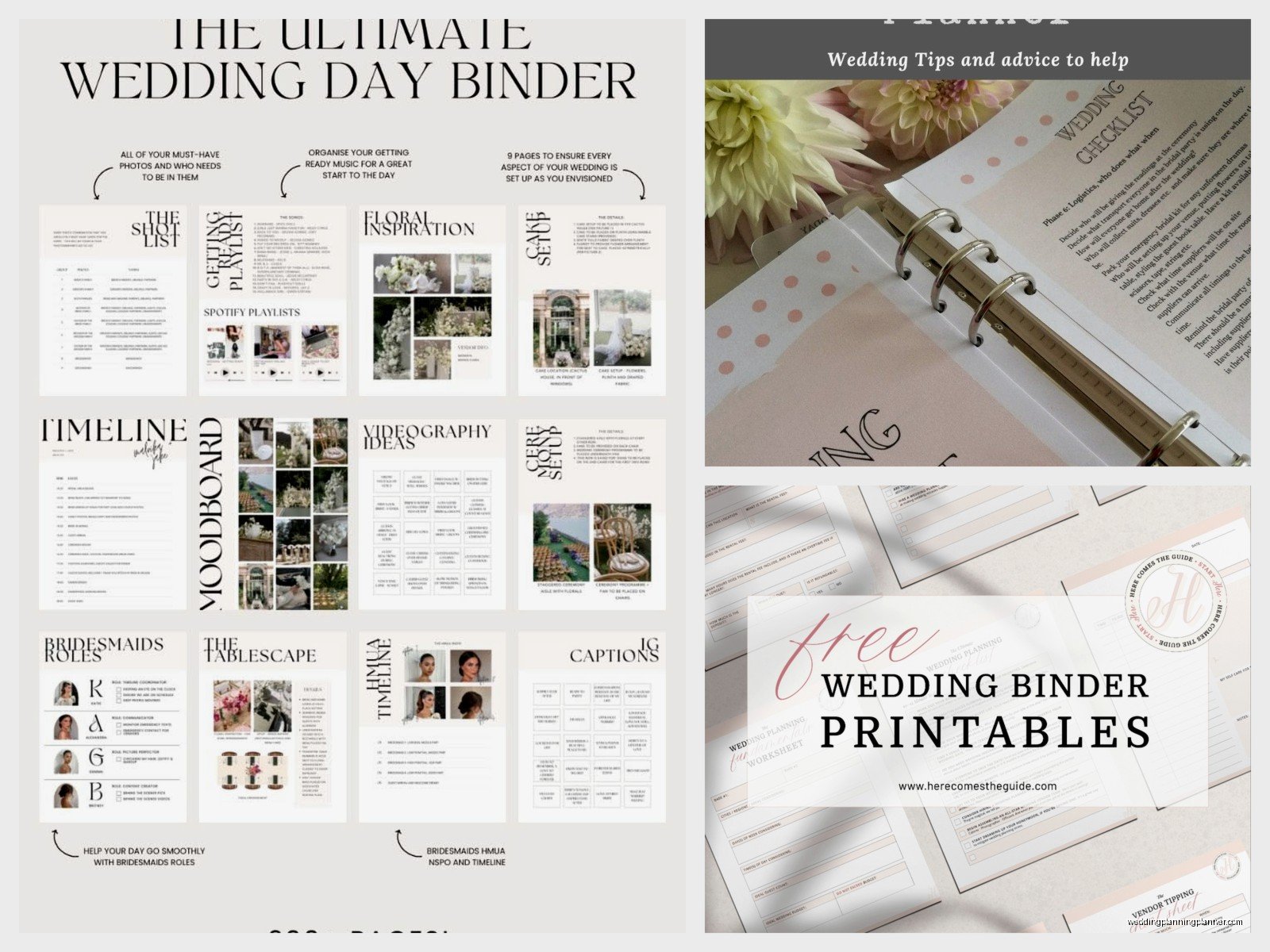
The free templates I share usually include:
- Budget breakdown pages with actual formulas that calculate totals
- Vendor contact sheets because you will forget your photographer’s email I promise
- Guest list tracker with meal preferences and plus-one info
- Timeline pages for the day-of schedule
- Checklist pages sorted by month
- Seating chart worksheets that you’ll redo seventeen times
- Payment tracker so you don’t accidentally double-pay the DJ
- Notes sections for random thoughts at 2am
Back in spring 2023 I had this bride who brought her wedding binder to every single meeting and it was so organized it made me look bad. Like she had color-coded tabs and printed everything on this fancy paper and I’m sitting there with my laptop covered in coffee stains. She actually caught a vendor trying to charge her twice for something because she had every receipt and email printed out. That binder literally saved her like $800.
Where To Actually Download These Things For Free
So the big question everyone has is where to get these templates without paying because wedding planning is expensive enough already right? I’ve got a few sources that actually work and aren’t gonna give your computer a virus or whatever.
My blog has a resource library with like 15 different printable templates and you just need to sign up for my email list which yeah I know everyone hates doing that but I don’t spam people I swear. I send maybe one email a month. The templates are all PDF format and designed to print on regular 8.5×11 paper because not everyone has access to fancy printers.
Canva has free wedding planner templates now too and you can customize them which is cool. You need a free Canva account but then you can change colors and fonts and add your own sections. They have both the pages you’d print AND covers you can design. Some people get really into making their binder cover match their wedding colors and honestly it’s kinda cute.
Google Docs and Sheets also work for this if you want something you can edit before printing. There are templates in their template gallery under personal planning or you can… I forget exactly where but if you search “wedding planner” in the template section stuff comes up.
How To Actually Set This Thing Up Without Losing Your Mind
Alright so you’ve downloaded your free templates and now you’re staring at like 40 pages of PDFs thinking what did I get myself into. Here’s what you actually do.
First get a binder that’s at least 2 inches thick. Those skinny 1-inch ones are useless trust me. You’re gonna accumulate so much paper. I use the ones with the clear sleeve on the front so you can slide in a cover page which makes it feel more official or something.
Print everything at once if you can because printing in batches means you’ll forget pages or run out of ink halfway through. I learned this the hard way when my printer died during a client emergency and I had to run to FedEx at like 9pm because we needed seating charts for a meeting the next morning. My cat knocked over my coffee mug onto the first batch of prints that night too which was just perfect timing.
Get tab dividers with labels. The basic ones from any office supply store work fine. I usually do like 8-10 sections:
- Budget and Payments
- Vendors and Contracts
- Guest List
- Timeline and Checklists
- Ceremony Details
- Reception Details
- Inspiration and Ideas
- Important Documents
Some people add sections for attire, honeymoon planning, or DIY projects depending on what they’re doing.
The Budget Pages Are Actually The Most Important Part
I cannot stress this enough the budget tracker pages will save your entire life. You need to know where every single dollar is going because wedding costs add up so stupidly fast. Like you’ll think you’re doing fine and then realize you forgot to budget for postage stamps and suddenly you need another $200.
The free budget templates I share have columns for estimated cost, actual cost, deposit paid, balance due, and payment due date. Fill this out as you book vendors and update it religiously. I had a groom in summer 2021 who didn’t track his payments properly and ended up overdrafting his bank account because three vendor payments hit the same week and he just… forgot they were all due then.
Print multiple copies of the budget pages honestly because you’ll want to revise and recalculate as things change and crossing stuff out gets messy.
Vendor Contact Sheets That You’ll Actually Use
These pages should have space for vendor name, contact person, phone, email, website, Instagram handle because that’s how half of vendors communicate now apparently, contract date, payment schedule, and notes about what you discussed.
I also include a spot for their backup contact info because if your florist goes MIA the week of your wedding you need to know who else works there. This happened to one of my couples and thank god they had the shop manager’s number written down.

Keep actual contracts in the binder too either in sheet protectors or a pocket folder. Don’t just rely on having them saved digitally because phones die and email servers have issues and you don’t wanna be scrambling to find that contract you signed six months ago.
Guest List Tracking Is Where Things Get Messy
The guest list pages in free templates usually have columns for name, address, invited to what events, RSVP status, number of guests, meal choice, and dietary restrictions. You need all of this information and keeping it in one place instead of scattered across texts and emails and your mom’s handwritten notes is gonna save you so much stress.
I recommend printing like 3-4 copies of the guest list template because your list will change. People will decline, you’ll realize you forgot your dad’s college roommate who he insists needs an invite, someone will ask for a plus-one you didn’t account for, it’s always something.
Use pencil for the first draft or two because you’re definitely gonna make changes. One of my brides used pen for everything and her guest list pages looked like a crime scene by the end with all the cross-outs and arrows and notes squeezed into margins.
Timeline Pages For Day-Of Sanity
Your wedding day timeline needs to be printed and in your binder and also given to like every vendor and your wedding party. The free templates usually have hourly breakdowns from early morning through the end of reception.
Fill in everything: hair and makeup start time, when photos begin, ceremony start, cocktail hour, dinner service, toasts, first dance, cake cutting, last song, venue must be cleared by whatever time. Get specific with times because “late afternoon” doesn’t help anyone.
I always tell couples to build in buffer time because things run late always. Your photographer will want an extra 10 minutes for family photos, your aunt will be late getting to the ceremony, the caterer will need more setup time than they said. Just assume everything takes 15% longer than planned.
Checklist Pages You’ll Obsessively Check Off
The checklist templates are usually broken down by timeframe like 12 months out, 9 months out, 6 months, 3 months, 1 month, week of, day before, day of. These are helpful for making sure you don’t forget major tasks but also don’t get too rigid about the timeline because every wedding is different.
You might book your venue 18 months out or 6 months out depending on your situation. You might order invitations 4 months before or 2 months before. The checklists are guidelines not rules.
I like to print these and keep them at the front of the binder so you can flip to them easily and feel that satisfaction of checking stuff off. Very satisfying honestly.
Customizing Free Templates To Actually Work For You
Here’s the thing about free templates they’re designed to work for like general wedding planning but your wedding isn’t general it’s specific to you. So you gotta customize.
If you’re having a destination wedding add sections for travel planning and accommodation booking. If you’re doing a lot of DIY add project tracking pages. If you’re having a religious ceremony you might need pages for ceremony readings and music selections and all that.
You can add pages, skip pages you don’t need, combine sections, whatever works. I’ve seen people add tabs for bachelorette party planning, rehearsal dinner details, or thank you card tracking.
The PDF templates can’t really be edited unless you have Adobe Acrobat but you can print them and write in additional headers or tape in extra sections. Or use the Canva templates which let you edit everything before printing.
Keeping Your Binder Updated Is The Hard Part
Downloading and printing templates is easy the hard part is actually maintaining the binder throughout your engagement. You gotta commit to updating it regularly or it becomes useless.
I tell people to set like a weekly binder date where you spend 30 minutes updating pages, adding new vendor info, checking off completed tasks, filing new contracts. Make it a thing you do every Sunday morning with coffee or whatever.
If you let it go for weeks or months you’ll forget what needs updating and then you’re back to having information scattered everywhere which defeats the whole purpose.
What To Do With The Binder After The Wedding
Okay so this isn’t really about downloading templates but people always ask me this. After the wedding you can keep the binder as a keepsake or strip out the useful stuff and recycle the rest.
I usually pull out the timeline, vendor contact info in case I want to recommend them to friends, final budget breakdown just for records, and any sentimental notes or cards people wrote. The rest like blank checklist pages and unused guest list sheets you can toss.
Some people get really sentimental about their planning binder and keep the whole thing which is fine too I guess but it takes up space and most of the info becomes irrelevant after the wedding.
Digital Versus Physical Binder Situation
I know I started this whole thing talking about physical binders but real talk some people prefer digital organization and that’s fine. You can use the same free templates and just keep them on your computer or tablet instead of printing.
Apps like Notion or Google Drive work well for digital wedding planning. You can upload PDFs, create databases for vendors and guests, link to inspiration photos, all that stuff. It’s searchable which is nice and you can’t spill wine on it.
But I still think there’s value in having at least some stuff printed especially your day-of timeline and vendor contacts because technology fails at the worst possible moments. Dead phone battery, no wifi, tablet glitching, whatever. Paper doesn’t have those problems.
Maybe do both? Keep a digital master copy but print key pages for your physical binder. That’s what I do for my own planning stuff and it works pretty well.
The main thing is just having a system that you’ll actually use because the best organizational method is the one you stick with not the one that looks prettiest on Pinterest or whatever. Free templates give you a starting point and then you make it work for your brain and your wedding and that’s really all that matters when you’re trying to plan this whole thing without losing your mind completely.
