
Planning Guides, Style Guide
Wedding Ceremony Script Template: Free Download Files
Sep
Okay So Wedding Ceremony Scripts Are Actually Super Simple Once You Break Them Down
Look, I’ve been doing this wedding planning thing for like fifteen years now and the NUMBER ONE thing that stresses couples out unnecessarily is the ceremony script. They think it needs to be this super formal, perfectly worded thing when honestly? Most officiants are just winging it with a template anyway.
So here’s what you actually need to know about ceremony script templates and where to get the good free ones without signing up for seventeen email lists.
The Basic Structure Nobody Tells You About
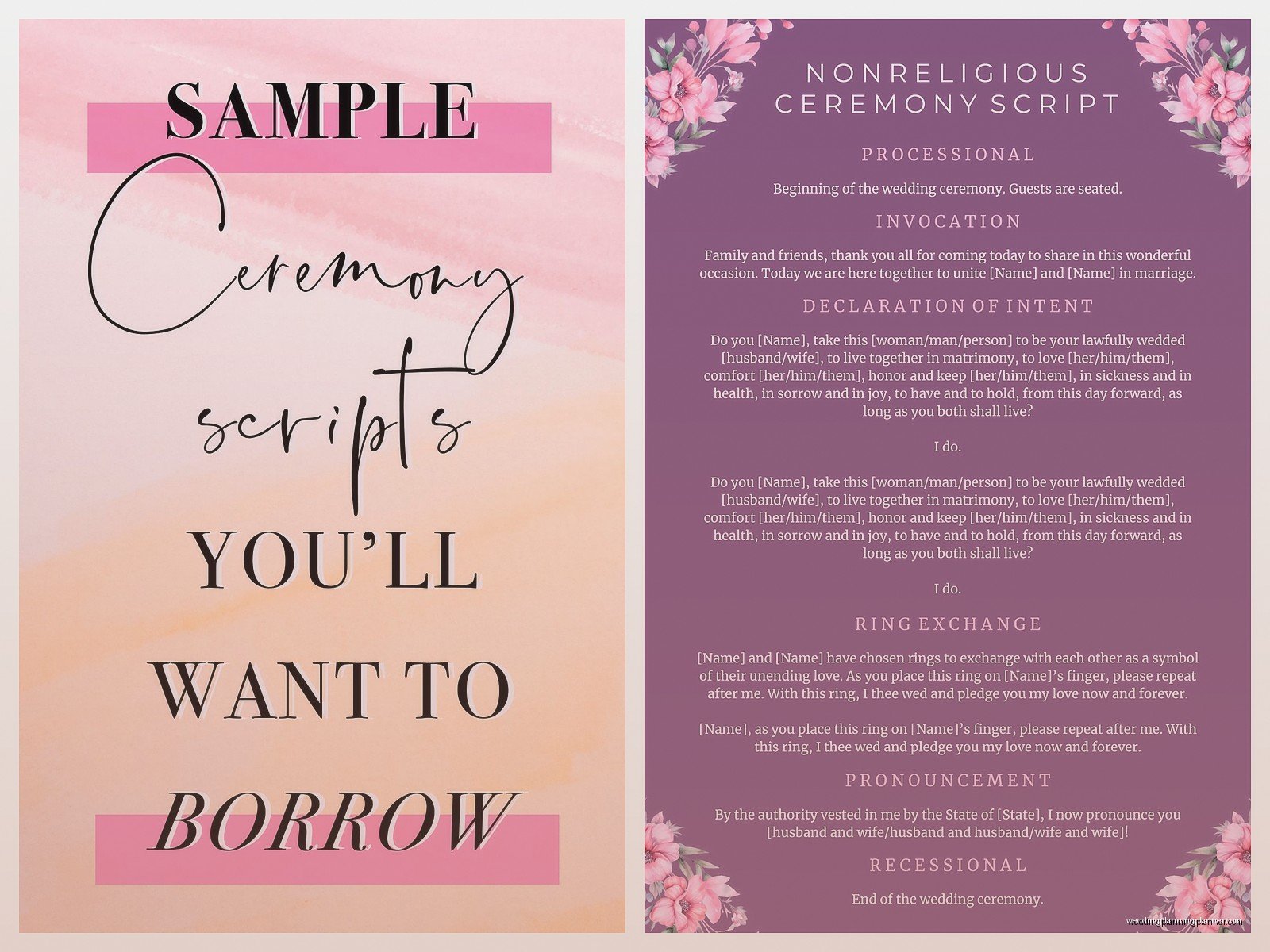
Every ceremony script follows the same basic bones, whether it’s religious, secular, traditional, or you’re getting married on a beach dressed as pirates (yes, I’ve seen it). The structure is:
- Processional notes (who walks when)
- Opening words/welcome
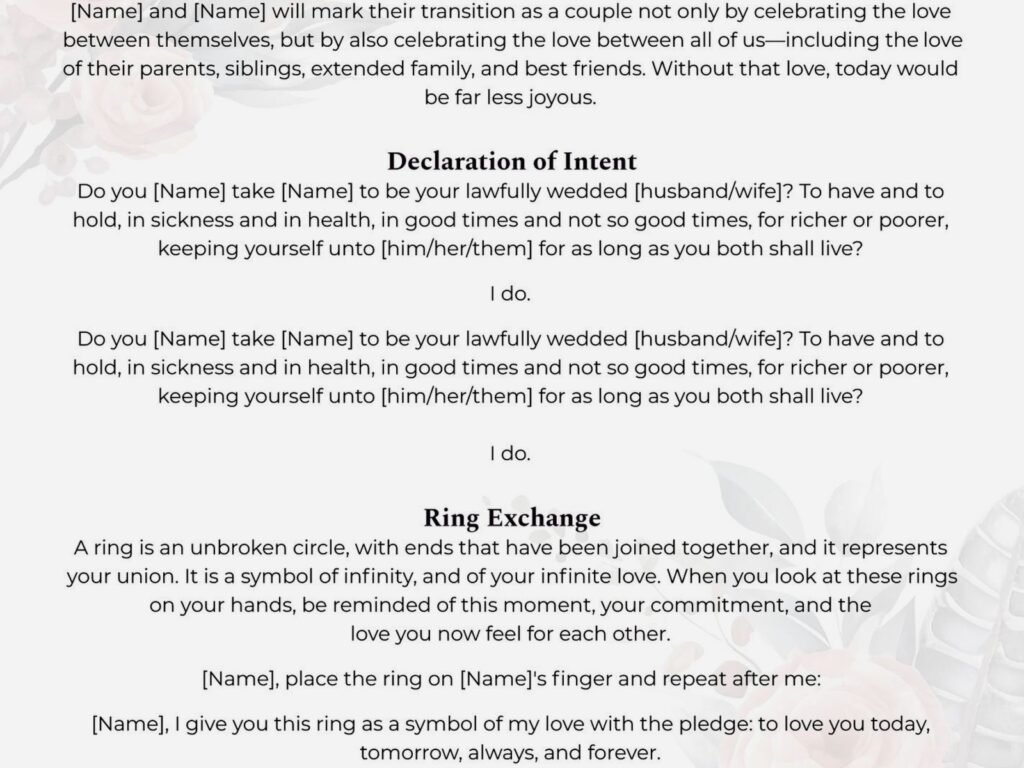
- Declaration of intent (“do you take this person”)
- Readings or rituals (optional but most people include something)
- Vows exchange
- Ring exchange
- Pronouncement (“I now pronounce you…”)
- The kiss
- Recessional notes
That’s it. That’s the whole thing. Everything else is just flavor and personalization.
Where To Actually Download Free Templates
Alright so I’m gonna give you the real list, not the SEO-optimized garbage that makes you click through twelve pages.
The Knot and WeddingWire both have free downloadable templates. Yeah, they’re the big corporate wedding sites, but their templates are actually solid and cover like every religion and style. You don’t even need an account for most of them, though they’ll def try to make you create one.
Officiant Eric’s website has been around forever and he just gives away scripts. Multiple formats. The guy is kinda a legend in the wedding officiant world and his stuff is thorough without being cheesy.
American Marriage Ministries offers free scripts when you get ordained through them (which is also free, btw). Even if your officiant is already ordained somewhere else, you can still download their templates without signing up for the ordination thing.
Canva surprisingly has ceremony script templates now? They’re more design-focused so if you want something pretty to print out for your officiant, that’s a good option. Though honestly your officiant probably doesn’t care if it’s on crumpled printer paper or calligraphied onto handmade linen.
What Annoyed Me About Scripts Last Spring
Okay so spring 2023 I had this couple who downloaded like NINE different templates and then tried to Frankenstein them together into one mega-script. It was 47 minutes long. Forty. Seven. Minutes. For the ceremony alone, not including the processional music or anything.
I had to sit them down and be like… your guests will literally leave. Your grandmother will fall asleep standing up. Nobody wants a 47-minute ceremony unless you’re having a full Catholic mass, and even then people are checking their watches.
The problem with downloading multiple templates is you start thinking everything is important and needs to be included. Nah. Pick ONE template that matches your vibe and then customize just the parts that matter to you.
How To Customize Without Making It Weird
This is where people get tripped up. You download a template and it says generic stuff like “we are gathered here today to celebrate the union of [Partner A] and [Partner B]” and you think you gotta rewrite the whole thing to make it “yours.”
But here’s the thing – the opening and closing are supposed to be kinda generic. That’s not the personal part. The personal parts are:
- Any readings you choose (poems, song lyrics, excerpts from books)
- Your actual vows
- Any unity ceremonies you include
- Maybe a story the officiant tells about you as a couple
Everything else? Standard language exists for a reason. It flows well, people recognize it, it sounds ceremonial without being stuffy.
I tell couples to customize maybe 30% of the template max. The rest should stay pretty close to the original structure.
Religious vs. Secular Templates
So obviously if you’re having a religious ceremony, you’re gonna need a template that matches your faith tradition. Most churches/synagogues/temples/mosques have their own required elements anyway, so you’re somewhat locked into a structure.
But if you’re doing a secular ceremony, you have way more flexibility and honestly? That can be harder because there’s no roadmap. I usually recommend secular couples start with a “traditional but non-religious” template and then remove or replace anything that feels too churchy.
Words to watch for if you want it fully secular: “holy,” “sacred,” “blessed,” “in the eyes of God,” anything about “divine” stuff. You can replace these with “meaningful,” “special,” “cherished,” “witnessed by loved ones,” etc.
The Vows Section Is Where Things Get Complicated
Most templates will give you traditional vow options like “to have and to hold, from this day forward” etc. And look, those are beautiful and there’s a reason they’ve lasted hundreds of years.
But if you’re writing your own vows, the template should just have a placeholder that says [PERSONAL VOWS] or whatever. Then you write yours separately and just plug them in.
What I see happen a lot is couples will use the template’s traditional vows AND write personal vows and then do both during the ceremony. Which is fine! Just know that adds time and also can feel repetitive. Usually I suggest picking one or the other, or doing traditional vows during the ceremony and reading personal letters to each other during getting-ready time.
My cat just knocked over my coffee which is perfect timing because I needed a break from typing anyway…
File Formats That Actually Matter
Okay so when you’re downloading these templates, you’re gonna see them offered in different formats. Here’s what you actually need to know:
PDF: Good for reading and printing, annoying for editing. If the template is PDF-only, you’ll need to basically retype everything into a Word doc if you wanna customize it. Some PDFs are fillable though, which is slightly better.
Word Doc (.docx): This is the best format for actually working with the template. You can edit directly, track changes if you’re collaborating with your officiant, easily adjust formatting, etc.
Google Docs: Same benefits as Word but cloud-based, which is great if you’re sharing with your partner and officiant. Just make sure you download a copy for yourself because you don’t wanna be dependent on someone else’s Google Drive permissions.
Pages: If you’re on Mac, this works fine but it’s harder to share with non-Mac users. Usually better to convert to PDF or Word for sharing.
I always tell couples to save the template in at least two formats – one editable version for working on it, and one PDF version for the final script to give to the officiant.
What Your Officiant Actually Needs From You
So you’ve downloaded a template, customized it, it’s perfect. Now what?
Your officiant needs a final printed copy, usually in a binder or at minimum stapled. Some officiants are cool with reading off a tablet, but most prefer paper because it’s easier to handle, doesn’t have glare issues, and won’t die at 3% battery right before the pronouncement.
Print it in a large font – like 14pt minimum. Your officiant is gonna be standing outside possibly in bright sun or low light, holding this thing at arm’s length, trying to read while also projecting their voice. Don’t make them squint at 10pt Times New Roman.
Double-spacing helps too. And honestly? Print it single-sided. Yeah it uses more paper but it’s way easier to flip pages without losing your place.
Timing Is Something Templates Don’t Tell You
Here’s what nobody mentions – you need to actually TIME your script before the wedding day. Like, read it out loud at ceremony pace (which is slower than normal talking pace because the officiant needs to project and pause for emphasis).
A good ceremony length is 15-25 minutes total. Under 15 feels rushed, over 25 and people start getting restless unless you’re doing a full religious service.
When you’re timing it, include pauses for:
- The bride/couple walking down the aisle (usually 1-2 minutes)
- Any readings (add the actual time it takes to read them)
- Unity ceremonies like candle lighting or sand pouring (2-3 minutes usually)
- Musical interludes if you have any
- The kiss and recessional (another 1-2 minutes)
If your script is running long, the easiest places to trim are: opening remarks, explanations of rituals (just do them, don’t explain them), and any “repeat after me” sections that could be simplified.
The Pronouncement Has More Variations Than You Think
Most templates will have the traditional “I now pronounce you husband and wife” but there are tons of variations depending on what you prefer:
- “I now pronounce you married”
- “I now pronounce you spouses for life”
- “I now pronounce you partners in life”
- “By the power vested in me, I declare you married”
- “You are now married – congratulations!”
For same-sex couples, you can use “husband and husband,” “wife and wife,” “partners,” “spouses,” or just first names – “I now pronounce you [Name] and [Name], married!”
This is one of those tiny details that matters more than you’d think, so make sure the template you download either has the version you want or is easy to edit.
Readings And Where To Find Good Ones
Templates usually have placeholder text like [INSERT READING HERE] which is not helpful when you’re trying to actually pick something.
The best readings are short (under 2 minutes when read aloud), meaningful to you as a couple, and understandable to your guests. Like, don’t pick an obscure poem in Middle English that requires footnotes unless that’s genuinely your thing.
Common sources for readings:
- Song lyrics from “your song” or a meaningful artist
- Excerpts from favorite books (especially if you met in a bookstore or bonded over reading)
- Poems – Pablo Neruda, Maya Angelou, and ee cummings are wedding favorites
- Quotes from movies or TV shows (I had a couple use a Lord of the Rings quote and it was actually really sweet)
- Religious texts if that’s appropriate for your ceremony
- Something a family member wrote specifically for you
Just make sure whoever’s reading it practices beforehand. Nothing tanks a beautiful reading like someone stumbling through it because they saw it for the first time thirty seconds ago.
Unity Ceremonies And Whether You Need Them
A lot of templates include sections for unity ceremonies – candle lighting, sand pouring, handfasting, wine sharing, etc. These are totally optional and honestly I think they’re kinda falling out of fashion? But some couples really love them.
If you’re including one, the template should have a brief explanation script for the officiant to read while you’re doing the thing. Keep this SHORT. We don’t need a five-minute explanation of the symbolism of two candles becoming one flame. People get it.
The unity ceremony section is also easy to just delete from the template if you’re not doing one. Don’t feel pressured to include something just because there’s a spot for it in the template.
What To Do If You Hate All The Free Templates
Sometimes you download five different templates and they all feel wrong. Too formal, too casual, too religious, too generic, whatever.
At that point you have options: hire someone to write a custom script (this exists, there are ceremony script writers, usually costs $200-500), have your officiant write one from scratch (if they’re experienced they probably can), or honestly… just pick the closest template and do more heavy customization than usual.
But I’m gonna be real with you – if you hate ALL the free templates, the issue might not be the templates. It might be that you’re overthinking what a ceremony script should be or sound like. Sometimes you gotta just pick something and trust that on the day, with your people there and emotions running high, the exact wording won’t matter as much as you think it does right now.
Printing And Presentation Tips
Once your script is finalized, print at least three copies: one for the officiant, one backup for the officiant (seriously, do this), and one for yourselves to keep.
Put the officiant’s copy in a small binder or nice folder. You can get these at any office supply store for like three dollars. Some couples go fancy with leather portfolios or custom covers, which is fine but unnecessary.
If you’re having an outdoor ceremony, consider printing on heavier cardstock or laminating it. Regular printer paper gets floppy in humidity and impossible to read in wind.
And label it clearly – “CEREMONY SCRIPT – [Your Names] – [Date]” on the front. Your officiant might be doing multiple weddings that season and you don’t want them grabbing the wrong binder.
The Legal Stuff Templates Sometimes Forget
Most templates focus on the ceremonial aspects and kinda gloss over the legal requirements, which vary by location. Your officiant needs to know what legally has to be said or done for the marriage to be valid where you live.
In some places, specific legal language must be included. In others, as long as you have a licensed officiant and signed paperwork, the ceremony words don’t matter legally at all.
Check with your county clerk’s office or whoever issues marriage licenses in your area. Your officiant should also know this, but it’s worth confirming so there’s no “oh crap, we forgot the legal declaration” moment.
Some templates include a section for the legal declaration of intent – basically the part where you both say “I do” or “I will” in response to the officiant asking if you take each other as spouses. This is often legally required, so don’t cut it even if it feels redundant with your vows.
Multilingual Ceremonies Need Special Templates
If you’re having a bilingual or multilingual ceremony, the free templates get trickier because most are English-only. You’ll need to either find templates in both languages or do significant translation work.
For bilingual ceremonies, decide if you’re doing:
- Full translation (everything said twice in both languages – this doubles your ceremony time)
- Key moments only (maybe opening and vows in both languages, rest in primary language)
- Alternating (some sections in one language, other sections in another)
Format the script clearly so the officiant knows which language they’re speaking when. Use different fonts, colors, or indentation to distinguish between languages on the page.
Digital Vs. Printed For The Actual Day
I mentioned this earlier but it’s worth expanding on – most officiants prefer printed scripts but some are comfortable with digital. If your officiant wants to use a tablet or phone:
- Make sure the file is downloaded, not cloud-dependent (ceremony sites often have spotty service)
- Disable auto-lock and keep brightness high enough to read in sunlight
- Have a printed backup anyway because technology fails at the worst moments
- Consider a tablet stand so they’re not holding it the whole time
Personally I’ve seen too many tablet disasters to recommend it, but I’m also kinda old-school about this stuff. If your officiant is tech-savvy and insists they prefer digital, just make sure there’s a backup plan.
Okay I think that’s everything I know about ceremony script templates after doing this for way too long. The main thing is just pick one that feels roughly right, customize the important bits, and don’t stress about making it perfect because honestly nobody remembers the exact words afterward anyway. They remember how you looked at each other and whether the ceremony felt like “you” – and those things have nothing to do with which free template you downloaded.
