
Planning Guides, Style Guide
Wedding Envelope Template: Free Download Files

Aug
Finding and Using Free Wedding Envelope Templates
Okay so wedding envelope templates are honestly one of those things I wish more couples knew about earlier in their planning process because I’ve watched so many people stress over addressing 150 envelopes by hand when they could’ve just… downloaded a template and printed everything neatly. The number of times I’ve seen smudged ink or crooked addresses is kinda ridiculous at this point.
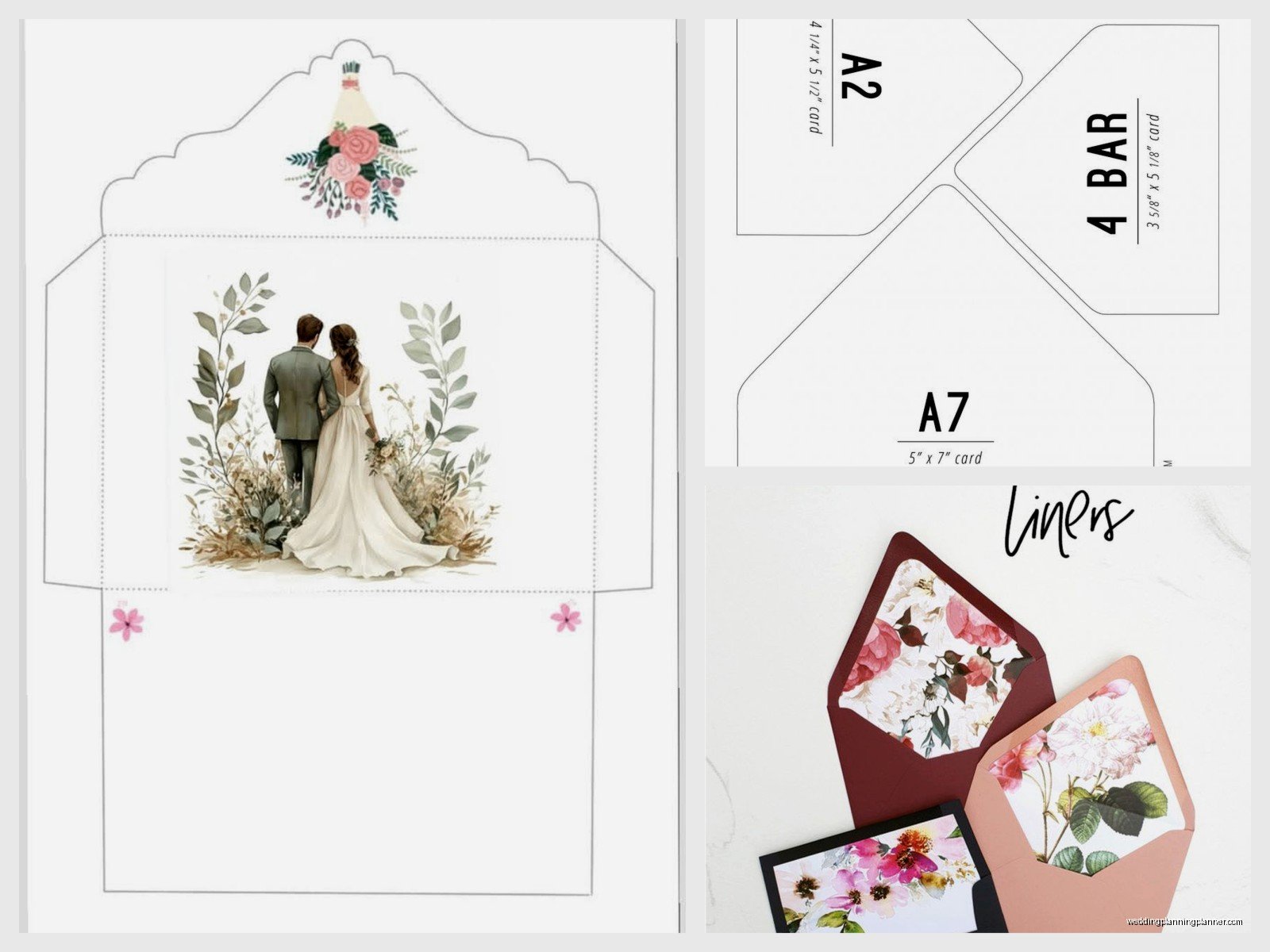
Free envelope templates are basically pre-formatted files that let you print addresses, return addresses, or decorative elements directly onto your envelopes. They come in different sizes to match standard envelope dimensions – A7 for 5×7 invitations, A6 for smaller cards, #10 for business-style invites, whatever you need. You download the file, plug in your guest addresses, and print. Done.
Where to Actually Find These Templates
I’m gonna be real with you – not all free template sites are created equal. Some have gorgeous options but the files are formatted weird and won’t print correctly. Others have simple templates that work perfectly every time.
Template.net has a solid collection. They offer Word, Google Docs, and PDF versions which is helpful because not everyone has the same software. The designs range from super basic to moderately decorated. I used one of their A7 templates for a client wedding back in spring 2023 when we had like 48 hours to get everything printed because the original calligrapher got food poisoning – not ideal timing but the template saved us.
Canva is probably my go-to now even though it requires making an account. Their free tier has tons of envelope templates and you can customize fonts, colors, add little graphics. The interface is pretty intuitive even if you’re not design-savvy. You can adjust everything right there and download as PDF.
Microsoft Office templates – if you already have Word, just search their template library. They have straightforward envelope layouts in various sizes. Nothing fancy but they print reliably which honestly matters more than having seventeen different font options.
Avery makes templates specifically designed for their label and envelope products, but the templates work fine on regular envelopes too. Their website has a design tool that’s free to use. I find their interface a bit clunky compared to Canva but whatever works for you.
What File Format You Actually Need
This trips people up constantly. You’ll see templates offered as Word docs, PDFs, PSD files, AI files, or editable PDFs. Here’s what you need to know:
Word documents (.doc or .docx) are the easiest if you’re comfortable with Microsoft Word. You can type directly into them, adjust margins, change fonts. The downside is that formatting can shift when you open the file on different computers or… wait, I should mention that my cat literally walked across my keyboard while I was formatting envelopes last month and somehow changed all the addresses to Wingdings font. Took me twenty minutes to figure out what happened.
PDF templates come in two types – fillable and non-fillable. Fillable PDFs let you type information into designated fields which is convenient. Non-fillable PDFs are basically just guides for placement and you’d need to overlay text using PDF editing software.
Photoshop (PSD) or Illustrator (AI) files require those specific programs. If you don’t have Adobe Creative Suite, these won’t help you. But if you DO have access, they offer the most design flexibility.
Setting Up Your Template Before Printing
Alright so you’ve downloaded a template. Now what? Don’t just immediately load envelopes into your printer – I’ve seen that go wrong too many times.
First, open the file and check the dimensions. The template should specify what envelope size it’s for. Match that to your actual envelopes. An A7 envelope is 5.25 x 7.25 inches. If your template says A7 but the document shows different dimensions, you gotta adjust it or find a different template.
Test your margins. Most printers can’t print edge-to-edge – there’s usually a quarter-inch margin on all sides that the printer physically can’t reach. Your template should account for this. If addresses are positioned too close to the edges, they’ll get cut off during printing.
Choose your font carefully. I know everyone loves those swirly calligraphy fonts but honestly? They’re hard to read and post office sorting machines sometimes reject envelopes with overly decorative addressing. A nice serif or clean script font works better. Keep it at least 10-point size, preferably 12-point.
Actually Printing on Envelopes Without Losing Your Mind
This is where people usually call me panicking. Printing on envelopes is weirdly finicky and what works on one printer won’t work on another.
Load ONE envelope first as a test. Figure out which way it needs to face in your printer – some printers want envelopes face-up, others face-down. Some feed from the top, others from the side. Check your printer manual or just experiment with a spare envelope.
Most printers have an envelope setting in the print dialog box. Use it. It adjusts the paper type settings so the printer knows it’s not feeding regular paper. This prevents jams and smudging.
For addressing, use a mail merge if you’re doing more than like 20 envelopes. Word has a built-in mail merge function that pulls addresses from an Excel spreadsheet. You set it up once, and it automatically populates each envelope with the correct guest info. There are tutorials online but basically you create your address list in Excel, then tell Word to pull from that file. It sounds complicated but it’s actually pretty straightforward once you do it the first time.
The Thing That Annoyed Me Most About Free Templates
Can we talk about how some “free” template sites make you sign up for a subscription just to download one file? That drives me absolutely crazy. You search “free wedding envelope template,” find exactly what you need, click download, and BAM – you need to enter credit card info for a “free trial” that auto-renews at $29.99 per month. Nah. I always check if there’s actually a download button that doesn’t require payment info before I waste time customizing anything.

Also some sites watermark their free templates which is… I mean I get protecting your work but if I’m printing addresses for a wedding, I don’t want “FreePrintables.com” stamped across every envelope. Read the fine print before downloading.
Alternatives If Templates Aren’t Working
Sometimes the template route just isn’t gonna work. Maybe your printer hates envelopes (some really do), or you’re using a non-standard size, or the formatting keeps breaking.
You can create your own template pretty easily. Open a blank document, set page size to match your envelope dimensions, add text boxes where you want addresses to appear. Save it as your personal template. It takes maybe 15 minutes to set up but then you have something formatted exactly for your printer and envelope size.
Or honestly? Address labels are totally acceptable now. I know traditional etiquette says hand-address or print directly on envelopes, but most guests don’t care. You can buy clear labels that look pretty seamless or white labels with decorative borders. Print your addresses on label sheets using a regular paper template, then stick them on envelopes. Way less frustrating than fighting with envelope feeding mechanisms.
Inner Envelopes vs Outer Envelopes
If you’re doing formal invitations with both outer and inner envelopes, you’ll need templates for both. Outer envelopes get the full mailing address. Inner envelopes traditionally just have guest names – “Mr. and Mrs. Smith” or “The Smith Family” – without the street address.
You can usually use the same template file for both, just modify what information you’re including. The inner envelope is typically slightly smaller than the outer, so check dimensions if you downloaded a specific size template.
Design Elements to Consider Adding
Once you’ve got the basic addressing sorted, you might wanna add some visual elements. A lot of templates come with decorative options – border designs, monograms, little flourishes.
Return address formatting gives you options too. You can do traditional upper-left corner placement, or print it on the back flap of the envelope. Back-flap printing requires a separate template usually since you’re printing on a different part of the envelope.
Some couples add a thin colored border around the envelope edge or a small graphic element that ties into their wedding theme. Just remember that anything too close to the edges might not print properly depending on your printer’s margins.
Ink and Paper Considerations
The type of envelope you’re using affects how well printing works. Smooth, matte envelopes print most reliably. Heavily textured or glossy envelopes can cause smudging or poor ink adhesion.
If you’re using colored envelopes – like navy or burgundy – test how your printer ink shows up. Black ink on dark paper won’t be readable. You’d need white ink which requires a special printer or you should use labels with white backgrounds.
Let printed envelopes dry completely before stacking them. I learned this during that summer 2021 wedding season when we were rushing through everything and I stacked freshly printed envelopes immediately – the ink transferred and we had to reprint 60 envelopes. Give them at least 5 minutes.
Troubleshooting Common Printing Issues
Envelopes jamming in the printer? You’re probably loading too many at once. Do small batches of 5-10 envelopes at a time. Also make sure they’re not sticking together – sometimes new envelopes have a slight static cling.
Addresses printing crooked or off-center? Your template margins don’t match your actual envelope placement. Adjust the margins in your document or reposition how you’re loading envelopes into the printer.
Ink smearing? Either the envelope coating isn’t compatible with your ink type, or you need to change your printer’s paper settings to allow more drying time between printing.
Can’t get envelopes to feed at all? Some home printers genuinely can’t handle envelope printing well. Office-grade printers or laser printers typically do better than basic inkjet printers. If your printer absolutely won’t cooperate, the label method or outsourcing to a print shop might be worth it.
When to Just Pay for Professional Printing
Look, sometimes DIY isn’t worth the headache. If you’re doing more than 200 envelopes, or using specialty materials, or you just don’t wanna deal with it – printing services exist for a reason.
Local print shops can usually print on your envelopes for like $0.50-$1.00 per envelope. You provide the envelopes and address list, they handle the rest. It’s honestly not that expensive when you factor in your time and the cost of wasted envelopes from printing mistakes.
Online services like Minted or Zazzle offer addressed printing when you order invitations through them. The convenience factor is huge even though you’re paying a bit more.
But if you’ve got a standard printer, regular envelopes, and under 100 to print? Free templates work perfectly fine and you’ll save a decent chunk of money doing it yourself. Just budget extra time for the learning curve and buy some extra envelopes for test printing because you’ll definitely need them.
