
Planning Guides, Style Guide
Wedding Program Template Free Download: Free Download Files

Aug
Okay So Wedding Program Templates
Look, free wedding program templates are everywhere online but finding ones that don’t look like they’re from 2009 or require seventeen software subscriptions is actually harder than you’d think. I’ve been doing this wedding planning thing for like fifteen years now and honestly the amount of times couples come to me in a panic because they downloaded a “free” template that only works if you have Adobe Creative Cloud Premium Plus Gold Edition or whatever… it’s a lot.
So here’s the deal with free program templates and where to actually get them without losing your mind.
Where I Actually Send My Couples for Free Downloads
Canva is gonna be your best friend here. I know everyone talks about Canva but there’s a reason – they have hundreds of wedding program templates that are genuinely free. Not free-with-an-asterisk, just free. You need an account but that’s also free. The templates are editable right in your browser which means you don’t need to download weird software or figure out how to work a PSD file at 11pm the night before your wedding.
I had this bride in spring 2023 who was absolutely convinced she needed to design everything from scratch in Illustrator because that’s what her sister did, and she spent like three weeks struggling with it before finally texting me at midnight saying she was gonna cry. Sent her to Canva, she had her programs done in forty minutes. Sometimes the simple solution is actually the right one.
Template.net has a decent collection too. They have both Word and Google Docs formats which is super helpful if you’re more comfortable with those. The designs are… okay? Some are really nice, some look kinda dated, you gotta scroll through and find the good ones. But they’re actually downloadable and editable without needing special software.
Microsoft Office templates – if you already have Word, go to File > New and search “wedding program” and there are built-in templates. They’re not gonna win design awards but they’re clean and professional and you can customize them easily. My mom still uses Word for everything so I always keep these in my back pocket for clients who are less tech-savvy.
The Annoying Thing Nobody Tells You
What drives me absolutely insane is when template sites advertise “free download” but then you get there and it’s only a preview that’s free, or you can download it but can’t edit it without paying, or – and this one really gets me – you can use it free for personal use but their definition of personal use doesn’t include weddings because weddings involve vendors and apparently that makes it commercial? I’ve wasted so much time clicking through these misleading listings.
Always read the actual license terms before you spend an hour customizing something. I know it’s boring but trust me.
What Format You Actually Need
This depends on how you’re printing them. If you’re doing it at home on your own printer, you want a PDF or a Word doc or something you can open and print directly. If you’re sending them to a print shop (which honestly I recommend for anything over like 50 programs because your home printer will betray you), you need to ask the print shop what format they prefer.
Most print shops want a PDF with fonts embedded and images at 300 DPI minimum. Canva lets you download as PDF Print which handles all that automatically. Word docs can be converted to PDF pretty easily too – just do Save As and choose PDF.
I’ve had couples try to send print shops a Canva link or a Google Docs sharing link and then get confused when the shop says they can’t use it… you gotta actually download the file as a PDF first.
Sizes and Folding Situations
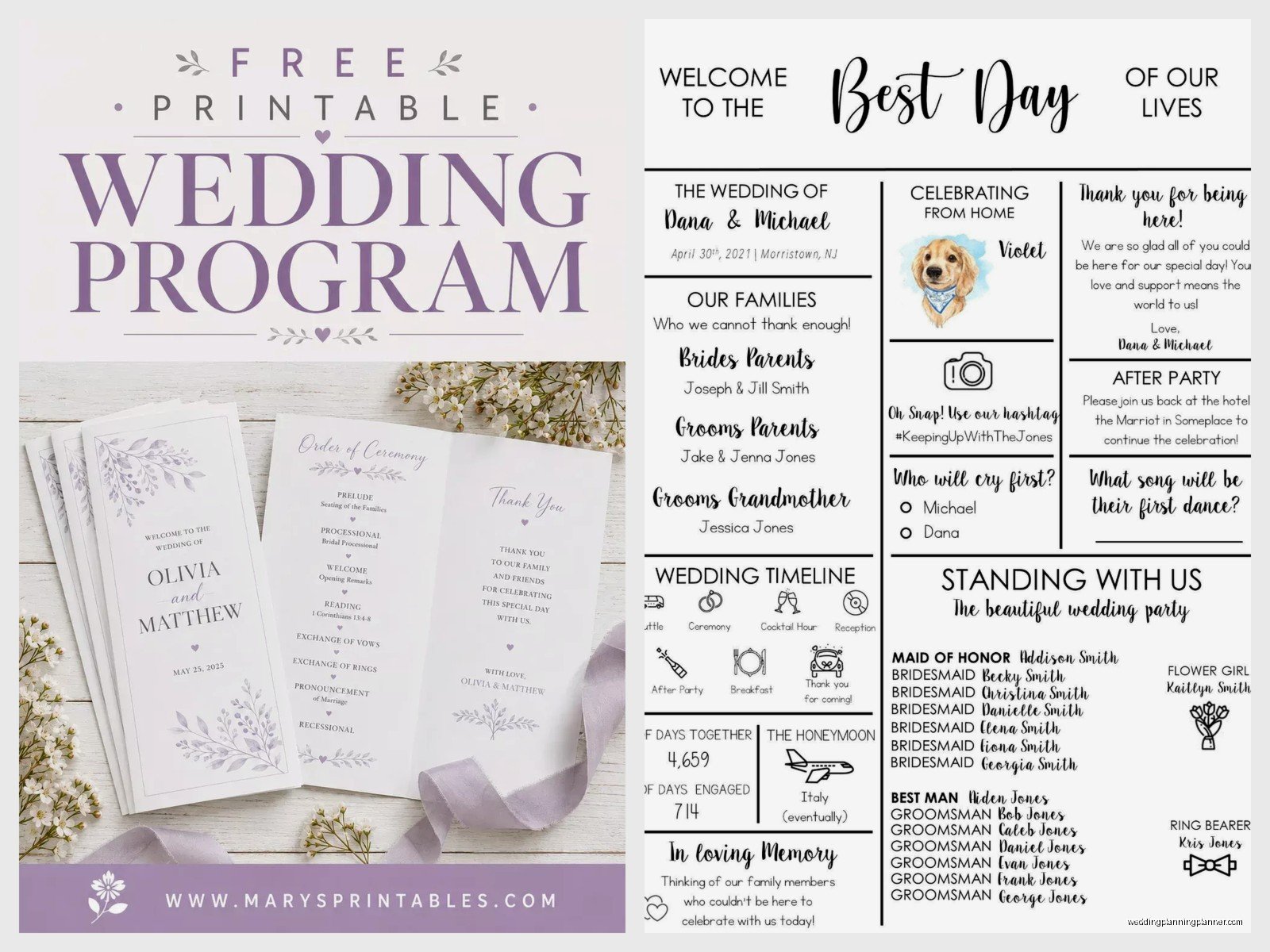
Standard wedding program sizes are usually 5.5 x 8.5 inches (that’s a regular letter paper folded in half) or 4 x 9 inches for a more elegant skinny look. Some people do 5 x 7 or even flat cards instead of folded programs. The template you download should specify what size it is – make sure that matches what you want and what your printer can handle.
Folding styles: bifold (folded in half like a greeting card), trifold (folded in thirds like a brochure), or flat (no fold, just front and back). Bifold is the most common and the easiest to print at home.
When you’re looking at templates, check if it’s designed as a single page that you’ll fold yourself or if it’s already laid out as separate pages. This matters for printing. If it’s designed as one page with a fold line, you print it single-sided usually and then fold. If it’s separate pages, you might need to print double-sided or print multiple pages and assemble them.
What Actually Goes In A Wedding Program Anyway
You’d think this would be obvious but I get asked this constantly. Here’s the standard stuff:
- Your names and wedding date (obviously)
- Ceremony location
- Order of events/ceremony outline
- Wedding party names and roles
- Parents’ names
- Thank you message to guests
- Special remembrances if you’re honoring deceased family members
- Explanation of any cultural or religious traditions if your guests might not be familiar with them
You don’t have to include all of this. Some couples just do names, date, and order of ceremony. Some go full detail with every single person’s name and role and a paragraph about how they met. It’s your call.
The templates you download will have placeholder text that shows you where everything goes. Just replace it with your actual information. Sounds simple but you’d be surprised how many people forget to change something and end up with “Bride’s Name” printed on 150 programs. Proofread like three times.
Customizing Without Making It Look Weird
When you’re editing a template, try to stick with the fonts and layout that are already there. I know it’s tempting to use that fancy script font you found, but mixing too many fonts makes it look messy. Usually stick to two fonts max – one for headings, one for body text.

Colors should match your wedding colors obviously, but make sure there’s enough contrast that people can actually read it. Light gray text on white paper looks elegant in theory but half your guests will be squinting. This is especially important if you have older guests.
If you’re adding photos (some couples put their engagement photo on the program), make sure the image is high resolution. A photo that looks fine on your phone screen will look pixelated and blurry when printed. You want at least 300 DPI for printing.
Printing These Things Without Crying
Home printing: Get good quality cardstock, not regular printer paper. 80lb or 100lb cardstock works well. Cut it to size before you fold it if needed. Print a test copy first to make sure everything lines up correctly – I cannot stress this enough. I watched a groom print 200 programs before realizing they were cutting off the bottom line of text and he had to redo everything.
The paper jam situation with cardstock is real, by the way. Your printer might not love thick paper. Go slow, don’t try to print all 150 at once, maybe do batches of 20 or so. And have extra paper because you will mess some up.
Professional printing: Honestly for like $50-75 you can get a print shop to do 100 programs and it’ll save you so much stress. Vistaprint, Minted, Staples, local print shops – they all do programs. You upload your PDF, choose your paper, they print and ship them to you. Done. The quality is usually way better than home printing too.
If you go the professional route, order a proof first if possible, or at least order with enough time that if something’s wrong you can reorder. I had a couple in summer 2021 who ordered programs that arrived three days before the wedding and the color was completely wrong – like they wanted dusty blue and got bright turquoise. Luckily we had time to rush reorder but it was cutting it close.
How Many Do You Even Need
You don’t need one per guest. Usually one per couple or family is fine. So if you have 150 guests, you probably need like 75-80 programs. Some people won’t take one anyway. I always recommend ordering or printing about 10-15 extras just in case, but you definitely don’t need to match your guest count exactly.
Some couples are skipping programs entirely now and doing a sign at the entrance with the ceremony information, or a QR code that links to a digital program. That’s totally fine too if you wanna save the money and hassle. Programs are nice but not required.
Specific Sites and What They Offer
Canva Free Templates: Go to canva.com, search “wedding program”, filter by Free. You’ll get tons of options. They have bifold, trifold, flat designs. Modern minimalist, rustic, elegant, floral, basically every style. You edit right in the browser, customize colors and text, then download as PDF. Some templates have “Pro” elements but you can usually delete those and replace with free elements or your own stuff.
Template.net Wedding Programs: They have Word, Google Docs, and Pages formats. Download the file, open it in the corresponding program, edit, save. Pretty straightforward. The selection isn’t as big as Canva but if you prefer working in Word this is your move.
Etsy Free Templates: Search “free wedding program template” on Etsy and you’ll find some. These are usually PDF files you download and then fill in using PDF editing software or you print and handwrite (nah, don’t handwrite 100 programs, that’s chaos). Quality varies a lot. Read the reviews.
Google Docs Templates: In Google Docs, go to Template Gallery and search wedding. There are some program templates. They’re basic but functional. Easy to share with whoever’s helping you with wording too since it’s collaborative.
My cat just knocked over my coffee while I’m writing this and I’m choosing to ignore it and keep typing, but anyway…
The Font Situation
If a template uses a specific font and you don’t have that font installed on your computer, it’ll substitute a different font and everything might look wrong or spacing might be off. Canva handles this automatically since everything’s in the browser. But if you’re downloading a Word template or something, you might need to install fonts.
Most free templates stick to standard fonts that everyone has – like Times New Roman, Arial, Georgia, etc. If it uses a fancy font, the template should either embed the font in the file or tell you where to download it. Google Fonts is a good free source for additional fonts if you want something different.
Stuff That Can Go Wrong And How To Fix It
Your text doesn’t fit in the space provided: Make the font smaller or cut some text. I know you wanna thank everyone individually but sometimes you gotta just say “thank you to our families and friends” and call it a day.
Colors look different when printed: Screens show colors in RGB, printers use CMYK, they don’t always match. Print a test page. If the color’s really important to you, take a test print to the print shop and ask them to match it.
Everything’s blurry: Your images are too low resolution. Find higher quality versions or remove the images.
The fold line is cutting through text: You didn’t account for the fold properly. Look at the template’s bleed and margin guides. Text should have at least a quarter inch margin from any edge or fold line.
It won’t download or the file is corrupted: Try a different browser, clear your cache, restart your computer – the standard tech support stuff. If a file is genuinely corrupted, find a different template.
Timeline For Getting This Done
Don’t wait until the week before your wedding to think about programs. Ideally start looking at templates like 2-3 months out. Finalize your design and order/print them at least 2-3 weeks before the wedding. This gives you buffer time if something goes wrong.
You need to know your ceremony details before you can finish the program – like who’s doing readings, what songs you’re using, final wedding party lineup. So make sure that’s all confirmed first.
Random Tips From Years of Doing This
Double check name spellings. Triple check. I’ve seen programs with misspelled names and it’s awkward. Ask people how they want their names listed – some people go by nicknames, some use middle names, some have specific preferences.
If you’re having a religious ceremony, run your program content by your officiant. Some have specific ways they want things worded or ordered.
Weather-proof if you’re outdoors. Cardstock holds up better than regular paper if it’s humid or breezy. Or have a backup plan to hand them out inside.
You can do programs as fans for outdoor summer weddings – there are templates for that too. Serves double purpose.
Don’t overthink it. Programs are a nice detail but guests glance at them for like two minutes max. They don’t need to be perfect masterpieces. Get something that looks nice, has the info people need, and move on to the other million things on your wedding to-do list.
Someone’s gonna leave theirs on a chair and you’ll find it later and feel weird about it but that’s just how it goes. We used 200 programs at a wedding last month and found like 75 of them left behind afterward. People just forget or don’t wanna carry stuff. It’s fine.
If you’re crafty you can add ribbon, wax seals, dried flowers, whatever to dress up a simple template. Pinterest has a million ideas for that. Just factor in the time – if you’re DIY-ing decorations for 100 programs that’s gonna take a while.
