
Planning Guides, Style Guide
Zola Planning: Complete Guide
May
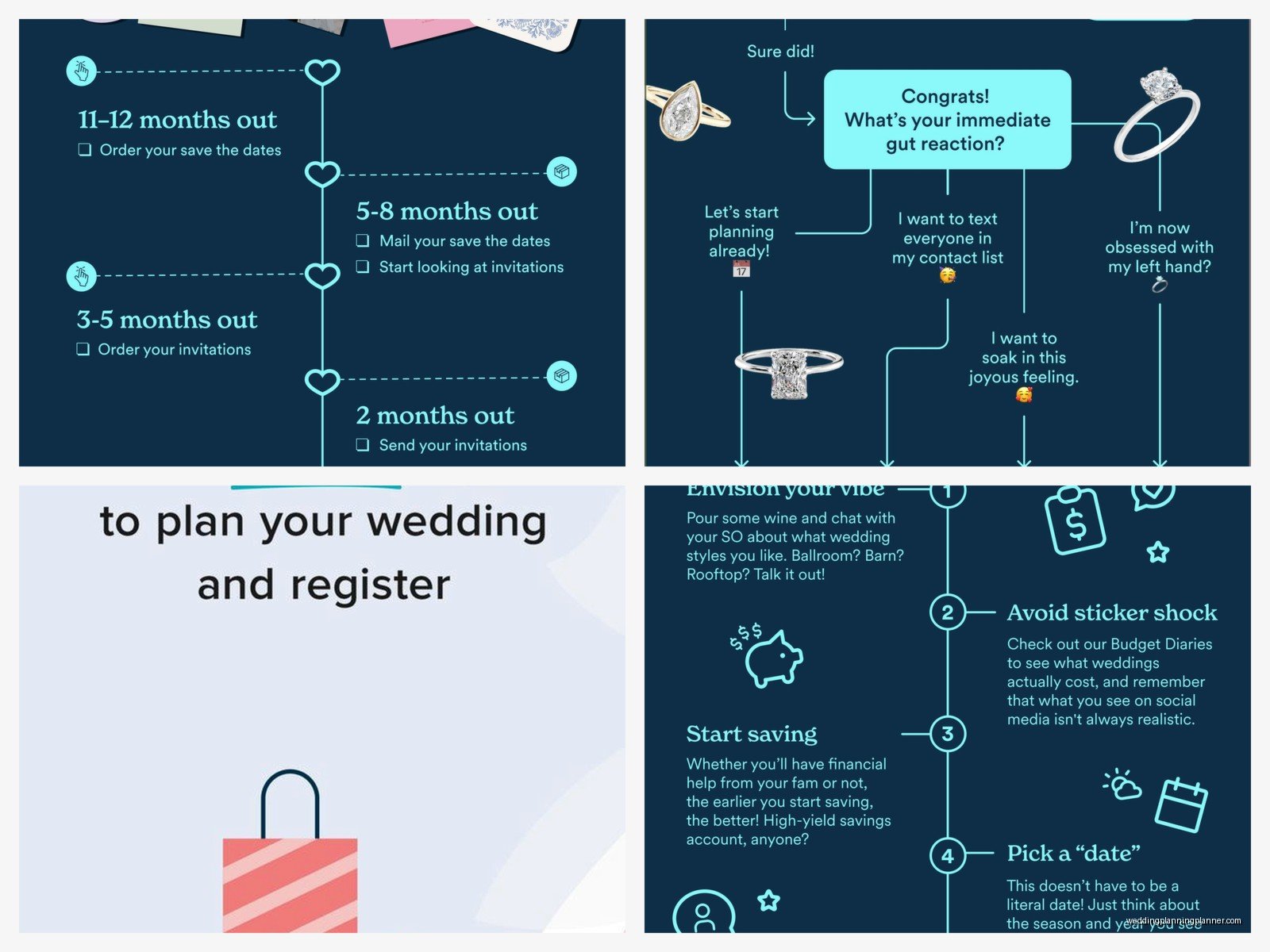
Setting Up Your Zola Account
Okay so Zola is basically the planning platform I recommend to like 80% of my couples now and I started pushing it hard around spring 2022 when I had this bride who was using three different apps and kept losing track of her guest addresses. Zola keeps everything in one spot which is kinda the whole point.
First thing—just go create your account with your partner. You’ll both need access from day one, trust me on this. Use an email you actually check because Zola sends a lot of notifications and some of them are actually useful. When you’re setting up your wedding website URL, pick something simple. I had a couple who chose “sarahandmichaelfinallygettinghitched2024” and then regretted it because it was so long nobody could type it correctly.
The dashboard is gonna be your home base. It shows your checklist, guest list status, registry items, and website stats all on one page. Honestly it can feel overwhelming at first but just… ignore most of it initially and focus on one section at a time.
Building Your Wedding Website
The website builder is probably Zola’s strongest feature and it’s free which is wild considering how much functionality you get. You pick a template and there are like dozens of them—some are minimalist, some are super colorful and busy. I always tell couples to pick something that loads fast on mobile because 70% of your guests will only ever look at it on their phones.
You can customize colors, fonts, add your engagement photos, write your love story (though honestly most guests skip that part, sorry). The important pages you actually need are: event details, travel accommodations, registry, and RSVP. Everything else is kinda extra.
One thing that annoyed me about Zola’s website builder is that you can’t fully customize the layout on some templates—like you’re stuck with their section order unless you switch templates entirely, which can mess up stuff you already configured. So choose your template carefully from the start.
Guest List Management
This is where Zola really shines and also where you’ll spend the most time pulling your hair out because guest lists are just inherently stressful. You can import guests from a spreadsheet which saves time, or add them manually one by one.
For each guest you’ll enter their name, address, email, phone number, and assign them to groups. The groups thing is super useful—I usually have couples create groups like “bride’s family,” “groom’s college friends,” “coworkers,” etc. Later when you’re deciding who gets invited to what events (rehearsal dinner, welcome party), you can filter by group.
You gotta decide early whether you’re doing adults-only or allowing kids. Zola lets you specify this per household which is helpful. When you address the invitation to “Mr. and Mrs. Smith” without including “and family,” the system only gives them two RSVP spots. Though I’ve definitely had guests try to add their kids anyway in the notes section…
The address collection feature is amazing. You can send a link to guests asking them to submit their own address, which saves you from tracking everyone down. I used this for my own niece’s bat mitzvah last year and it cut my admin time in half.
Plus-Ones and Household Management
This gets messy fast. Zola lets you add a plus-one to a guest, and you can either name the plus-one if you know who they’re bringing, or leave it unnamed. For unnamed plus-ones, the primary guest can enter their date’s name when they RSVP.
Households are tricky—if you have a family of four, you create one household with four people in it, and they all RSVP together under one invitation. But if you’re inviting roommates who aren’t related, they should get separate invitations even if they live at the same address. It sounds simple but I’ve seen couples mess this up and accidentally not invite someone’s spouse or whatever.
Digital RSVPs
The RSVP system connects directly to your guest list which means when someone responds, it automatically updates your headcount. You can create custom questions too—meal choices, dietary restrictions, song requests, whether they’ll attend the welcome party.
For meal choices, I always recommend adding a text box for allergies and restrictions instead of trying to list every possible dietary need. You’ll get responses like “I’m vegetarian but I eat fish” or “no cilantro please” and it’s just easier to have them tell you in their own words.
Set your RSVP deadline for at least 3-4 weeks before your wedding date. You’ll need time to follow up with non-responders, and trust me there will be like 15-20% of guests who just… don’t respond by the deadline. Then you’re texting them like “heyyyy are you coming or not, I need to give final numbers to the caterer.”
The system sends automatic reminders to guests who haven’t RSVP’d yet, which is helpful but also kinda impersonal? Some couples turn off the auto-reminders and do personal follow-ups instead.
Registry Setup
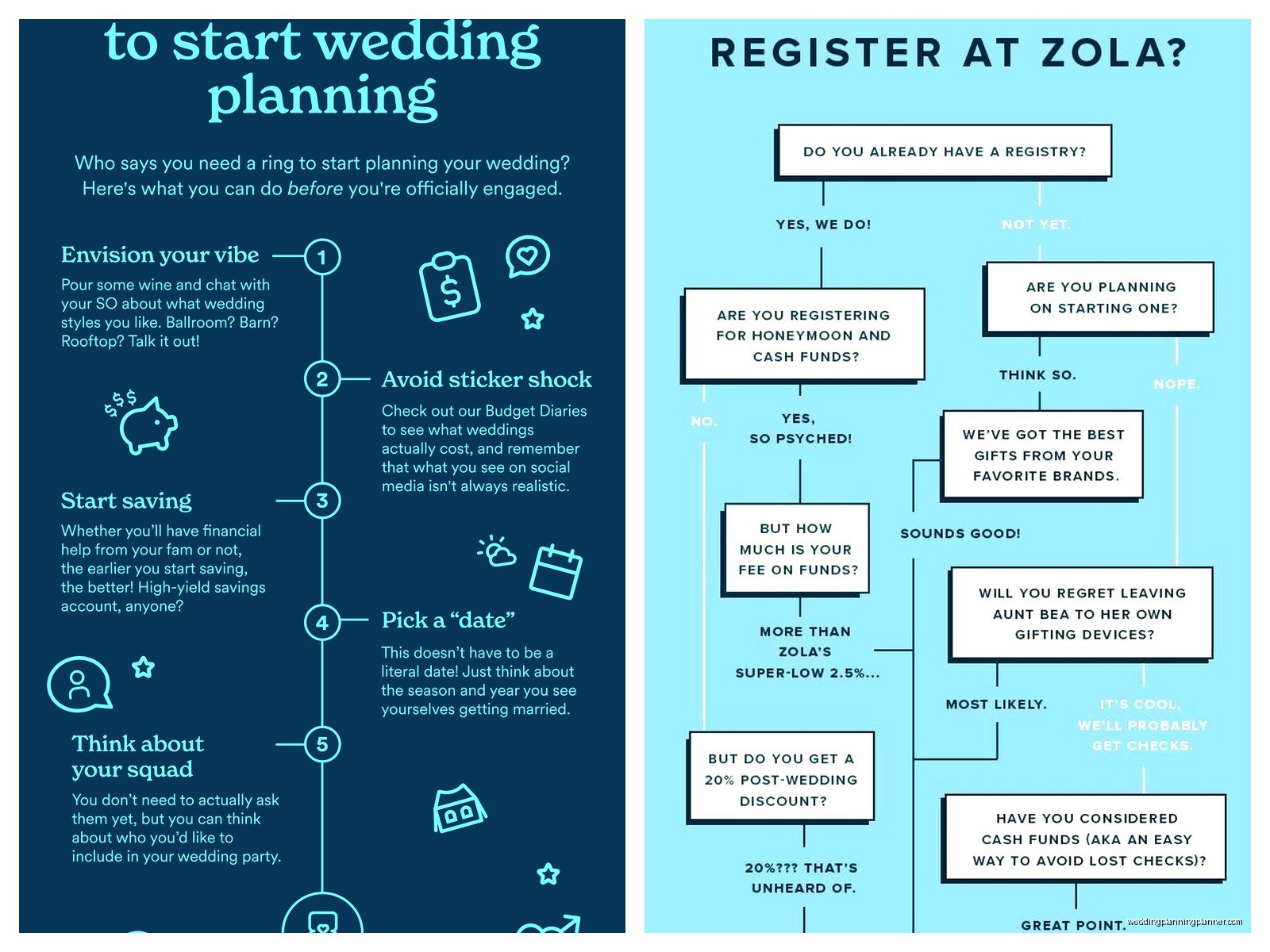
Zola’s registry is honestly pretty comprehensive. You can add items from Zola’s own store, import items from other retailers (Amazon, Crate & Barrel, whatever), and add cash funds for honeymoon or house down payment or whatever you want.
The cash funds thing is where it gets interesting—you can create custom funds with cute names and descriptions. I’ve seen “Pasta Fund for Italy Honeymoon” and “New Kitchen Renovation Fund” and even “Help Us Buy a Dog Fund.” Some older relatives find the cash registry thing tacky but like… most couples already live together and don’t need three toasters, so.
You can add a shipping address and guests can choose to ship gifts directly to you or to themselves (if they wanna wrap it and bring it personally). There’s also a “group gifting” option for expensive items where multiple guests can chip in together.
My cat knocked over my coffee while I was helping a couple set up their registry last month and it spilled all over my notes, but anyway—one tip is to add items at various price points. Like don’t just put $200 items, include some $30-50 things for guests on a budget.
Universal Registry
This feature lets you import registry items from basically any website. You install a browser button and then when you’re shopping online, you click it and it adds that item to your Zola registry. Super convenient if you want serving bowls from one store, bedding from another, and camping gear from REI or something.
Planning Tools and Checklist
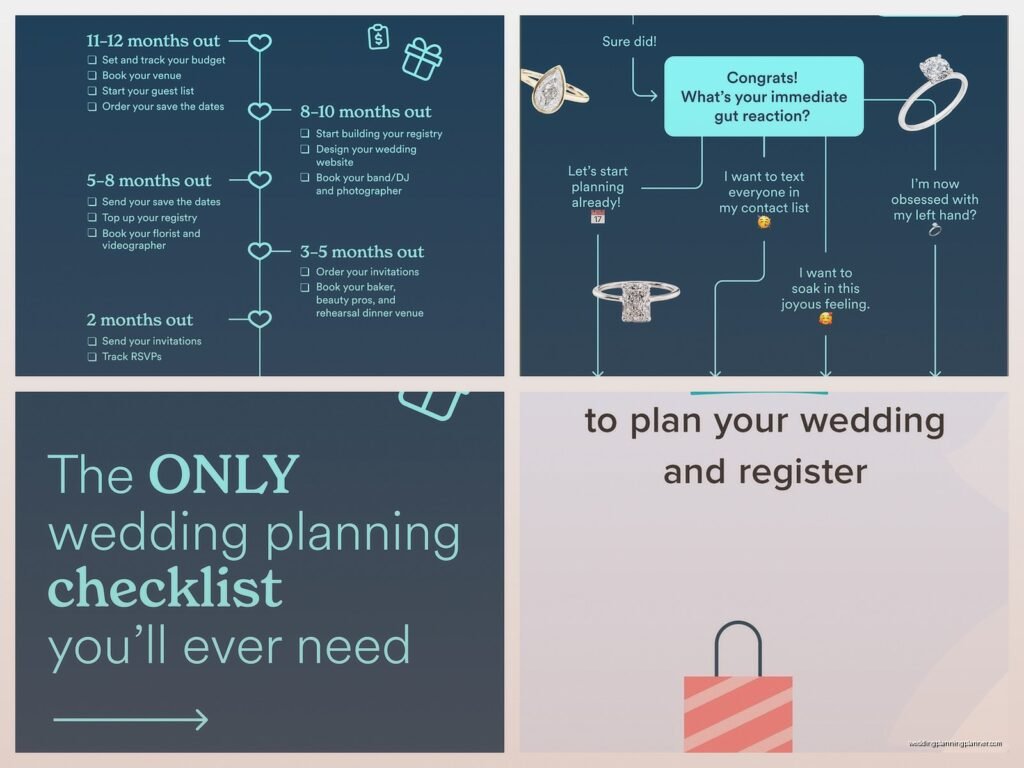
Zola has this built-in checklist that’s organized by timeline—like “12 months before,” “9 months before,” etc. It’s based on a traditional wedding timeline so if you’re doing a shorter engagement or a non-traditional wedding, some tasks won’t apply to you.
You can add your own custom tasks which I always recommend. The default checklist doesn’t include super specific things like “mail welcome party invites to hotel guests” or “confirm kosher meal count with caterer” or whatever unique stuff your wedding needs.
There’s also a budget tracker but I’m gonna be honest, it’s pretty basic. You enter your total budget, add vendor costs, and it shows you what percentage you’ve allocated. It doesn’t connect to your actual payments or anything—you have to manually update it. I usually recommend couples use a separate spreadsheet or app like HoneyBook for more detailed budget tracking, but the Zola tracker works fine for a quick overview.
Vendor Management
You can save vendor information in Zola—names, contact info, contracts, payment schedules. It’s basically a database for all your wedding pros. The contracts upload feature is useful because you can access all your paperwork from anywhere instead of digging through email.
What Zola doesn’t do is actually help you find or compare vendors, really. There’s a vendor marketplace but it’s not comprehensive in most cities. For vendor research I still send couples to other platforms or local recommendations.
Paper Invitations Through Zola
So this is interesting—Zola sells paper invitations and you can order them directly through your account. The designs automatically match your wedding website if you want that coordinated look.
They have save-the-dates, invitations, programs, menus, place cards, thank you cards, basically all the paper goods. The quality is decent, pricing is competitive with other online stationery companies. You can upload your guest list and they’ll print addresses directly on the envelopes which saves you from hand-addressing 150 envelopes or hiring a calligrapher.
But here’s what bugs me—the customization options are somewhat limited compared to working with a custom stationer. You’re choosing from templates and you can tweak colors and wording, but you can’t like, completely redesign the layout or add custom illustrations or whatever. For couples who want something really unique and personal, I usually steer them toward independent designers instead.
The timeline for paper goods through Zola is usually 2-3 weeks for production plus shipping, so plan accordingly. And definitely order samples before you commit to 200 invitations—colors look different on screen versus in person.
The Zola App
Everything I’ve mentioned is accessible through the mobile app too, which is clutch when you’re out meeting with vendors and need to check your guest count or whatever. The app lets you check RSVPs, update registry, view your checklist, message guests.
During the wedding weekend itself, I’ve had couples use the app to check last-minute RSVPs or see which guests haven’t arrived yet. Though honestly on your actual wedding day you should not be looking at apps, you should be enjoying yourself and letting your coordinator handle that stuff, but I digress.
Guest Communication Tools
You can message guests directly through Zola which is… okay I guess? It sends them an email from your wedding website email address. I don’t use this feature much because it feels easier to just text or email people directly, but some couples like having all communication in one platform.
There’s also a “blast message” feature where you can send updates to all guests or specific groups. Like if there’s a venue change or you want to remind everyone about shuttle times, you can send one message to everyone at once.
Coordinating Multiple Events
If you’re having a welcome party, ceremony, reception, and farewell brunch, you can create separate events in Zola and track RSVPs for each one individually. This is super helpful because not everyone is invited to every event.
You set up each event with its own date, time, location, and dress code. Then when you’re managing your guest list, you specify which guests are invited to which events. When they RSVP, they see all the events they’re invited to and respond to each one.
I had this couple in summer 2023 who were doing a full weekend in the Berkshires with like five different events and Zola’s multi-event RSVP system saved us so much confusion. Before platforms had this feature, we were tracking everything in spreadsheets and it was a mess.
Seating Chart
Once RSVPs are in, you can create your seating chart in Zola. You set up your tables (rounds of 8, rounds of 10, long tables, whatever your venue has), then drag and drop guests onto tables. It shows you how many seats are left at each table so you don’t accidentally put 11 people at a table that fits 10.
The visual layout doesn’t actually represent your room layout though—it’s just a list of tables with names assigned. For the actual floor plan and figuring out where tables physically go in your space, you’ll need a different tool or just work with your venue coordinator.
You can export your seating chart as a PDF or spreadsheet to share with your caterer and venue. And you can make a table assignment card design through Zola’s paper goods if you want those.
Thank You Card Tracking
There’s a feature where you can track which guests you’ve sent thank you notes to, which is helpful because after the wedding when you’re writing 150 thank you cards, it’s easy to lose track of who you’ve already thanked. You can mark each gift with “thank you sent” and add notes about what you wrote.
Honestly though, I usually just recommend couples keep a simple spreadsheet for this because it’s faster than logging into Zola every time you write a card, but the feature exists if you want everything in one place.
Things Zola Doesn’t Do
Just so you know what you’ll need other tools for—Zola doesn’t handle actual vendor payments or contracts with legal tracking. It doesn’t create detailed timelines or floor plans. It doesn’t manage your wedding party’s attire orders. It doesn’t coordinate day-of logistics or create run-of-show documents for vendors.
For timeline creation I use other tools, for floor plans I work with the venue’s layout software or use AllSeated, and for day-of coordination that’s just… my job as the planner with a detailed spreadsheet and lots of phone calls.
Also Zola’s customer service is kinda hit or miss? Sometimes you get quick responses, sometimes it takes days, and if you have a complex question about your guest list or RSVP settings, the support folks don’t always understand the nuance of what you’re trying to do. Just something to keep in mind.
Privacy Settings
You can make your wedding website password-protected if you want privacy. Some couples do this, some don’t care. If you’re having a small wedding or you’re a private person or there’s family drama and you don’t want certain people finding your website, definitely use a password.
You can also hide your registry from your main website and only share the registry link privately. And you can control whether your website shows up in search engines or not.
